

Forum Replies Created
-
AuthorPosts
-
George
ParticipantHey @Hugues!
You can definitely do this 🙂 Try adding the following PHP snippet to your theme’s functions.php file:
add_filter('tribe_organizer_label_singular', 'change_single_organizer_label' );function change_single_organizer_label() {
return 'Organiser';
}add_filter('tribe_organizer_label_plural', 'change_plural_organizer_label' );
function change_plural_organizer_label() {
return 'Organisers';
}
Cheers!
GeorgeParticipantHey @Jasraj,
Sorry you’re having trouble here!
I’m curious if you can do these following steps, and then let me know what you find:
1. Do a “test” order of tickets with PayPal.
2. Check out this “Order” in your wp-admin, in the WooCommerce section of the admin.
3. What is this Order’s status – is it “Complete”, for example? Google “WooCommerce Order status” if you are not familiar with woocommerce order statuses.
4. If the status is not “Complete”, does setting it to “Complete” and then saving the order get the email to send?
Thank you!
GeorgeNovember 23, 2015 at 10:43 am in reply to: Allowing Anonymous Users to post events with pro #1029739ParticipantIf you need it on only one site, then you can just buy the Personal License. If you need it on 3 or 10 or even more sites, check out the license options on the page itself:

Does that help? You write this:
The link you sent doesn’t explain what I need to buy.
What does that mean? Please clarify any specific questions, I’m happy to help address them! 🙂
Cheers,
GeorgeParticipantTo the best of my knowledge there is not a fix yet. I do not know when a fix will definitively arrive unfortunately 🙁
Stay tuned!
GeorgeParticipantHey @Steven,
Thank you for sticking with all of this.
One thing I noticed here is that in your first post, you mention your permalinks setup as this: “Permalinks set to Default”.
Does that mean that they are literally set to the option labeled “Default” in your site’s Permalinks settings page?
1. If so, does using the “Post Name” permalinks option work any better here?
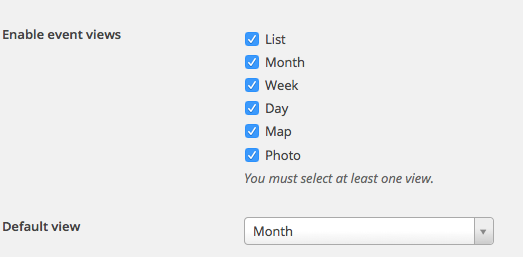
2. Are “Map” and “Photo” views checked in your “Enable event views” options? Here’s a screenshot of this option for reference, it is in the Events > Settings > Display tab:
3. Finally for now, no, there is not a shortcode to implant the map view at this time. 🙁
Thank you for your patience with this! This is an odd problem and I cannot reproduce this at all 🙁
Sincerely,
GeorgeParticipantHey @Jodi,
Thanks for reaching out! Do you mean that you want users on your site to post from the front-end of your site? If so, that is not possible with Events Calendar Pro without extensive code customization, which we are not able to help with. You could buy our add-on, Community Events, which enables this → https://theeventscalendar.com/product/wordpress-community-events/
—
If you do not mean that you want people to post events from the front-end of your site, then can you elaborate on your issues here in more detail?
Thank you!
GeorgeParticipantHey Caín,
Unfortunately we are not able to dig deep into the technology of our queries and the code required to modify them here. I am sorry about this! We indeed have some MySQL Queries that we need to optimize but we are working on that in our own software updates; we can not do it on-the-fly here for the needs of your project.
One option would be to hire a developer to help you optimize the plugin even further. We have a list of highly-rated developers here, for example → http://m.tri.be/18k1
On that list, “Donald Grover” specifically is an expert with performance and scalability, so he might be worth contacting for hire.
Otherwise the next-best option is literally to wait for our normally-scheduled plugin updates which over time are going to include many performance improvements here.
I’m sorry about this current limitation with things! Please let me know if I can help with anything else.
Sincerely,
GeorgeParticipantHey @Bizdoktor,
Unfortunately regardless of further information and such, the only real actionable step that could be taken would be to install and activate our “No 404s” hotfix plugin, which you can download here → http://m.tri.be/no404s
Install and activate that on your site; if 404s are damaging your site, then this plugin will at least force our 404 headers to become 200 status headers instead. That may help.
Cheers,
GeorgeParticipantHey Keith,
Thanks for sticking this. Unfortunately, there is nothing special about the Month and Week view displays like you asked; I think unfortunately this may be a problem with the SuperSocializer plugin itself and so not something we can much help with 🙁 I’m sorry!
— George
ParticipantThanks for clarifying Steven!
That’s some odd behavior that I cannot reproduce. Your system information shows you’re running the most recent versions of our software, and you mention having tried the “Fixing HTTP 404 Errors” steps to no avail.
However, you also mention this: “output of the functions.php query snippet attached”
But no text or code was posted. Our forum’s aggressive content filters might have stripped code you tried to post or something – can you copy and paste the output you’re referring to into a Paste at http://pastebin.com and then share a link to that here? I’ll take a look.
—
After all of this, I would next unfortunately recommend our full set of troubleshooting steps. You can find these steps here → https://theeventscalendar.com/knowledgebase/testing-for-conflicts/
After each step, go and change your “Default View” and see if the issues arise again.
Let us know what you find.
Thank you!
GeorgeParticipantHey Michael,
I’m really sorry about these issues – and about the delayed response here!
Your issues are a bit odd and I cannot reproduce them. So, I’m wondering – can you first share your system information with us? Here’s how to do that → https://theeventscalendar.com/knowledgebase/sharing-sys-info/
Cheers!
GeorgeParticipantHey @oniregoc,
Thanks for all of this feedback. Can you post it on the official betas.theeventscalendar.com is directed on the Beta Testing Guidelines? → http://betas.theeventscalendar.com/beta-testing-guidelines/
We’re trying to separate Beta feedback from our customer support forums here, so that would be immensely appreciated, and I can respond to each of your points there 🙂
Cheers!
GeorgeParticipantHey Daniel!
That is likely more the result of WordPress itself handling the redirect, or something on your server or from another plugin; our plugins don’t have code that would explicitly make a redirect like this happen.
I hope this helps!
— George
ParticipantHey @Steven,
Sorry to hear about this!
Can you clarify exactly what you mean by your phrasing here: “When I switch to Map (or Photo) View in settings”
What does that mean? Do you mean that you adjust something literally in your site’s wp-admin, and then the front-end breaks? If so, what things in the admin specifically are you changing?
If this is not what you mean, elaborate on what you mean – I just want to be 100% certain I know what you’re talking about 🙂
Cheers!
GeorgeParticipantThanks for the update Iain – again, I’m really sorry about the frustrations and limitations here! 🙁
Best of luck with your project,
George -
AuthorPosts