

Forum Replies Created
-
AuthorPosts
-
November 19, 2015 at 5:58 pm in reply to: Hook / Actions when ticket sales end or event ends. #1028337
George
ParticipantPlease do post again if you’re able to solve this puzzle…it’s an interesting problem! I’ll close this thread for now for the sake of keeping things organized. If you want to reference this thread, just link back to it and we’ll pick up where we left off 😀
Cheers,
GeorgeParticipant😀
ParticipantWoot! 😀 Best of luck with your project.
— George
November 19, 2015 at 5:45 pm in reply to: how to echo message if there is no ticket for event #1028333ParticipantWhat I wrote above still unfortunately replies here:
From there, build it up into some code that detects whether any tickets exist and such. That’s where the code gets a bit complex, and since we do not support custom features like this you will have to take the reins on coding that yourself.
So you will ultimately have to build out this customization and that functionality.
—
In closing, however, here is some code that might work for you. I have not tested this, and you will need to play around to build what you want exactly, but this is a function that should get all the IDs of tickets attached to an event. If there are none, then it will return false:
function example_if_has_tickets() {$post_id = get_the_ID();
if ( Tribe__Events__Main::POSTTYPE !== get_post_type( $post_id ) )
return false;$Woo__Tickets = Tribe__Events__Tickets__Woo__Main::get_instance();
$ticket_ids = $Woo__Tickets->get_tickets_ids( $post_id );$num_tickets = count( $ticket_ids );
if ( $num_tickets && 0 < intval( $num_tickets ) )
return true;return false;
}
So you can use this in a loop somewhere, for example, like this:
if ( example_if_has_tickets() ) {

    // There are tickets, so run that code.

} else {

    // There are NO tickets, so run that code

}
I hope that helps you get started – it’s an idea and example. You will need to take the reins on the rest of your customizations, but if you want to hire professional help then one thing that might help further is a list of some highly-reviewed developers that we have here: http://m.tri.be/18k1
Cheers!
GeorgeParticipantHey Keith,
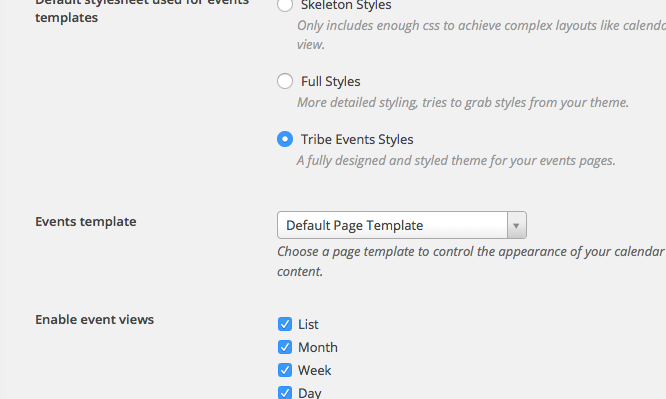
If you head to Events > Settings > Display in your wp-admin, what is the current selection for your “Events template” option? If it is not “Default template”, does setting it to this make a difference with the changes to default-template.php?
Here’s a screenshot of that option for reference:
— George
ParticipantThanks for this Nadine!
I noticed that your version of Events Calendar Pro is 3.12.4, but the most recent version is 3.12.6 – if you go to http://theeventscalendar.com/my-account/downloads, you can get a fresh copy of 3.12.6.
Delete the existing version of Events Calendar Pro off of your site – this will NOT delete existing event content! – and then install the fresh 3.12.6 version.
—
If you do these steps but issues persist, then I’d recommend doing each step in our troubleshooting guide here → https://theeventscalendar.com/knowledgebase/testing-for-conflicts/
After each step, try saving the license key and see if anything improves.
Let us know what you find – thank you!
George
ParticipantI’m glad to hear that Luke! Best of luck with your project 🙂
— George
Participant😀
ParticipantHey Sean,
It’s easy in hindsight now to say that all of these steps were not necessary, but I unfortunately just did not understand what you were asking. Then you confirmed something and took it back and it was confusing, from my end of things.
I hope you can at least acknowledge that, because I’m genuinely sorry that all these steps happened too – it’s far from normal, and stems from a desire to help 🙂
Best of luck with your project,
GeorgeParticipantWoot! 🙂 Best of luck with your site.
— George
ParticipantHey there,
Thank you for the detailed write-up here. While we do not offer professional services for our plugins per se, we’ve been very, very focused on performance recently and would love to explore this more with you!
I don’t have any definitive action steps at this time, but have flagged this for review with our team leaders tomorrow and will update you soon. Just wanted to write this reply to acknowledge that we’ve seen this and are interesting in looking more into this!
Thank you,
GeorgeParticipantHey Robert,
Thanks for reaching out – I’ll address each of your questions in order:
1) They are a non-profit. I understand you have a program for non-profits so I will have them apply for it.
2) They will be posting events and will need to sell tickets to those events through the event page
3) Some events will be free but would still like people to register for the event through the event page
4) some events will have a portion of the costs be tax-deductable. Is it possible to do that?1-3 here are all possible and doable. As for managing costs that are tax-deductible, our WooCommerce Tickets add-on does not currently have its own feature for this. This may be achievable, however, within WooCommerce itself, which I will touch on further below.
5) Do I need additional software like woocommerce for the ticket sales or will it go straight to Paypal or something like that?
Yes – none of our Tickets plugins are standalone plugins, think of them as double-add-ons that are “add-ons” for both The Events Calendar and WooCommerce.
So you need WooCommerce. It powers the entire payment system. The Events Calendar: WooCommerce Tickets is not a payment platform, and anything related to taxes or the checkout process or PayPal or anything like that are all handled through WooCommerce. The Events Calendar: WooCommerce Tickets just connects Events to these WooCommerce-provided features, so that a new product type (“tickets”) can be sold on your site for events 🙂
6) I use the DIVI theme by Elegant Themes to build websites. Is there anything regarding that theme that I need to know?
Not that I know of! There are many, many people who use the Divi theme with The Events Calendar and love the combination. If you have further questions about theme, contact the Elegant Themes support team – they provide good support.
I hope this all helps!
GeorgeParticipantNo worries! 😀 Thanks for posting right away – best of luck with your project!
— George
ParticipantHey Justin,
Something like this is technically possible, but would require extensive custom coding. We unfortunately would not be able to help build it 🙁
If you’re interested in hiring a professional to build this, we have a list of many highly-rated customizers here → http://m.tri.be/18k1
I hope that helps!
George
ParticipantThanks for sharing this information!
I don’t see anything outright problematic; I will take another look into our code to see about this – maybe the code-merge for this fix isn’t happening until the next release.
In that event, please stay tuned to releases because this is a ticketed bugfix that we have coming in the 4.0 release at the latest.
I’m sorry about the trouble here!
Cheers,
George -
AuthorPosts