
Home › Forums › Calendar Products › Events Calendar PRO › An odd line break has appeared…
- This topic has 7 replies, 2 voices, and was last updated 10 years, 11 months ago by
George.
-
AuthorPosts
-
November 17, 2015 at 5:11 am #1026756
[email protected]
ParticipantHi
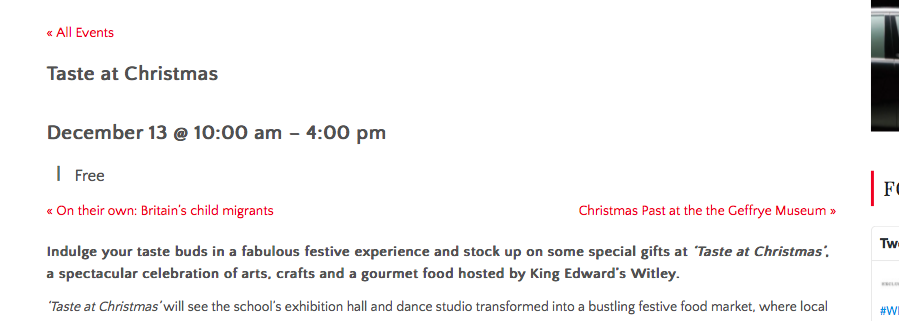
A strange line break has started appearing in my events, before the price information (e.g. | £10). See below:
https://cldup.com/-QMw14clOu.png
Any help welcome!
November 17, 2015 at 6:04 am #1026761ParticipantHey @Stevenradams,
Just to be 100% clear, you mean the vertical bar character right? So that, essentially, instead of “| Free” you just want “Free”?
If so, try adding the following bit of CSS to the very bottom of your theme’s style.css file:
.tribe-events-divider {

    display: none !important;

}
Cheers!
GeorgeNovember 17, 2015 at 6:36 am #1026979ParticipantThanks so much for your help Cliff. Sorry — my post wasn’t that helpful!
I like the vertical bar and am not trying to remove it…the query is that the ‘| £x’ bit used to appear on the same line as the event’s date and time (which is why the vertical bar is used, I expect). But, suddenly, it has started appearing on the next line even when there is plenty of room left in the column for it to be accommodated on the same line. The link in my post above shows a screenshot of the prob.
V odd…
Thanks in advance!
November 17, 2015 at 9:32 am #1027088ParticipantThanks for clarifying! Ignore my original CSS 🙂
Try this instead:
.tribe-events-schedule h2 {

    clear: none;

    display: inline-block;

    font-style: normal;

    font-weight: 700;

}
Here’s how that makes things look for me:
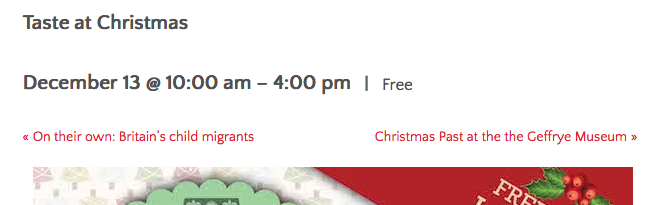
I hope that helps!
GeorgeNovember 17, 2015 at 10:07 am #1027105ParticipantThanks for your help George (and sorry for calling you Cliff!!).
The css didn’t change the behaviour, though interesting that you see the event info correctly … I’m using Mac Safari 9.0.1 so will now go and do some browser testing…
Thanks George.
November 18, 2015 at 10:18 am #1027625ParticipantHm, that’s odd if it doesn’t apply for you – have you found anything out by your browser testing?
Adding float:left; may make a difference in Safari, like this:
.tribe-events-schedule h2 {

    clear: none;

    display: inline-block;

    float: left;

    font-style: normal;

    font-weight: 700;

}
November 19, 2015 at 2:54 am #1027858ParticipantGeorge, you’re a hero. Thanks so much for taking the time to help me. Fixed!
SA
November 19, 2015 at 5:47 pm #1028334ParticipantWoot! 😀 Best of luck with your project.
— George
-
AuthorPosts
- The topic ‘An odd line break has appeared…’ is closed to new replies.