
Home › Forums › Calendar Products › Events Calendar PRO › Super Socializer
- This topic has 8 replies, 3 voices, and was last updated 10 years, 8 months ago by
Support Droid.
-
AuthorPosts
-
November 15, 2015 at 1:48 pm #1026062
Keith
ParticipantHi,
I’m looking at a social-sharing plugin called Super Socializer. I want to a add a floating sharing bar to the main events page. According the Super Socializer documentation, you can add the sharing bar to any page with a shortcode. I’m trying to work out where to put the short code.
I thought maybe default-template.php would be the right place, but putting the shortcode there doesn’t work. In fact no changes to that template, including saving it as an empty file have any effect.
Could you give me a pointer as to where the code should go?
Thanks,
KeithNovember 16, 2015 at 8:26 am #1026419George
ParticipantHi Keith,
While we unfortunately not speak much for other plugins, if it’s truly a “Short code” then you should be able to add the short code into the content of any event – in other words, right from within your event content editor in your site’s wp-admin, without having to modify code files.
If “short code” doesn’t mean the specific WordPress feature “shortcode”, and adding custom code is required, then you might find single-event.php to be a good location for the code.
—
Now, it seems from your issue that your files might not even be updating at all, which could be the problem here too…
Unfortunately, this is something you would have to troubleshoot mostly on your own, but here are some thoughts:
• If you are trying to use the principles outlined in our Themer’s Guide for these file edits, ignore these principles for now and just modify the core plugin files to see if the changes take effect. This is just a test to try and figure out where the problem lays; if you modify core files and the changes take effect, then the issue would just be the file structure you tried to replicate in your theme version of these templates or something.
• If nothing I wrote above made sense, and you are not familiar with our Themer’s Guide or anything, then I’m wondering: have you made these file changes locally on your computer? And if so, are you certain that you have correctly then re-uploaded the modified files to your site via FTP?
Cheers!
GeorgeNovember 16, 2015 at 1:03 pm #1026575ParticipantHi George,
Thanks for the help. The plugin does have settings to allow the sharing bar to placed on most of the pages, like this. That puts the bar on the individual event pages. What I’m trying to do is put it on the overview pages: the month, list, photo, etc. views.
I thought the template to alter might be default-template.php. I first modified it per the Themer’s Guide. When that didn’t work, I tried modifying the source. When that still didn’t seem to be having any effect, I saved the file as an empty document. That still made no difference. I’m thinking now that I must be modifying the wrong file.
Cheers,
KeithNovember 17, 2015 at 9:08 am #1027072ParticipantThanks for elaborating a bit on this @Keith – I’m sorry to admit it, but the next steps I would normally recommend here are all of the things you said you already tried to no avail 🙁
I would recommend contacting that plugin’s support team for help with this at this point – code inside default-template.php should take effect, and would be a good candidate for what you mention trying to do, so unfortunately the problem seems to be either that the way you added code was itself erroneous, and/or that the other plugin’s code is added correctly but just not functioning for some reason.
Sincerely,
GeorgeNovember 19, 2015 at 4:13 am #1027869ParticipantHi Geoge,
Thanks for the help. I’m still confused by this. Setting aside the SuperSocialier plugin, I can’t understand how the default-template.php script is working. As a test, I simply replaced it with a null file [cat /dev/null > default-template.php]. That had no effect at all.
As a further test, I did the same thing with month.php in that directory, and that did have the expected result, i.e. the Month View didn’t work at all.
I think if I can find out why modifying default.template.php is having no effect, or if I should be modifying an alternate file, I’d be able to carry on with the SuperSocializer stuff myself.
Cheers,
Keith-
This reply was modified 10 years, 11 months ago by
November 19, 2015 at 5:35 pm #1028332ParticipantHey Keith,
If you head to Events > Settings > Display in your wp-admin, what is the current selection for your “Events template” option? If it is not “Default template”, does setting it to this make a difference with the changes to default-template.php?
Here’s a screenshot of that option for reference:
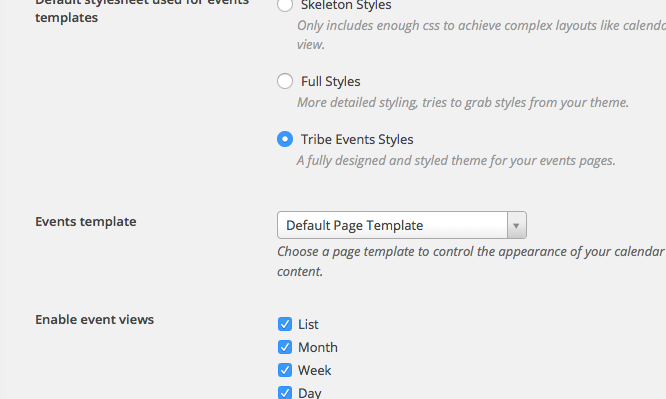
— George
November 20, 2015 at 3:12 am #1028403ParticipantHi George,
Yes that is already set to the default template. I think it was that name that led me to php file in the first place.
I have noticed something else regarding the SuperSocializer plugin. I mentioned above that it has it has its own settings. I see now that those settings are causing the sharing bar to appear on all but the month and week views. Is there anything special about those views?
Cheers,
KeithNovember 23, 2015 at 9:15 am #1029686ParticipantHey Keith,
Thanks for sticking this. Unfortunately, there is nothing special about the Month and Week view displays like you asked; I think unfortunately this may be a problem with the SuperSocializer plugin itself and so not something we can much help with 🙁 I’m sorry!
— George
February 18, 2016 at 8:31 am #1075748KeymasterThis topic has not been active for quite some time and will now be closed.
If you still need assistance please simply open a new topic (linking to this one if necessary)
and one of the team will be only too happy to help. -
This reply was modified 10 years, 11 months ago by
-
AuthorPosts

- The topic ‘Super Socializer’ is closed to new replies.