
Home › Forums › Calendar Products › Events Calendar PRO › Page not found when changing to Map View
- This topic has 9 replies, 3 voices, and was last updated 10 years, 11 months ago by
Brook.
-
AuthorPosts
-
November 19, 2015 at 5:03 pm #1028318
Steven
ParticipantWhen I switch to Map (or Photo) View in settings my events page returns a “page not found”. Month view works fine. Single event view displays fine. I have run through the “Fixing HTTP 404 errors” knowledge base article. Permalinks set to Default returned at 404 error. Any other ideas? System info and output of the functions.php query snippet attached. Thanks!
November 19, 2015 at 6:03 pm #1028339George
ParticipantHey @Steven,
Sorry to hear about this!
Can you clarify exactly what you mean by your phrasing here: “When I switch to Map (or Photo) View in settings”
What does that mean? Do you mean that you adjust something literally in your site’s wp-admin, and then the front-end breaks? If so, what things in the admin specifically are you changing?
If this is not what you mean, elaborate on what you mean – I just want to be 100% certain I know what you’re talking about 🙂
Cheers!
GeorgeNovember 19, 2015 at 6:07 pm #1028341ParticipantThanks George. When I go to Events->Settings->Display and change the Default View from “Month” to “Map View” it breaks. Same happens if I try Photo View. Hope that clarifies things.
Steven
November 20, 2015 at 8:56 am #1028677ParticipantThanks for clarifying Steven!
That’s some odd behavior that I cannot reproduce. Your system information shows you’re running the most recent versions of our software, and you mention having tried the “Fixing HTTP 404 Errors” steps to no avail.
However, you also mention this: “output of the functions.php query snippet attached”
But no text or code was posted. Our forum’s aggressive content filters might have stripped code you tried to post or something – can you copy and paste the output you’re referring to into a Paste at http://pastebin.com and then share a link to that here? I’ll take a look.
—
After all of this, I would next unfortunately recommend our full set of troubleshooting steps. You can find these steps here → https://theeventscalendar.com/knowledgebase/testing-for-conflicts/
After each step, go and change your “Default View” and see if the issues arise again.
Let us know what you find.
Thank you!
GeorgeNovember 20, 2015 at 9:40 am #1028692ParticipantThis reply is private.
November 20, 2015 at 11:10 am #1028716ParticipantHi George, I followed the troubleshooting steps and the problem still occurs when I switch to the Twenty-Thirteen theme and turn off all of the plug-ins. Here’s what I did:
– Switched to Twenty-Thirteen theme
– Turned off all plug-ins except “The Events Calendar” and “The Events Calendar Pro” plug-ins
– cleared browser cache
– Test url mysite.com/eventlist (slug changed to eventlist) with default View set to Month Result: Site displays month calendar
– Test url mysite.com/eventlist/map Result: page not foundFor some reason the map page is not being created. Odd.
November 20, 2015 at 3:12 pm #1028787ParticipantNot sure that this has any relevance but my theme normally displays the title of a post on the top of a page. So, for example, “About Us” page would have “About Us” labelled on the top. This does not happen with the events calendar. When I have the Display set to “Month” (which does work) the title of the calendar page is “Shop”. Thinking that your calendar is picking up something from my WooCommerce plug-in, I tried disabling WooCommerce then refreshed the calendar. The title of the page is changed to “Archive”. I’ve tried using the default template and the events template and the result is the same.
I’m wondering, is there a shortcode that I can put in a page to display the map view of the calendar?
Finally, I’ve tried un-installing and re-installing The Events Calendar plug-ins and nothing has changed. Still no Map/Photo view.
November 23, 2015 at 10:40 am #1029735ParticipantHey @Steven,
Thank you for sticking with all of this.
One thing I noticed here is that in your first post, you mention your permalinks setup as this: “Permalinks set to Default”.
Does that mean that they are literally set to the option labeled “Default” in your site’s Permalinks settings page?
1. If so, does using the “Post Name” permalinks option work any better here?
2. Are “Map” and “Photo” views checked in your “Enable event views” options? Here’s a screenshot of this option for reference, it is in the Events > Settings > Display tab:
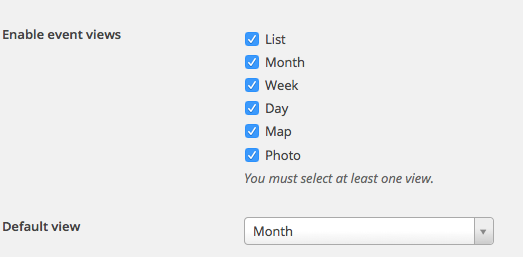
3. Finally for now, no, there is not a shortcode to implant the map view at this time. 🙁
Thank you for your patience with this! This is an odd problem and I cannot reproduce this at all 🙁
Sincerely,
GeorgeNovember 23, 2015 at 11:33 am #1029789ParticipantAnother duh moment. . . I had not checked the “enabled event views”. I’m so sorry for wasting your time on this! It’s working fine. Still a bit mystified as to why it’s picking up my “shop” template but I’ll do a bit more investigating to see what I can find before I bother you again :-/
Thanks again for your patience and help! Quite impressed with your support!
November 24, 2015 at 4:51 pm #1030440ParticipantHowdy Steven,
No worries there, we all have those moments. Computers make fools of everyone at some point.
Please do get back to us if you need further assistance with the template issue. We would be happy to help. Since the original issue here is resolved I am going to archive this topic. Cheers!
– Brook
-
AuthorPosts
- The topic ‘Page not found when changing to Map View’ is closed to new replies.