
Home › Forums › Calendar Products › Events Calendar PRO › Events missing from backend, picture view not working
- This topic has 10 replies, 3 voices, and was last updated 10 years, 8 months ago by
Support Droid.
-
AuthorPosts
-
November 28, 2015 at 1:08 am #1031633
Marianna Fridjonsdottir
ParticipantHi I have written before about my problem of all events missing from the backend. I have over 400 items but cannot see them. I have as suggested tried to deactivate and uninstall plugins, themes and so on and nothing happens. After last update (everything is up to date, also pro) the search in front does not work any longer and the photo view gives a 404 and does not work. I really would like some urgent help on those issues. I can see that others have had problems with events disappearing from the backend, but I cannot see that I can use the advices. Thank you so much
November 30, 2015 at 3:15 am #1032288George
ParticipantI’m sorry that you’re having these issues! It is true that others have reported similar sorts of things from time to time, but in most cases the problem indeed turns out to be a theme or plugin code conflict.
You mention that you tested for this to no avail, however; so for now, instead of recommending that conflict testing, can you share your “System Information” with us? Here’s how to do so → https://theeventscalendar.com/knowledgebase/sharing-sys-info/
Thank you!
GeorgeNovember 30, 2015 at 5:35 am #1032330ParticipantHi George thank you so much
I have made screendumps of all sysinfo and they are here
https://drive.google.com/folderview?id=0BxVwZQghYxePUUNUeHJ0QWtobUE&usp=sharingHope we can solve otherwise you can get access to the site.
best from me
MariannaNovember 30, 2015 at 9:25 am #1032699ParticipantHey Marianna,
Thanks for sharing this system information! I unfortunately did not find anything here that hints at what the cause of this problem is…
With that being said, please DO NOT post any login information for your site. We cannot log into customer sites for any reason.
—
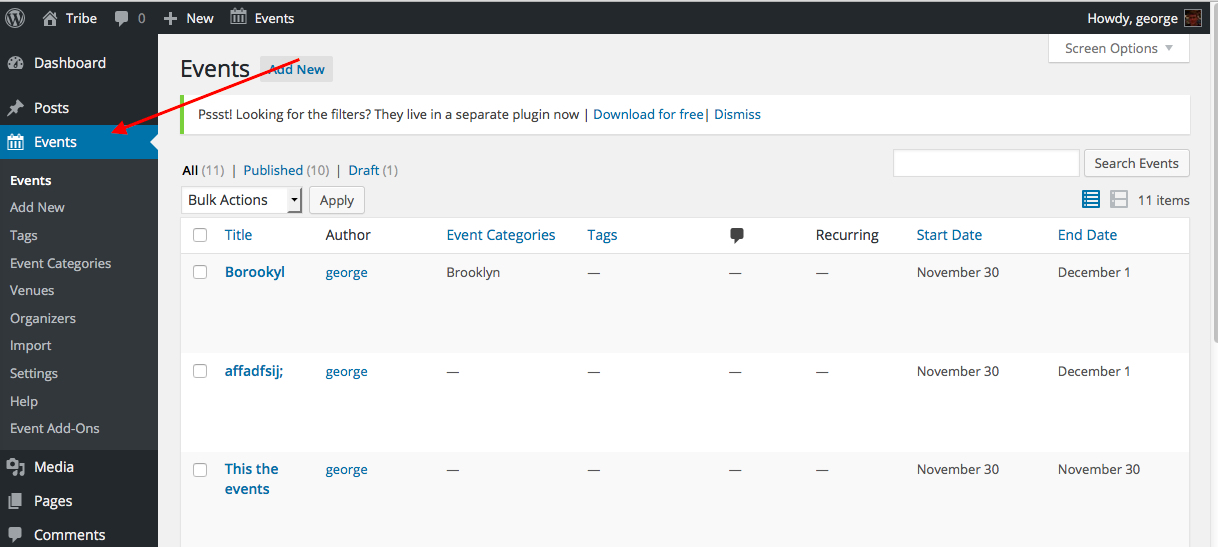
As for how things are in your site’s wp-admin, could you share a screenshot of exactly what you find when you go to Events > Events in your wp-admin? Here’s my wp-admin, for example:
—
Finally, for now, do any errors pop up on your site if you head to your site’s wp-config.php file and change this line of code:
define('WP_DEBUG', false);to this:
define('WP_DEBUG', true);That will display PHP errors if any exist, which might be quite useful here. Once you make this change, see if there are any PHP errors in either the front-end OR the wp-admin.
Thank you for your patience with this!
GeorgeNovember 30, 2015 at 10:30 pm #1032947ParticipantHi George, this is what I get with debugging true
WARNING: D:\HostingSpaces\Victoria\victoriapub.no\wwwroot\wp-content\plugins\w3-total-cache\inc\functions\other.php:19 – file_get_contents(D:\HostingSpaces\Victoria\victoriapub.no\wwwroot/wp-content/plugins/w3-total-cache/languages/faq-pro-nb_NO.xml): failed to open stream: No such file or directory
require_once(‘D:\HostingSpaces\Victoria\victoriapub.no\wwwroot\wp-admin\admin.php’), require_once(‘D:\HostingSpaces\Victoria\victoriapub.no\wwwroot\wp-admin\admin-header.php’), WP_Screen->render_screen_meta, apply_filters(‘contextual_help_list’), call_user_func_array, W3_Plugin_TotalCacheAdmin->contextual_help_list, w3_parse_faq, file_get_contents
WARNING: D:\HostingSpaces\Victoria\victoriapub.no\wwwroot\wp-includes\class-http.php:2136 – gzinflate(): data error
require_once(‘D:\HostingSpaces\Victoria\victoriapub.no\wwwroot\wp-admin\admin.php’), do_action(‘tribe_events_page_tribe-events-calendar’), call_user_func_array, Tribe__Events__Settings->generatePage, do_action(‘tribe_settings_content_tab_help’), call_user_func_array, Tribe__Events__Main->doHelpTab, include_once(‘D:\HostingSpaces\Victoria\victoriapub.no\wwwroot\wp-content\plugins\the-events-calendar\src\admin-views\tribe-options-help.php’), wp_remote_get, WP_Http->get, WP_Http->request, WP_Http->_dispatch_request, WP_Http_Curl->request, WP_Http_Encoding::decompress, gzinflateDecember 1, 2015 at 9:49 am #1033310ParticipantThank you for this information @mariannafridjonsdottir!
Just to double-check, can you deactivate the “W3 Total Cache” plugin and see if anything is improved with regards to this issue?
Thank you for your patience here,
GeorgeDecember 1, 2015 at 12:29 pm #1033399ParticipantHi Georg
Strange, I get this when deactivating W3 Total Cache, have not seen this before and it does not disappear when I reactivate. But the situation of the events in the backend has not changed…
thank you so much
MariannaDecember 2, 2015 at 8:52 am #1033904ParticipantHey Marianna,
Thank you for your patience! In your reply you wrote “I get this when deactivating W3 Total Cache” – were you referring to a screenshot or something that you tried to add to the reply?
If so, there is unfortunately not a screenshot in your post. Our forum could’ve stripped the code or something – sorry about that!
Can you try sharing a screenshot of the issue again, if that’s what you were trying to do originally? You can do so by uploading the screenshot to Imgur.com, Flickr.com, CloudUp.com, or any similar image-hosting site; then just share the links to those images here and I’ll take a look.
—
If you are not referring to a screenshot, then what was the “this” you got when deactivating W3TC?
Thank you!
GeorgeDecember 2, 2015 at 10:34 am #1033973ParticipantHi George, here is the this I get when deactivating W3 ….
https://drive.google.com/file/d/0BxVwZQghYxePOUMxemRjNzlVQ3c/view?usp=sharingthanks a lot
MariannaDecember 2, 2015 at 12:38 pm #1034080ParticipantThank you Marianna!
That error reveals an issue on the server level with your site. I would recommend sharing that screenshot with your web host via their customer support, and they should be help to increase the “server sort buffer size” as indicated by that error.
Thank you for your patience with this!
P.S.
Roughly how many events do you have on your site? Dozens? Hundreds? Thousands? Dozens of thousands? Just curious! 😀 It’s hard for me to tell from the front-end of your site.
Thank you!
GeorgeFebruary 18, 2016 at 8:32 am #1075891KeymasterThis topic has not been active for quite some time and will now be closed.
If you still need assistance please simply open a new topic (linking to this one if necessary)
and one of the team will be only too happy to help. -
AuthorPosts
- The topic ‘Events missing from backend, picture view not working’ is closed to new replies.