

Forum Replies Created
-
AuthorPosts
-
December 7, 2015 at 8:32 am in reply to: I want to purchase events calendar pro but have a question or two. #1036946
George
ParticipantHey Justin,
Unfortunately, no, a license for Events Calendar Pro or any other add-on for The Events Calendar does not include customization support 🙁
If you look around the forums, you’ll see that once in a while we can help with small tweaks here and there, or if there’s a bug that’s in our code itself then we tend to write custom code snippets to help restore functionality; outside of these categories, however, custom code is not something we can offer much help with.
As for your question here:
Even if you can point me in a direction on how to change the default template for the events page would be helpful!
I’m indeed happy to point you in the right direction as much as possible!
First and foremost on this front is the “Events template” option for The Events Calendar – simply head into Events > Settings > Display in your wp-admin, and find this “Events template” option there. If you try out every different template available, you might find one that works notably better with your theme than another.
If you still need to make further template modifications to get things to work, then I’d recommend giving our “Themer’s Guide” a good read → https://theeventscalendar.com/knowledgebase/themers-guide/
That will lay out many helpful principles and general ideas for modifying templates.
I hope this all helps!
Sincerely,
GeorgeParticipantHey Clay,
Do get to the WP Dashboard, I would recommend accessing your site’s wp-content/plugins directory via FTP. As with backups, if you’re not familiar with this there are tons of easy ways to do it that you can find on Google and such.
But once there, just DELETE the existing folders in wp-content/plugins that are related to these tribe plugins. Here are the plugins and what their corresponding folder names should roughly be (if they’re a little different, that is fine!):
• The Events Calendar => the-events-calendar
• Events Calendar PRO => events-calendar-pro
• Community Events => the-events-calendar-community-events or tribe-community-eventsOnce these are deleted, see if you can get to the wp-admin dashboard; if so, then proceed with the steps I wrote above starting at “2. The Solution, Specifically: Part Three”.
Cheers!
GeorgeDecember 4, 2015 at 12:04 pm in reply to: Many Features w/ Hard Dependency on HTML localStorage #1035708ParticipantI’m sorry about this @josh, but other than localStorage there is not a solution I could recommend at this time 🙁
I know it’s a huge disappointment and I’m very, very sorry about that! I will indeed close up this ticket, but before doing so, let me know if you have any other questions I can help with or any other thoughts on this…I’m sorry to disappoint Josh!
Sincerely,
GeorgeParticipantHey @Christoffer,
I appreciate your willingness to work with us and trust us with your login information, however we cannot log into user sites for any reason and I’ve removed your login credentials the instant I saw them [also, for future reference never post information like that on a public forum like this! 😀 ].
As for your issues though, I cannot recreate these problems and so the best step I can recommend would be to go through each troubleshooting step listed here → https://theeventscalendar.com/knowledgebase/testing-for-conflicts/
Try creating two events happening at the same time after EACH STEP in that process.
Does anything improve along the way? If so, let us know.
Thank you for your patience,
GeorgeParticipantThanks for all of this @Clyde, and for your patience here!
There are two separate things I’d like to touch on, so I’ll break them up below for simpler communication. If you address these things separately in your response, too, that will be awesome!
Manual Order Issue
One thing I notice in trying to replicate your problems is that if I go to “Orders > Add New” in the wp-admin and then add tickets as line items to the order, the order total remains at $0. But the status is set to “Pending Payment”.
1. Do you find the status set to this by default when manually entering orders, too?
If I then just save this order as-is, the order total remains at $0.
However, if I add the value to the “order total” field before saving the order, AND manually set the order status to “Complete”, then the value is saved fine. Here’s a screenshot of this “order total” field I am referring to:
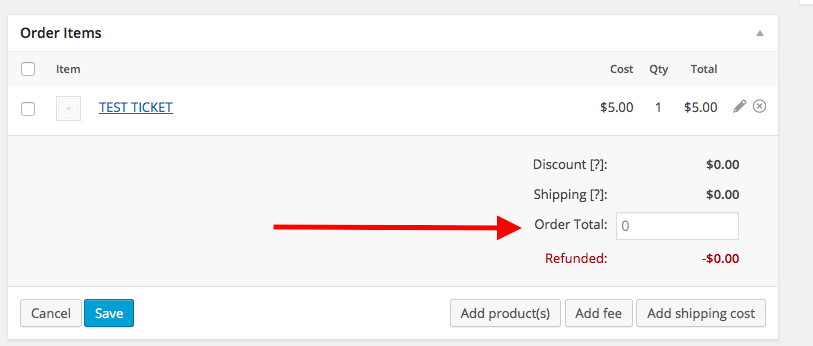
2. Do you find that if you add the numeric value to this “Order total” field, the cost is saved correctly and such?
Now, this doesn’t mean there aren’t issues – just curious if you have that same behavior as a place to start.
“Free!” Event-Saving Issue
This is the secondary issue you brought up above. One thing I’m curious about is how you described different ways of saving things, like this:
“but once i click save it says Free!. Once I update the whole admin page”
You say “once I click save it says Free!”. But then you say “updating the whole admin page”. I’m a bit lost here because on the edit event screen, just like with posts or pages, there is only one save button and it updates the whole event.
So what is the first saving you’re doing when you say “once I click save it says Free!”? How specifically is this different from the basic, big blue “Save” button that you see in events, posts, pages, etc. in their main edit screen?
Do you mean that you click “Save Ticket”? And then despite entering a price, the value in this screenshot that says $5.00 says “Free” instead of the value you entered?:

Thank you!
GeorgeParticipantSure thing Jacob, apologies for not understanding that clearly!
I would recommend excluding any of these file names from minification:
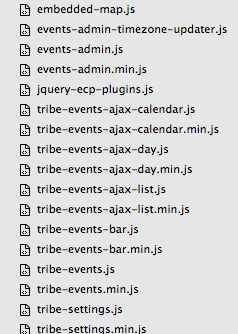
Now, I am not saying that all of these file names will show up – many will not even show up, which is fine. But if you see any of these filenames and you can exclude them, you should 🙂
I hope this helps!
GeorgeParticipantHey @bluewaterparent,
Before attending to the recurring event issue, I’m curious about this event → http://www.bluewaterparent.com/event/lapsit-burtchville-8/
It’s the one with errors, obviously.
This event does NOT have errors: http://www.bluewaterparent.com/event/4312/
—
1. On the event WITHOUT errors, what is the value of the “cost” field?
2. On the event WITH errors, what is the value of the “cost” field?Thanks!
GeorgeParticipantHey @corey,
Glad there’s been progress here. For a full-width page, if your theme offers this layout option you should be able to access it by going to Events > Settings > Display in your wp-admin; once here, scroll down to find the Events Template option and try out each template there. Check on the event page layout after each template change, and see if it’s the full-page layout you like 😀
Cheers!
GeorgeParticipantThanks for confirming, Antonio.
Do you have any further questions on this matter? If you’re trying to re-enable that field, that is unfortunately not possible without custom code which we cannot help with 🙁
If you do not have any other questions I will close up this thread 🙂
Cheers,
GeorgeParticipantThank you for sharing all of this information and for your patience with this!
You do not need to share any more “System Information” blocks here now.
What are the exact problems on the Live site specifically now? Is it still what you wrote in your first post here? – “When i create a recurring event it creates only a few and then stops. No errors, no console errors.”
If not, then what are the issues now?
Thank you for your patience @amazing!
— George
ParticipantNice! Glad this information helped; that themer’s guide should help a ton with moving the customizations into your theme. I’m perhaps a little biased, but in my opinion it’s the sort of thing where once you do it one time, the system sort of “clicks” and is much easier to work with from there 🙂
Cheers!
GeorgeParticipantNice! 😀 Best of luck with your site,
GeorgeDecember 4, 2015 at 11:22 am in reply to: license key is out of installs without having multiple installs #1035676ParticipantWoot! 😀
December 4, 2015 at 11:21 am in reply to: Google import added hundreds of past events to current month #1035675ParticipantHey Joel, if you follow the steps here to we can issue a refund in full [assuming all the purchases are made recently enough for our payment processors’ refund window] → https://theeventscalendar.com/knowledgebase/refund-policy/
Thanks,
GeorgeDecember 4, 2015 at 11:17 am in reply to: Warning: strtotime() expects parameter 1 to be string, object given in #1035674ParticipantMatt I am really sorry about these issues – each of these are things I cannot reproduce and I am puzzled about this.
Would you be able to share your System Information again with me here? I’m just curious about which plugins are now at 4.0 and such on your site.
-
AuthorPosts