

Forum Replies Created
-
AuthorPosts
-
December 15, 2015 at 9:37 am in reply to: Can't deactivate Woocommerce tickets to upgrade to Events Tickets Pro #1041776
George
ParticipantI’m sorry that these issues are all still happening Tony – at this point, I would recommend removing those two lines of code in the theme functions.php file.
Then, remove WooCommerce Tickets off of your site, and activate Event Tickets and Event Tickets Plus.
Then contact your theme developer, or whoever else implemented that custom code, and seek further assistance from them on how to re-implement the customization there.
This should be helpful – thank you for your patience and persistence with this!
Sincerely,
GeorgeParticipantNo worries @Brian! Thank you for updating things and for making that test page.
oddly enough, for me those + and – icons show up fine:
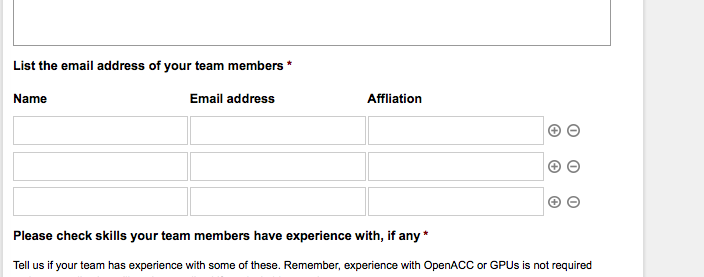
I am in Firefox on a Mac:
1. in what browsers and operating systems do you see this issue in?
2. And does using a different browser make any difference with the behavior of this issue?Thank you for your patience with this! 😀
— George
ParticipantThank you, @christoffer. Really sorry that I can’t help more here 🙁
Before I close this thread, I would like to point out that we have a list of highly-rated customizers here if you’re interested in hiring someone to help out with all of this → http://m.tri.be/18k1
Best of luck with your project!
GeorgeParticipantHey @ocws,
This will create one event that events every day from December 8 until December 24, one event that starts 2:15pm and ends at 3:45pm.
To have another even that is one the same days, but starts at 4pm and ends at, for example, 5pm, then you will need to create another recurring event with the same configuration but just the different start and end dates/times.
Is that clear? Let me know if this helps! 😀
Cheers,
GeorgeParticipantThank you so much for your patience with this!
We’ve recently updated our plugins to 4.0.1, which includes a number of bug fixes. If you update to these versions, does anything improve on your site with these issues?
Sincerely,
GeorgeParticipantHey Robert,
Thanks for providing all of this information!
In the information for the first site, I see a listing like this:
The MSIA Events Calendar Plugin version 0.1 by Modern Tribe, Inc. AND MSIA1. What is this plugin?
2. The error message you get is related to recurring-event rules that are generated within event meta. I’m wondering if anything improves if you make sure that Events Calendar Pro is totally deactivated on the site you are importing into – this might allow the import to run successfully, then you can try activating Events Calendar Pro after the fact and see if anything is improved…
Cheers! And thank you so much for your patience with this 🙂
— George
December 15, 2015 at 9:12 am in reply to: tobegin using WooTickets, please install and activate the latest version of The #1041751ParticipantHey @Alex,
Thanks for posting your System Information.
It looks like you’ve got all the right plugins you need, so for that error to display is the result of something breaking on your site. I know this seems like a simple step to do, but I would recommend simply deactivating your Tribe plugins:
• The Events Calendar
• Events Calendar Pro
• Event Tickets
• Event Tickets Plus1. With all of these plugins deactivated, does the error still display?
2. If you re-activate each of these plugins, then once they’re all re-activated, does the error still display?
Cheers,
GeorgeDecember 15, 2015 at 9:08 am in reply to: What do I need for selling events via WooCommerce #1041747ParticipantNow, Event Tickets [the free, core plugin] will only allow people to RSVP for tickets. In other words, you cannot charge people money for tickets if you just have Event Tickets.
You will need to add Event Tickets Plus to your site to be able to charge money for your tickets, and to collect that money with WooCommerce.
—
Does all of this information help at all? Let me know!
— George
December 15, 2015 at 9:07 am in reply to: What do I need for selling events via WooCommerce #1041746ParticipantThanks Henning – happy to elaborate on Event Tickets and Event Tickets Plus here.
So, The Events Calendar is what generates the actual events. Events Calendar Pro and all other add-ons that we sell here just extend this “core”, free functionality with The Events Calendar.
If you want to have tickets for these events, then you will need Event Tickets.
Like The Events Calendar, Event Tickets is a free core plugin.
Events Calendar Pro is a premium add-on for The Events Calendar; Event Tickets Plus is a premium add-on for Event Tickets.
Does that make sense?
ParticipantThere’s great feedback here, and I appreciate it @Dirk. I wish you the best of luck with your project – stay tuned to plugin updates because we’re always improving things 🙂
Cheers!
GeorgeDecember 15, 2015 at 9:03 am in reply to: Organizer data erased and blank organizer added when error message returned #1041743ParticipantHey @karly,
Thanks for this. I’m curious about these two things:
1. Have you done the “Reset file permissions” step I recommended above? If not, try it and see if anything improves.
2. The WP Engine staging site system can have odd behaviors. I looked up this bug in our development system and can see that our fix for it was, indeed, included in 4.0.1, so I’m just curious about why this is still happening and have had many inconsistent behavior problems that arise from the WP Engine platform specifically….
So, can you try resetting the file permissions, then regenerating the staging site from within your WP Engine dashboard?
—
Thank you for your patience with this!
Sincerely,
GeorgeParticipantHey Vince,
Sure thing, you can use these functions to pull out date and time from an event:
tribe_get_start_date()
tribe_get_end_date()
Cheers!
GeorgeParticipantNo problem!
Thank you for clarifying – tweaking this will unfortunately take some code customization, but should totally be possible. Try adding this code somewhere in your theme’s functions.php file:
add_filter( 'TEC_VenueOrganizer_List.args', 'tribe_support_1041393' );function tribe_support_1041393( $args ) {
$args['orderby'] = 'title';
$args['order'] = 'ASC';
return $args;
}
You can also just edit the code within the plugin directly, if you’re comfortable with that. You’d take the same arguments in the code above and just add them in the query() function within the plugin’s code, around line 47 and such, here’s an image showing this in practice:
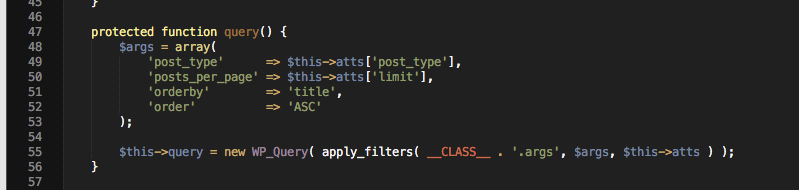
Cheers!
GeorgeParticipant😀
December 15, 2015 at 8:10 am in reply to: Term Not Updating in Translation; Same Title and Placeholder Term #1041721ParticipantSounds good @Karly – please note, however, that any source code edits will likely be lost the next time you update the plugins on your site. Just wanted to remind you!
Cheers,
George -
AuthorPosts