

Forum Replies Created
-
AuthorPosts
-
December 15, 2015 at 8:06 am in reply to: Can't deactivate Woocommerce tickets to upgrade to Events Tickets Pro #1041718
George
ParticipantDo you have Event Tickets and Event Tickets Plus both installed and activated on your site?
If not, then undo the theme change for now and leave WooCommerce Tickets up active.
Then, install Event Tickets and Event Tickets Plus on your site. Activate both. Then try these steps again and see if things improve.
Thank you for your patience with this,
GeorgeParticipantHey Ginette,
Thanks for the link!
To fix this issue, you’d need to add some CSS to the bottom of your theme’s style.css file like this:
h1.tribe-events-single-event-title {

    font-size: 2em;

}
—
Now, you can use any size you’d like there. The 2em is just an example. Here’s how 2em looks for example:
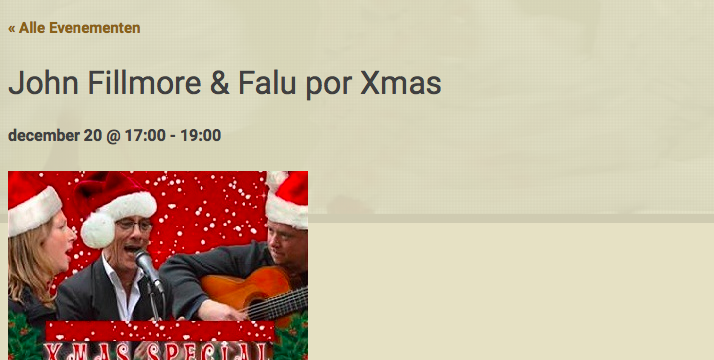
Here’s how 3em looks:
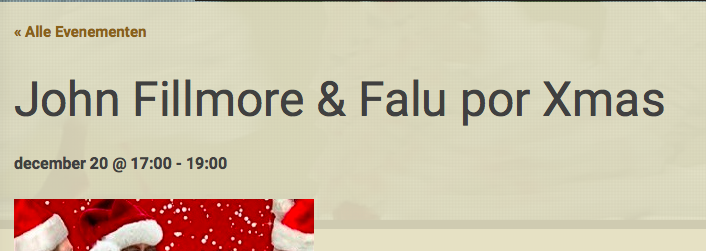
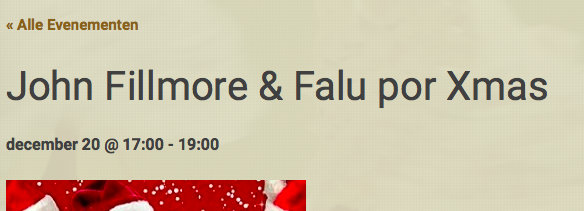
And you can do stuff like 2.5em:
—
Play around with this and see if it helps – I hope it does! 🙂
Cheers,
GeorgeParticipantHey @Dirk,
I’m sorry that our update hasn’t been super helpful 🙁
Hopefully this helps with one aspect of all of this – try adding the following CSS to the bottom of your theme’s style.css file:
#ticket_form_table .ticket .ticket_field[value="Tribe__Tickets__RSVP"] {

    display: none !important;

}
#ticket_form_table .ticket .ticket_field[value="Tribe__Tickets__RSVP"] + span {
display: none !important;
}Then, check out the Community Tickets section and see if the RSVP option is indeed removed.
—
This will keep the option gone from the front-end of the site, but will it remain hidden in the admin back-end. I know that you mention wanting to pare down all of these features, but I would recommend very strongly that you do NOT try to modify the admin-facing versions of these features as much as possible. Just the front-end 🙂
Cheers!
GeorgeParticipantI’m sorry @Christoffer 🙁
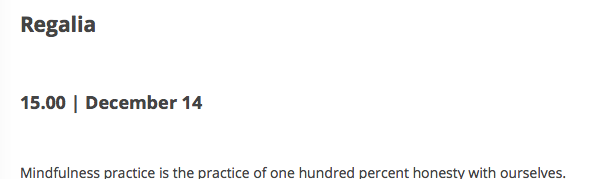
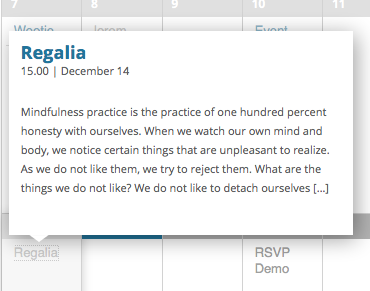
The nature of customization projects are all the site-specific things like this, because this code works well for me. For example, see these images as proof:
—
I’m sorry that this solution doesn’t work for you as well – I’m not sure why 🙁 Your best bet would be to explore the custom coding from here, and/or hire a developer to help, but in either case you’ll have to take the reins from here.
I’m sorry @Christoffer!
— George
ParticipantThanks @alonso! I’m sorry that this is the situation at present – but we’re working on a bug fix regardless, so stay tuned for that! 😀
Cheers,
GeorgeParticipantHey @Kcswebs,
I’m sorry to hear about these issues – however, can you clarify what plugin you’re referring to when you say “the shortcode plugin”?
We do not make any sort of plugin named along those lines, and unfortunately cannot provide support for unofficial plugins, so I just want to make sure I know which specific plugin you’re referring to here. (And I’ll help as much as possible regardless).
Cheers!
GeorgeDecember 15, 2015 at 7:41 am in reply to: Is it possible to use woocommerce tickets and eventbrite tickets? #1041692ParticipantHey @Joe,
Yes, you can have both plugins running alongside each other 🙂
Please keep me posted on this process with your site, and if any issues arise!
— George
ParticipantThanks for the update @Justin!
Best of luck with your site,
GeorgeParticipantHi Yuri,
You can pull of what you describe here by installing these free plugins:
• WooCommerce
• The Events Calendar
• Event TicketsAnd then installing this premium add-on, which is available here on http://theeventscalendar.com:
• Event Tickets Plus
—
I hope this information helps – let me know anything else that I can help with! 😀
— George
ParticipantI’m sorry to hear about this @André!
Fortunately, it’s pretty simple to change the excerpt length. I went into the two best methods for doing this in this other thread here → https://theeventscalendar.com/support/forums/topic/increase-word-count-on-listview/#post-1041664
Check out that post; use those methods; and let me know what you think!
Cheers,
GeorgeDecember 15, 2015 at 7:14 am in reply to: Events Summary Page Shows Full Event Descriptions #1041665ParticipantHey Jeremy,
There are two pronounced issues here – the excerpt issue, and then the disappearing Pro license issue. I’m sorry about the existence of both of them!
—
The excerpt issue may be fixed by simply updating to the latest version of The Events Calendar, which is now 4.0.1
If that alone does not resolve the problems, let me know – updating to 4.0.1 is the best first step anyways…
—
As for the License Key issue, this is bizarre and, unfortunately, usually arises from a theme or plugin code conflict of some type. To help investigate this, can you share your “System Information” with us? Here’s how to do that → https://theeventscalendar.com/knowledgebase/sharing-sys-info/
Sincerely,
GeorgeParticipantHey @Justin,
In that file you will see this line of code around line 69:
<?php echo tribe_events_get_the_excerpt(); ?>This is the code you can replace like Brian originally recommended in that old forum thread (he mentions a function the_excerpt(), but that function is now the above-mentioned tribe_events_get_the_excerpt()).
—
Alternatively, you can just add a function like this to your theme’s functions.php file:
add_filter( 'excerpt_length', 'tribe_support_1041174' );function tribe_support_1041174( $length ) {
return 100;
}
↑ That above code will change the excerpt length to 100 words. You can use any digit other than 100, of course, so play around to find the perfect word count.
Cheers,
GeorgeParticipantHey @Ladydekade,
I’m sorry to bear this news, but at this time there is no support for these features in our plugins 🙁
This is one of the great missing features from Event Tickets Plus! We’re working on it but it’s not available at this time, and won’t be for at least several months.
I’m really sorry if this is a big disappointment!
Please let me know what you think or if I can help with anything else.
Sincerely,
GeorgeParticipantHey Nick,
The specific Uservoice post you linked to is for “Global Stock” – a different feature than what you’ve described here, as far as I can tell.
What you seem to be describing here is simply the ability to offer these different “tiers” of tickets, which should totally be doable within Event Tickets Plus. For example, see this screenshot of creating a “ticket”. You could easily create a “regular” ticket as you’ve described it; and then could create another, cheaper ticket that goes on sale sooner (your “Early Bird” discount).
The “group discount” is unfortunately not possible at this time without code customization 🙁 And if you need that “Global Stock” feature for this, that is still not available.
There are good reasons for why that’s no available yet – I understand your frustration with us taking relatively long to implement that feature. But I can assure you it is because it’s actually a surprisingly complex thing to pull off, and we’ve been focused on the other major recent releases (the 3.9.x – 3.12.x releases, the major 4.0 releases, and four new plugins: Event Tickets, Event Tickets Plus, Community Tickets, and Advanced Post Manager).
Just providing some backstory as to the delays on implementing ‘global stock’. I hope the rest of the information I’ve provided here is clear and helps you move forward with your project – let me know what you think!
— George
ParticipantHey Daniel,
When you say this:
I’ve activated tickets for products
Can you clarify exactly how you activated tickets for products? Take a screenshot of your method if possible – you can do so by uploading the screenshot to Imgur.com, Flickr.com, CloudUp.com, or any similar image-hosting site; then just share the links to those images here and I’ll take a look.
Thank you!
George -
AuthorPosts