
Home › Forums › Ticket Products › Event Tickets Plus › Where to write price.
- This topic has 7 replies, 2 voices, and was last updated 10 years, 10 months ago by
George.
-
AuthorPosts
-
December 13, 2015 at 9:55 am #1040533
christoffer
ParticipantHi! I am using events calender pro and tickets plus for my gym courses, and i would like to display price on every course without the price in booking. So it will be free to book using rsvp, but they pay when they get here. So i still want to display price next to the date, but there is not place to write the price in settings ?
December 14, 2015 at 9:13 am #1040942ParticipantHey @Christoffer,
This is unfortunately a bit tricky to do, and would require some custom coding 🙁
The simplest possible way I can think of going about doing this would be to first create an additional field within Events Calendar Pro, which you can learn to do here → https://theeventscalendar.com/knowledgebase/pro-additional-fields/
You can name this field “Cost at the door” or something, and then on each event, add the appropriate cost values. It will display these values in the “meta details” section of your events.
—
To take this further and add this value next to the dates in event views, that unfortunately is where the custom coding would come into play.
Let me know if you implement the “Additional Field” first, and what you name this additional field exactly. I will use that information and try to recommend some code for you 🙂
Thank you,
GeorgeDecember 14, 2015 at 12:22 pm #1041110ParticipantI created it and named it “Pris” So if you could give me some code, that would bre great, looks so weird with only white space, next to the date otherwise.
Best regards!
December 14, 2015 at 12:59 pm #1041147ParticipantThanks @Christoffer!
I wrote a little snippet that works well for me – here’s an example of how to do this. Add this to your theme’s functions.php file and let me know if it helps:
add_action( 'tribe_events_event_schedule_details_inner', 'tribe_pris_field_example' );function tribe_pris_field_example( $inner ) {
$fields = tribe_get_custom_fields( get_the_ID() );
$price = 0;foreach ( $fields as $key => $field ) {
if ( 'Pris' == $key )
$price = $fields[ $key ];
}return $price . ' | ' . $inner;
}
Cheers,
GeorgeDecember 14, 2015 at 1:34 pm #1041176ParticipantSry to say, it is not working, check image here http://imgur.com/nujZ3B6
December 15, 2015 at 7:50 am #1041706ParticipantI’m sorry @Christoffer 🙁
The nature of customization projects are all the site-specific things like this, because this code works well for me. For example, see these images as proof:

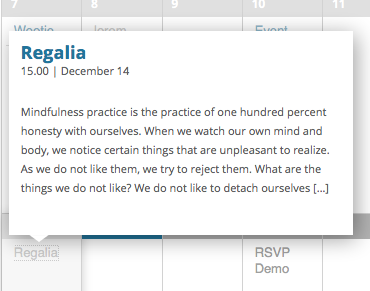
—
I’m sorry that this solution doesn’t work for you as well – I’m not sure why 🙁 Your best bet would be to explore the custom coding from here, and/or hire a developer to help, but in either case you’ll have to take the reins from here.
I’m sorry @Christoffer!
— George
December 15, 2015 at 8:39 am #1041732ParticipantWell, thank you anyway!
December 15, 2015 at 9:31 am #1041768ParticipantThank you, @christoffer. Really sorry that I can’t help more here 🙁
Before I close this thread, I would like to point out that we have a list of highly-rated customizers here if you’re interested in hiring someone to help out with all of this → http://m.tri.be/18k1
Best of luck with your project!
George -
AuthorPosts
- The topic ‘Where to write price.’ is closed to new replies.