
Home › Forums › Calendar Products › Events Calendar PRO › List All Organisers Alphabetically
- This topic has 6 replies, 2 voices, and was last updated 10 years, 10 months ago by
George.
-
AuthorPosts
-
December 15, 2015 at 4:47 am #1041393
kcswebs
ParticipantHi everyone,
Just purchased the plugin, love it, it’s awesome!
I have a couple of issues, I’m hoping can be resolved.
I have the shortcode plugin installed to list all organisers, but they need to be listed alphabetically. I’ve looked on the forums, but there is no definitive answer. Whats the best way to do this?
Also, when viewing an individual Organiser, the breadcrumb at the top of the page is a link to all courses page, how can I get it just to go back to the list of all Organisers? I’ve tried the simple approach of echo “Go Back“; but that doesnt seem to work.
Thanks in advance.
December 15, 2015 at 5:48 am #1041413ParticipantAs a follow up, I’ve resolved my issue with the breadcrumb link going back to the following page.
December 15, 2015 at 7:43 am #1041698ParticipantHey @Kcswebs,
I’m sorry to hear about these issues – however, can you clarify what plugin you’re referring to when you say “the shortcode plugin”?
We do not make any sort of plugin named along those lines, and unfortunately cannot provide support for unofficial plugins, so I just want to make sure I know which specific plugin you’re referring to here. (And I’ll help as much as possible regardless).
Cheers!
GeorgeDecember 15, 2015 at 7:50 am #1041708ParticipantHi George,
Sorry, my bad!
I’m using the Events Calendar Pro plugin, and to list all organisers on one page, I’m directed to list them all using the plugin featured on your link https://theeventscalendar.com/knowledgebase/listing-venues-and-organizers/
It all works swimmingly, but I just need the organisers to be alphabetical.
Thanks!
December 15, 2015 at 8:47 am #1041734ParticipantNo problem!
Thank you for clarifying – tweaking this will unfortunately take some code customization, but should totally be possible. Try adding this code somewhere in your theme’s functions.php file:
add_filter( 'TEC_VenueOrganizer_List.args', 'tribe_support_1041393' );function tribe_support_1041393( $args ) {
$args['orderby'] = 'title';
$args['order'] = 'ASC';
return $args;
}
You can also just edit the code within the plugin directly, if you’re comfortable with that. You’d take the same arguments in the code above and just add them in the query() function within the plugin’s code, around line 47 and such, here’s an image showing this in practice:
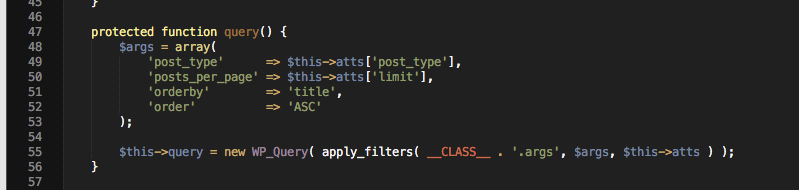
Cheers!
GeorgeDecember 15, 2015 at 9:00 am #1041740ParticipantThats sorted it completely!
Thanks very much George.
Good Work Sir 😉
December 15, 2015 at 9:47 am #1041793ParticipantNice! Best of luck with your project 🙂
— George
-
AuthorPosts
- The topic ‘List All Organisers Alphabetically’ is closed to new replies.