
Home › Forums › Calendar Products › Events Calendar PRO › The Event Calendar conflict with Gravity Forms
- This topic has 11 replies, 2 voices, and was last updated 10 years, 10 months ago by
George.
-
AuthorPosts
-
December 14, 2015 at 8:56 am #1040930
Sonya Mowery
ParticipantWe use a combination of Gravity Forms with TEC and TEC Pro. I have a test form that works correctly on a standard WordPress page and post but not in an event post. I found that TEC is causing a conflict with the Gravity Forms field that allows the end user to add or subtract multiple rows. Specifically, the inline CSS that gets added to the page which renders the icons (+) and (-) for this type of field appears to be getting blocked by TEC. I’ve added URL with images below displaying the conflint on a test page and test event page. Would appreciate any assistance you can provide. Thanks!!!
December 14, 2015 at 9:17 am #1040946ParticipantHey @Brian,
Sorry to hear about a conflict here! We can definitely investigate this – to help with that, can you clarify the following things first?
1. Your “System information” says that you’re using versions 3.12.6 of The Events Calendar and Events Calendar Pro. These plugins are now at 4.0.1 and 4.0, respectively – if you update to these latest versions, does that affect this conflict at all?
2. You say “We use a combination of Gravity Forms with TEC and TEC Pro.” – can you clarify exactly you are using them in combination? Are you just putting Gravity Forms shortcodes into event content, for example? Or are you using custom code integrations and so on? Provide more detail here and elaborate on how these plugins are being used on your site.
3. Finally, can you share a link directly to the events in your screenshots? I went to the link provided in your “System Information” but I was unable to load a page there.
—
The information from each of these points will be very helpful – thank you in advance for providing as much of it as you are able.
Cheers!
GeorgeDecember 14, 2015 at 9:26 am #1040954ParticipantThis reply is private.
December 14, 2015 at 12:46 pm #1041135ParticipantThank you Brian!
I took a look at this URL but could not find the sort of “repeating” field you mentioned (where users can add fields or subtract fields) – have you temporarily disabled this field there because it’s broken or something?
If so, then is there any way you could make the field visible for now, and tell us which specific field has this CSS issue you are describing?
I’m really sorry about requesting so much clarification and such here – I just want to make sure I can actually see your issue live so that I can best help out 🙂
Thank you for your patience!
GeorgeDecember 15, 2015 at 6:43 am #1041637ParticipantThis reply is private.
December 15, 2015 at 9:35 am #1041773ParticipantNo worries @Brian! Thank you for updating things and for making that test page.
oddly enough, for me those + and – icons show up fine:
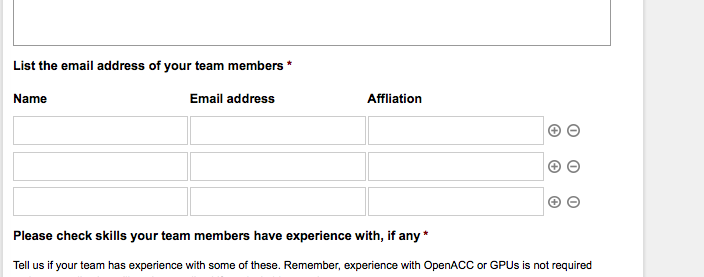
I am in Firefox on a Mac:
1. in what browsers and operating systems do you see this issue in?
2. And does using a different browser make any difference with the behavior of this issue?Thank you for your patience with this! 😀
— George
December 15, 2015 at 10:11 am #1041802ParticipantThis reply is private.
December 16, 2015 at 6:15 am #1042266ParticipantThis reply is private.
December 16, 2015 at 7:46 am #1042321ParticipantWhen I manually add the following classes, the images show up….so why would TEC be overriding or cancelling out these styles?
img.add_list_item {
background-image: url(data:image/svg+xml;base64,PD94bWwgdmVyc2lvbj0iMS4wIiBlbmNvZGluZz0idXRmLTgiPz48IURPQ1RZUEUgc3ZnIFBVQkxJQyAiLS8vVzNDLy9EVEQgU1ZHIDEuMS8vRU4iICJodHRwOi8vd3d3LnczLm9yZy9HcmFwaGljcy9TVkcvMS4xL0RURC9zdmcxMS5kdGQiPjxzdmcgdmVyc2lvbj0iMS4xIiB4bWxucz0iaHR0cDovL3d3dy53My5vcmcvMjAwMC9zdmciIHhtbG5zOnhsaW5rPSJodHRwOi8vd3d3LnczLm9yZy8xOTk5L3hsaW5rIiB3aWR0aD0iNTEyIiBoZWlnaHQ9IjUxMiIgdmlld0JveD0iMCAwIDUxMiA1MTIiPjxnIGlkPSJpY29tb29uLWlnbm9yZSI+PC9nPjxwYXRoIGQ9Ik0yNTYgNTEyYy0xNDEuMzc1IDAtMjU2LTExNC42MDktMjU2LTI1NnMxMTQuNjI1LTI1NiAyNTYtMjU2YzE0MS4zOTEgMCAyNTYgMTE0LjYwOSAyNTYgMjU2cy0xMTQuNjA5IDI1Ni0yNTYgMjU2ek0yNTYgNjRjLTEwNi4wMzEgMC0xOTIgODUuOTY5LTE5MiAxOTJzODUuOTY5IDE5MiAxOTIgMTkyYzEwNi4wNDcgMCAxOTItODUuOTY5IDE5Mi0xOTJzLTg1Ljk1My0xOTItMTkyLTE5MnpNMjg4IDM4NGgtNjR2LTk2aC05NnYtNjRoOTZ2LTk2aDY0djk2aDk2djY0aC05NnY5NnoiPjwvcGF0aD48L3N2Zz4=);
}
img.delete_list_item {
background-image: url(data:image/svg+xml;base64,PD94bWwgdmVyc2lvbj0iMS4wIiBlbmNvZGluZz0idXRmLTgiPz48IURPQ1RZUEUgc3ZnIFBVQkxJQyAiLS8vVzNDLy9EVEQgU1ZHIDEuMS8vRU4iICJodHRwOi8vd3d3LnczLm9yZy9HcmFwaGljcy9TVkcvMS4xL0RURC9zdmcxMS5kdGQiPjxzdmcgdmVyc2lvbj0iMS4xIiB4bWxucz0iaHR0cDovL3d3dy53My5vcmcvMjAwMC9zdmciIHhtbG5zOnhsaW5rPSJodHRwOi8vd3d3LnczLm9yZy8xOTk5L3hsaW5rIiB3aWR0aD0iNTEyIiBoZWlnaHQ9IjUxMiIgdmlld0JveD0iMCAwIDUxMiA1MTIiPjxnIGlkPSJpY29tb29uLWlnbm9yZSI+PC9nPjxwYXRoIGQ9Ik0yNTYgMGMtMTQxLjM3NSAwLTI1NiAxMTQuNjI1LTI1NiAyNTYgMCAxNDEuMzkxIDExNC42MjUgMjU2IDI1NiAyNTYgMTQxLjM5MSAwIDI1Ni0xMTQuNjA5IDI1Ni0yNTYgMC0xNDEuMzc1LTExNC42MDktMjU2LTI1Ni0yNTZ6TTI1NiA0NDhjLTEwNi4wMzEgMC0xOTItODUuOTY5LTE5Mi0xOTJzODUuOTY5LTE5MiAxOTItMTkyYzEwNi4wNDcgMCAxOTIgODUuOTY5IDE5MiAxOTJzLTg1Ljk1MyAxOTItMTkyIDE5MnpNMTI4IDI4OGgyNTZ2LTY0aC0yNTZ2NjR6Ij48L3BhdGg+PC9zdmc+);
}
img.add_list_item,
img.delete_list_item {
width: 1em;
height: 1em;
background-size: 1em 1em;
opacity: 0.5;
}
img.add_list_item:hover,
img.add_list_item:active,
img.delete_list_item:hover,
img.delete_list_item:active {
opacity: 1.0;
}December 16, 2015 at 11:51 am #1042436ParticipantI’m really sorry about this, because I do not understand why this CSS would not apply to the CSS on the events page. The CSS on the page that DOES work is being echoed right into the page – i.e., it’s not in a stylesheet, just echoed raw into the DOM in some STYLE tags…
I’m perplexed and am also sorry that I do not have a definite answer for this. I’ll investigate as much as possible; for the time being, however, it seems like adding that CSS you shared to the bottom of your theme’s style.css file is the best option. It should keep this working for now, anyways.
Sincerely,
GeorgeDecember 16, 2015 at 11:56 am #1042440ParticipantPlaying around with the template I found that removing this event header seems to fix the problem. I think the only thing we loose is the button to add the event to your calendar.
<!-- Event header --> <div id="tribe-events-header" <?php tribe_events_the_header_attributes() ?>> <!-- Navigation --> <h3 class="tribe-events-visuallyhidden"><?php printf( __( '%s Navigation', 'the-events-calendar' ), $events_label_singular ); ?></h3> <ul class="tribe-events-sub-nav"> <li class="tribe-events-nav-previous"><?php tribe_the_prev_event_link( '<span>«</span> %title%' ) ?></li> <li class="tribe-events-nav-next"><?php tribe_the_next_event_link( '%title% <span>»</span>' ) ?></li> </ul> <!-- .tribe-events-sub-nav --> </div> <!-- #tribe-events-header -->Wonder why that would be causing the conflict?
December 17, 2015 at 7:04 am #1042909ParticipantThanks for sharing this Brian! Not sure what about that code specifically caused the conflict, but glad you’ve found the problem.
If you re-implement any customizations, make sure you leave WP_DEBUG set to TRUE on your site, and add each element one at a time checking on the site behavior after each step. Then if issues arise again, you’ll know what specific line of code is the issue and can troubleshoot that specific thing…
For now, I will close up this thread. Thank you for your patience with it!
Cheers,
George -
AuthorPosts
- The topic ‘The Event Calendar conflict with Gravity Forms’ is closed to new replies.