

Forum Replies Created
-
AuthorPosts
-
George
ParticipantNo problem Suzie! Thanks for sharing this.
Adding the start date is indeed possible, but this is something you’ll need to play around with a bit to find what works best for your site. For example, you can add just the “start date” to the existing content by looking at the bit of code right at the bottom of that snippet in that article, which looks like this:
return $title;
If you change that to something like this, then the start date will be added after the title:
return $title . ' – ' . tribe_get_start_date( $event_id );
Need to add the End Date, too? Or other date-related aspects of the given event? To explore the options and play around with things, head into your plugin files for The Events Calendar and look for the following file:
the-events-calendar/common/src/functions/template-tags/date.phpThere’s a litany of useful functions here that will get start time, start date, end time, end date, some combination of these things, and so on.
Check out the file; read through the code and the available functions; and with this information and some Googling if anything pops up that you’re not familiar with, I’m sure you’ll be able to something useful together.
Since we cannot help with code customizations, I will unfortunately have to go ahead and close up this thread for now 🙁 But I hope that the information I’ve shared here helps! And if other support issues arise, you can open a new thread any time.
Best of luck with your customizations!
GeorgeParticipantHey @xrossglobalgroup,
There is a lot of great feedback here, though comments like this one of yours are not appreciated:
but the fact that within 1 single week my developer came up with a tailor-made solution that provides me with exactly what I need (and others apparently), make me think you’ve not given enough thought to this issue.
Surely you can see and comprehend the differences between your situation – one developer, working for one customer, on one website – versus our situation – many developers, hundreds of thousands of users, hundreds of thousands of websites.
I’m not being snarky here! Just asking for a bit of respect for our development process 🙂 We have given this much thought, and for the practical realities of the present, we have shipped the first versions of things with one name field.
None of this is to rebuke the feedback provided here though! – quite the opposite! The feedback here is excellent and I appreciate the input from both of you immensely.
I’ll be sharing all of your feedback with our development team. I would not expect a change like this to happen any time in the immediate future, as it would require numerous structural changes through our whole codebase. However, feedback like this makes our product better, and we like making our product better, so more versatility for the way names are handled is something we are quite interested in.
Thank you both for your feedback here. I wish you the best of luck with your projects in the meantime, and for now will close up this thread.
Sincerely,
George—
PS
Just to address some of the specifics of @Barback’s feedback, the situation you described @Barback is indeed one that can be improved. However, it’s tough to jump to the conclusion that allowing two fields for a name would fix this. (I’m not saying it wouldn’t! Just elaborating on some of the complexities that this would open up).
For example, despite all of the problems you mention, let’s say there are two name fields as an option.
Well, should the second “name” input be a “required” field? i.e. users cannot submit the “buy ticket” form unless both first and last name are required?
If so, then what about all of the problems with the binary name format as elaborated on in the article I shared earlier in this thread?
You might say, “well, make it optional to decide which fields are required”. Okay – but now, from a product design perspective, there are two options for something that there are currently no options for. That is two more decisions a user has to make – by which I mean two more decisions all of our users would have to make, even though at this time your complaints and @xrossglobalgroup’s complaints are the only complaints about this we’ve had so far.
So, does it make sense to add two steps to the installation/setup process for Tickets and Events for hundreds of thousands of users, based on two complaints?
Hmmm…
Next, you bemoan the inefficiency with your process and claim that it is our naming field that is the cause of this. However, note that you also said that you PRINT OUT your list of names – surely choosing this over using a smartphone or computer is a big part of the inefficiency too, no? If using a smartphone or computer for check-in is not possible, I don’t mean to deride your choice to use paper – but I’m just acknowledging that there’s a whole robust, efficient, and fast Check-In / Attendees Management system provided by our plugin that you leave completely off the table by choosing to print out the names.
Finally, tickets do have unique security codes. Perhaps an even better option than any name-related option would be to put the attendees items into a CSV, and then just sort them by security code – which, since these are numeric, you would not have to manually do. Any good CSV / spreadsheet system allows for auto-sorting for numeric content. And so then at the door, you check folks in based on security code and just scan by leading number, then glance at the name to ensure you’ve got the right number without having to check each digit-by-digit. And so on…
Again, your feedback is much appreciated and I’m sorry about the current inefficiencies of the plugin you are facing. I hope that my comments here have clarified why, perhaps, the decision of name format is not as simple as it might seem and all of the implications of a product design decision like this one.
Thank you very much for reading any of this, if you do 🙂
ParticipantThanks for all of this information!
I was able to reproduce the problem by trying to import the URL you shared earlier.
I’ve reached out to some of the developers on our time so that we can take a closer investigation here, and I will keep this thread updated with what we find.
—
I’m sorry that I don’t have a concrete answer at this time, and that this issue exists at all! But we’ve recreated the problem, so there could be a bug of some kind here.
Thank you for your patience with things – stay tuned!
Sincerely,
GeorgeParticipantHey Chris,
If you get the “Destination folder exists” error, it is because there are folders from older installations of the plugin on your site that your server permissions did not allow for deletion of. This means that unfortunately you will have to do a manual “clean installation” of the plugin.
To do this, access the file structure of your site via FTP, and head to wp-content/plugins. Delete the Events Calendar Pro folder there. This will not delete event content.
Then, once that’s deleted, try installing again. If you’re not familiar with any terms I’ve used here, research them on Google.com for more information, like “how to install WordPress plugin via FTP” or something similar.
—
Next is this error:
The page “Events” uses the “/events” slug: the Events Calendar plugin will show its calendar in place of the page.
This is because, as the error says, you have a page that is using the /events slug already.
You cannot have a page using /events and then also try to have The Events Calendar generate a calendar at /events. You just cannot have two separate things using the same slug.
So, you would either have to delete the /events “Page” or change its slug, OR you can head to Events > Settings in your wp-admin and change the “slug” option for The Events Calendar.
— George
ParticipantHey Justin,
Wow, I indeed made a typo in that Gist – how embarrassing! I’ve corrected that on the Gist in case anyone else stumbles across it, since it’s a public Gist.
Good catch, thank you for sharing it 🙂
—
As for the paragraphs-in-excerpts, it seems like you mean literal “P” paragraph HTML tags – I think this is definitely something worth noting on our UserVoice page here → http://tribe.uservoice.com
Excerpts have unfortunately become trickier to work with over time, and at this time, in my opinion, we are just not handling them as robustly as we could be. This is not a fault of our developers – in fact, they’ve improved things substantially in the last few releases alone. But we’ve still got some work to do with the excerpts in The Events Calendar function, so please do share any thoughts on that page (or, if you see existing thoughts there, “upvote” them to increase our awareness of them!).
Thanks for your patience with these issues, and with my code typos 🙂
I’ll close up this thread for the time being, but if any other questions, comments, or concerns arise, open a new thread any time!
Cheers,
GeorgeParticipantHey @Klaudia,
Unfortunately there’s no way to make this work at this time 🙁 You would have to write custom code to pull this off, which we are not able to help with. There are two resources I would recommend:
• If you’re familiar with customizing code, you can use the principles of this guide to get started on the necessary customizations → https://theeventscalendar.com/knowledgebase/themers-guide/
• If you’re not familiar with writing custom code, but are interested in hiring someone to help you build this display of organizers, there is a list of highly-rated developers here that might be a good place to get started hiring someone → http://m.tri.be/18k1
I’m sorry that we cannot help with customizations, but wish you the best of luck with your project!
Sincerely,
GeorgeParticipantHey @websource,
Sorry to hear about these issues! I just tested this on my local site and did not recreate the problem, so I’m curious about a few things:
1. Can you share your “System Information” with us? Here’s how → https://theeventscalendar.com/knowledgebase/sharing-sys-info/
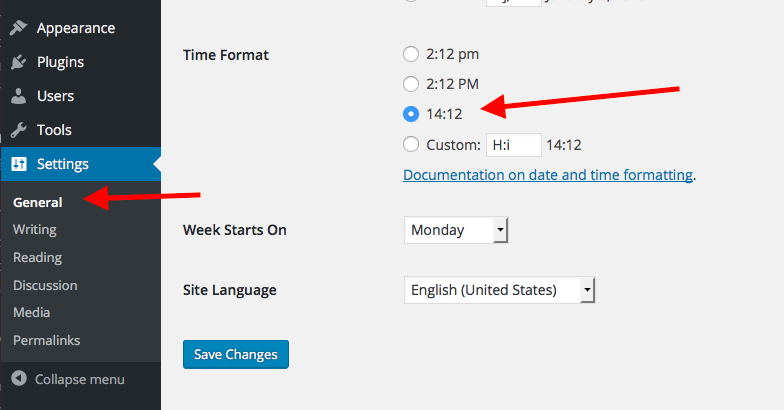
2. How, specifically, did you set your site’s time format to be in 24-hour time? For example, did you go to Settings > General in your site’s wp-admin, and just change the “time format” there? Or are you using another method? Here’s the wp-admin setting I am referring to:
Thank you!
GeorgeParticipantHey Folkert,
Thanks for reaching out.
I’m sorry to hear about these issues, but am curious about your use of iCal Importer for the transfer of data you describe.
It seems like you are trying to take events from one WordPress site and move them to another, on the same network.
1. Is this correct? Or are you moving events from a non-WordPress site to a WordPress site?
2. Can you share the “System Information” for both websites? Here’s how to do that → https://theeventscalendar.com/knowledgebase/sharing-sys-info/
This information will help us get started on investigating the issue.
Thank you!
GeorgeParticipantHey Suzie,
Thanks for reaching out – can you share a link to the instructions you are referring to about adding titles to the WooCommerce cart?
Just curious about that – we unfortunately cannot help with custom code here, but this might be a fairly simple customization and I’d love to help out if I can 🙂
Thanks!
GeorgeParticipantHey @Christoph,
Thanks for reaching out!
I’m sorry to hear about these issues – it sounds like there’s a code conflict of some kind here based on your theme testing, so for starters I would recommend sharing your System Information. Here’s how to do that → https://theeventscalendar.com/knowledgebase/sharing-sys-info/
That information will help me investigate this a bit more closely.
Thank you,
GeorgeParticipantGlad to hear it Phil – I’ve set the “priority” on the bug ticket quite high, so I’m hopeful and confident that it will receive attention sooner rather than later.
At this point I’ll go ahead and close up this thread, but stay tuned to updates in these two places:
• your wp-admin dashboard – when updates are released, check the “changelog” to see if anything related to this is included in the release
• http://theeventscalendar.com/blog – not trying to “promote” our blog, but we publish release notes there and, just like the changelog thing mentioned above, if something related to this makes it into the plugin it will be noted in the release notes.
Thank you for your patience with this Phil!
Sincerely,
GeorgeParticipantHappy New Year to you, too, @mediaversa 🙂
At this time, I unfortunately do not have specific updates on this. I’m sorry about that!
With this in mind, I will actually close up this thread for now to keep things organized. This is not a measure to silence you – if other issues arise, come back and open a new thread any time!
But on this specific issue, I won’t have much specific news to share, and so the best option for staying tuned to progress with this issue is to check the “Changelog” of each release. Code changes related to this will be noted in the changelogs.
You can also keep tabs on updates at http://theeventscalendar.com/blog
I hope these resources help! Thank you so much for your continued patience and for the well-wishes for 2016 🙂 Hope your 2016 is good so far yourself.
Cheers!
GeorgeParticipantHey @Websource,
We will not have a fix inside our own plugin for this because our own plugins are not causing this layout issue. This layout issue is caused mainly by Easy Digital Downloads and the limited space of the content area within the 2016 Theme.
The Events Calendar is a plugin – it provides functionality. For the look of things, you unfortunately have to take the reins with your theme and/or with CSS customizations and such.
I’m sorry to disappoint! It is POSSIBLE that at some point we will include styles to better protect handle this field when Easy Digital Downloads is active, but that this time I cannot promise the inclusion of such styles.
With all of this in mind, then, I will close up this thread for now because of the reasons elaborated above and because I have shared the necessary CSS to fix this, along with steps to implement the CSS.
So for now, I’ll close this thread. I wish you the best of luck with your site! If other issues arise, come open a new thread any time.
Cheers,
GeorgeParticipantHey @Tyson,
Thank you for sharing these links – I’m glad you did, because upon closer inspection of these items on your site, there seems to be quite a bit of custom HTML for The Events Calendar. Our own default HTML is not present, which is exemplified in the following screenshot:
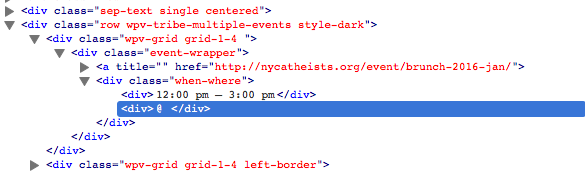
This indicates either custom code that you’ve built yourself, or that the theme has its own custom coding for integration with The Events Calendar. In either case, we unfortunately cannot troubleshoot the non-standard code.
Do you know if your theme has its own integration with The Events Calendar? Or if you have written custom code yourself and/or hired someone to write custom code for you?
If the former, you should contact the theme developer for assistance here and why their custom Events templates are not pulling in the proper event data. If the latter, you should pose the same questions to your developer and/or work backwards through your own customizations to find where the problems are arising.
This is true for both links you shared – the HTML is totally customized and there is actually very little standard HTML that The Events Calendar itself generates.
I hope this helps you move forward with hunting down the source of these issues!
— George
January 5, 2016 at 8:38 am in reply to: integration of events calendar pro with gravity forms #1050553ParticipantThanks for your flexibility Wolfgang – I will address your next question which is as follows:
Does the recurring event feature require a PATTERN for events? I typically have the same seminar taking place several times a year, but without following a specific pattern. Will the PRO feature allow for recurring events without patterns, too?
Some semblance of a pattern is indeed required, though the recurrence options are quite flexible and so it does not have to be something as simple as “event happens every Friday”.
This article covers recurring event structures in more detail, so to learn more about recurrence patterns I would recommend this article and playing around with things on your own site: https://theeventscalendar.com/knowledgebase/pro-recurring-events/
If there is no pattern to the occurrence of an event, then it may simply not be a good fit for recurring events. If it’s the same seminar but in different locations and always at different times, with no pattern or regularity to occurrence, then it may be best to just create individual, “normal” events for each seminar, but then put them all in the same Event Category for the seminar. Event Categories are part of the free, core plugin and so for this Events Calendar Pro would not be needed at all → http://wordpress.org/plugins/the-events-calendar
I hope this information helps!
Cheers,
George -
AuthorPosts