
Home › Forums › Calendar Products › Events Calendar PRO › Calendar Pro Update Not Appearing
- This topic has 12 replies, 5 voices, and was last updated 10 years, 8 months ago by
Support Droid.
-
AuthorPosts
-
January 1, 2016 at 8:42 am #1048864
Kenneth Bronstein
ParticipantWe are trying to update to version 4.04 as we are seeing issues with venues not displaying correctly on our calendar pages. Our dashboard indicates we need to update Events Calendar Pro. So we entered our license key and it was accepted as valid. However when we went to the updates page and clicked Check Again, we do not see any option to update.
Please assist, and thanks!
January 3, 2016 at 6:26 pm #1049496Madeline Hartman
ParticipantI’m having this same problem. I enter my license key and it says it’s valid and not expired. I hit save, and I’ve updated the plugin, but the “you’re out of date” message persists. What’s up MT?
January 4, 2016 at 4:02 am #1049535verkosto
ParticipantSame problem here. And even after the validating of the licence key, this notification keeps appearing:
“There is an update available for The Events Calendar PRO but your license key has not been entered. Please go to the Events > Settings > Licenses tab to enter your license key.”website is http://www.verkosto.net
January 4, 2016 at 4:55 pm #1050111George
ParticipantHi folks,
To be clear, The Events Calendar is at version 4.0.4, but Events Calendar Pro is only at version 4.0.3.
@Tyson, The Events Calendar is at version 4.0.4 on your site according to your “System information” – Events Calendar Pro is unfortunately not even listed there, though.
Can you share a screenshot of the full list of plugins in your site’s “Plugins” page in wp-admin? You can do so by uploading the screenshot to Imgur.com, Flickr.com, CloudUp.com, or any similar image-hosting site; then just share the links to those images here and I’ll take a look.
—
@Josh and @Daniel, I would recommmend that both of you open new and separate threads describing this problem. Please be sure to include your System Information with your new threads, as described here → https://theeventscalendar.com/knowledgebase/sharing-sys-info/
I only recommend this because while these issues seem the same on the surface, their underlaying causes could be quite different. Having things siloed away into separate threads allows us to address each issue more efficiently, and give your specific manifestation of the issue more specific attention.
Thank you! And thank you all for your patience with delayed support responses over the holidays.
Sincerely,
GeorgeJanuary 4, 2016 at 6:21 pm #1050170ParticipantThis reply is private.
January 4, 2016 at 7:11 pm #1050189ParticipantGlad to hear some progress has been made here – as for the remaining issues:
I still am not seeing the venue in the Upcoming Event and on the event page in the box on the upper left
Can you share two links as follows:
1. First, share a link to where you are referring to when you say “the Upcoming Event”.
2. Next, share a link to the event page where there’s the “box in the upper left”.
I’ll take a look at these specific pages and see if I can learn anything that way.
Thanks for your patience with this! 😀
Sincerely,
GeorgeJanuary 4, 2016 at 8:48 pm #1050207ParticipantThis reply is private.
January 5, 2016 at 8:47 am #1050566ParticipantHey @Tyson,
Thank you for sharing these links – I’m glad you did, because upon closer inspection of these items on your site, there seems to be quite a bit of custom HTML for The Events Calendar. Our own default HTML is not present, which is exemplified in the following screenshot:
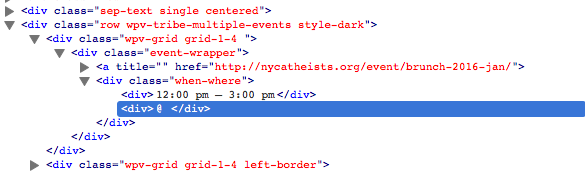
This indicates either custom code that you’ve built yourself, or that the theme has its own custom coding for integration with The Events Calendar. In either case, we unfortunately cannot troubleshoot the non-standard code.
Do you know if your theme has its own integration with The Events Calendar? Or if you have written custom code yourself and/or hired someone to write custom code for you?
If the former, you should contact the theme developer for assistance here and why their custom Events templates are not pulling in the proper event data. If the latter, you should pose the same questions to your developer and/or work backwards through your own customizations to find where the problems are arising.
This is true for both links you shared – the HTML is totally customized and there is actually very little standard HTML that The Events Calendar itself generates.
I hope this helps you move forward with hunting down the source of these issues!
— George
January 5, 2016 at 6:33 pm #1050833ParticipantThis reply is private.
January 6, 2016 at 7:33 am #1051195ParticipantHey Tyson, there may not be “changes” per se, but the theme itself might be coded in such a way to cause these issues.
1. What theme are you using?
2. Where did you find this theme, specifically? Share a URL if possible.
3. Have you reached out to the theme author yet about these issues? If so, what has their response been?The only way to correct the issues with the theme’s customizations would unfortunately require fixing the theme’s code itself 🙁
I’m sorry to have to deliver disappoint news like this! But let me know about the three questions above and I can go a bit further to investigate why the HTML output on your site for events is so bizarre.
Thank you,
GeorgeJanuary 6, 2016 at 4:15 pm #1051484ParticipantThis reply is private.
January 8, 2016 at 10:54 am #1052737ParticipantThanks for clarifying this – I would recommend reaching out to them with more or less the exact same description of the issues that you used here. This issue:
All seems fine but I still am not seeing the venue in the Upcoming Event and on the event page in the box on the upper left. On the latter the address appears but not the name.
Cheers!
GeorgeFebruary 18, 2016 at 8:33 am #1076586KeymasterThis topic has not been active for quite some time and will now be closed.
If you still need assistance please simply open a new topic (linking to this one if necessary)
and one of the team will be only too happy to help. -
AuthorPosts
- The topic ‘Calendar Pro Update Not Appearing’ is closed to new replies.