

Forum Replies Created
-
AuthorPosts
-
George
ParticipantHey @Josh,
While there isn’t specific documentation about connection both plugins, there are some resources that might be quite helpful regardless. First and foremost is the documentation for Gravity Forms’ API, which lives inside a class called GFAPI. You can see some really great documentation for this API class here → http://inlinedocs.gravityhelp.com/class-GFAPI.html
Now the embarrassing part – the documentation for our own API is not nearly as good. Because our API class is so recent, at this time the best documentation for it is just the API class itself, and its methods and the in-code comments that accompany each class method.
You can find The Events Calendar’s API class here:
the-events-calendar/src/Tribe/API.phpThe API class is called Tribe__Events__API – hopefully with both API classes you can put together something quite robust!
Cheers,
GeorgeParticipantHey @Sandra,
I’m really sorry to bear this news, but we unfortunately cannot offer support for any customization processes 🙁 It’s something that customers have to wholly take the reins on, or hire developers to help them with.
To learn more, check out the “Product Support” section of this page → http://theeventscalendar.com/terms
—
With that being said, I still took a quick look over this 🙂
What I would personally recommend is actually a much simpler way of making that Website field hidden for the organizer section – for this method, simply remove all of your PHP customizations completely. No template modifications of any kind required!
Once things are back to basically how they are “out of the box”, just drop some CSS like this into the very bottom of your theme’s style.css file:
#tribe-community-events #event_organizer .tribe-community-event-info tr.organizer:nth-of-type(4) {

    display: none !important;

}
Here’s an example of how this works – this is a screenshot right from my testing site:
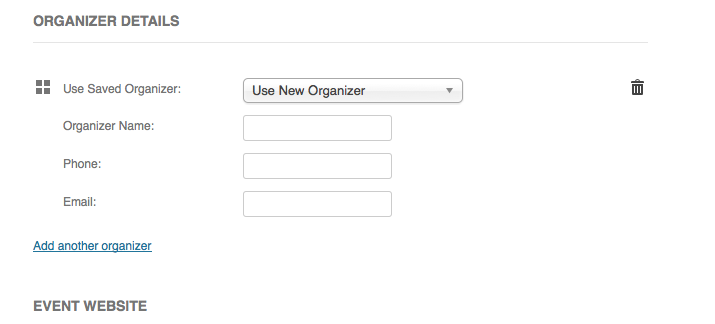
I hope this recommendation is helpful!
Cheers,
GeorgeJanuary 6, 2016 at 6:25 pm in reply to: Duplicate before & after content on Community Events add page #1051531ParticipantHey David,
I’m really sorry to see these issues surfacing again – you’re right that these have arisen for some customers in the past, though I tried to recreate the problem on my local site and unfortunately cannot recreate the problem 🙁
I say “Unfortunately” because if we cannot recreate problems, it’s hard to make up bug reports for them – however, I will continue to try to do that and will get some of our developers to look at this a bit more closely.
In the meantime, you can temporarily ensure that only one piece of “before content” content shows up by adding the following CSS to the bottom of your theme’s style.css file:
#tribe-community-events .tribe-events-before-html {

    display: none !important;

}
I’m sorry that there’s only a temporary fix at this time, but we will continue investigating this.
Let me know if the CSS above helps for now!
Cheers,
GeorgeParticipantHey @Laughmasters,
We cannot help with style customizations like this 🙁 Before posting more threads, please go over the “product support” section on this page → http://theeventscalendar.com/terms
—
While that policy is serious and worth respecting, we like to help regardless and especially for small code tweaks – fortunately, this is mostly an example of that.
Try some CSS like this in the bottom of your theme’s style.css file, for example:
.tribe-events-address .tribe-address span {

    margin-right: 0.2em;

}
Here’s how that makes things look:
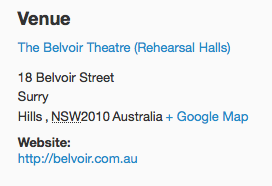
Is this light-years of improvement and perfect? Admittedly, not quite – but you can play around with this CSS, with the sizing of the margin-right value, etc. to find something that works well for you.
If you need to customize the address layout further, then unfortunately, regardless of our customization policies or not, the only way to get down-and-dirty with the actual construction of the addresses is to modify the related PHP templates inside The Events Calendar’s plugin files.
I’m sure you’ve seen this page before, but still – to learn more about customizing the PHP templates, if need be, check out our guide about doing so here: https://theeventscalendar.com/knowledgebase/themers-guide/
I hope this information helps, and reduces the amount of shits 🙂
Cheers,
GeorgeParticipantHey @Dkudler,
There’s indeed something pleasant about the irony of WordPress site issues in the month when you’ll be engaging in talks about WordPress sites, because irony is always pleasant, but the issue still sucks regardless – I’m sorry to hear about these problems!
The first thing that stands out to me is your use of WooCommerce Tickets itself – this plugin is now defunct, and instead we have an all new ticketing system that replaces this plugin (and other platform-specific ticketing plugins like EDD Tickets, Shopp Tickets, etc.).
The disparate and specific functionality of all these separate add-ons have all been rolled into one all-new pair of add-ons:
• Event Tickets – http://wordpress.org/plugins/event-tickets
• Event Tickets Plus – https://theeventscalendar.com/product/wordpress-event-tickets-plus/—
Now, I understand this information might be disheartening at first glance, but don’t worry – the process for updating is quite simple. You basically just need to delete WooCommerce Tickets [which will not erase event or ticket data], and then install the free Event Tickets plugin. Then, install the premium Event Tickets Plus plugin, and see how things behave on your site.
Event Tickets Plus is a premium add-on, but since you are a WooCommerce Tickets license holder, you have free access to Event Tickets Plus 🙂
Learn more about the process of getting up-to-date here → https://theeventscalendar.com/knowledgebase/moving-to-event-tickets-plus/
If issues persist, we can go from there, but updating to this most recent software is the first and most important step.
Cheers!
GeorgeParticipantHey @Barback,
That original thread was by and for @xrossglobalgroup – while posting in other people’s threads is allowed, of course, we try to keep threads to only one customer voice and one Support Team voice. It’s efficient and more organized than alternatives, which we’ve tried in the past.
So, thanks for opening a new thread for your own, and, while similar, also specific complaints.
—
Speaking of such complaints, there are a number of specific things I would like to address.
We use volunteers to check people in, and the low-tech paper method works best, at least for now. Volunteers at the box office of the theater handle the paper list better than all the technology.
Back in the original thread, I acknowledged specifically that you might not be able to use a smartphone or computer for check-ins. As for this:
We are trying to make the process user friendly and environment friendly, and we re-word the confirmations to say “You do not need to print out your ticket. We will have your name on a list at the door.” Asking them to print out or remember a security code is not a solution.
To clarify, the features of our plugins are to sell tickets, but it sounds like you are trying to have a good system in place that does not use tickets (i.e. because you are trying to make it so that people do not bring their tickets to the event).
So:
• The point of our plugin is to let users of your site buy tickets that they bring to an event
• We provide features for check-in and Attendee managementYou are using our plugins in a specific way, which from the sound of it essentially:
• Does not want to rely on users having/bringing tickets to the event
• Does not use the features for check-in and Attendee management that our plugin provides.This is fine, of course – you can use our plugin in any way you would like. However, I’m just being honest and up front that we will likely not be changing our name input configuration for the time being.
This leads into your comment here:
You are right in your reply that as a developer of this plugin used by thousands of users in many different scenarios, you have to consider more than just one client — I’m just feeling like you’ve made changes to the software that effect my client, and that in your responses in this forum you’ve made it clear that you’re not interested in how THIS client wants and needs to use your software.
To re-iterate, no, we ARE interested in how you want to use the software and are always interested in feedback. You have voiced your feedback, and we have noted your feedback. There is no immediate action that can be taken as a result of this, however. I am sorry about this reality.
—
Finally, as for your customization issues, it is true that Event Tickets and Event Tickets Plus do not work exactly the same way as WooCommerce Tickets of old, so your original customization will not work in exactly the same way.
However, please read the “Product Support” section of this page → http://theeventscalendar.com/terms
We cannot help with custom coding projects, so the support I can provide here is limited, but in either case, can you clarify why you have these two sentences in your first post here?
add Line 944
$lname = get_post_meta( $order_id, ‘_billing_last_name’, true );add Line 989
‘purchaser_lname’ => $lname,Are you asking me to add those code snippets to the corresponding lines of code above the snippets? I’m just not sure what this content means, so let me know why you pasted these two blocks of text into your post and I will try to offer some advice on getting that WooCommerce information out of WooCommerce.
— George
ParticipantHey Nathalie,
Sorry to hear about these issues.
First things first, we cannot log into user sites for any reason whatsoever. I removed the login information you posted as soon as I saw it, and have not logged into your site.
As for your issues, can you share your “System information”? Here’s how → https://theeventscalendar.com/knowledgebase/sharing-sys-info/
This will help my investigate this a bit more closely, so I can try and figure out what’s going on.
Thank you in advance for providing this information!
Sincerely,
GeorgeParticipantHey @Alain,
The tax rate-related features you describe may be possible with WooCommerce itself or some other WooCommerce add-on, but none of our add-ons, including Event Tickets Plus, handle payments themselves and thus do not provide any tax-addition features like you mention.
As for why you do not have an update for Event Tickets Plus, the free update to Event Tickets Plus is only offered for existing license holders of WooCommerce Tickets, or any other ticketing add-ons like EDD Tickets.
For you, the only WooCommerce Tickets license I see of yours is one that expired more than a year ago. Is this accurate? Have you recently purchased or renewed a license for WooCommerce Tickets, perhaps under a different account name or something?
Thanks!
GeorgeParticipantHey Carl,
Thanks for reaching out.
What you describe is unfortunately not possible in a straightforward way 🙁
You could technically pull this off with either of these two options:
• Manually import and export events across all three sites.
• Use one of our other add-ons too, called iCal Importer, to take the iCal feed export of the “main” calendar and then run imports on a schedule and/or manually on your two other sites. You can learn more about this add-on, and how its importing process works and such, on its official product page here → https://theeventscalendar.com/product/ical-importer/
I hope this information helps!
Sincerely,
GeorgeParticipantHey Julian,
This is indeed possible but is a custom-coding project, which type of project we are unfortunately not able to help with (see “Product Support” here for more information → http://theeventscalendar.com/terms).
With that being said, this knowledgebase article of ours might be helpful for getting started with this customization → https://theeventscalendar.com/knowledgebase/moving-the-ticket-form/
Check that article out and give things a try! If you don’t feel comfortable modifying code like this, then your best option would unfortunately be to hire a professional to assist further. There are many out there for hire, but we’ve got a list of some highly-rated developers here that might help you get started if you need to hire someone → http://m.tri.be/18k1
Cheers!
GeorgeParticipantHey Francisco,
Apologies for any confusion here!
Events Calendar Pro 4.0.3 and The Events Calendar 4.0.4 are the correct versions to use with each other. You are not meant to be using The Events Calendar 4.0.3 at this time.
As long as the first two digits match, it is fine.
The rule is this:
• The first two digits must match.
• The third digit should be as high as possible.So The Events Calendar 4.0.4 and Events Calendar Pro 4.0.3 is correct.
Does this help?
Thanks!
GeorgeParticipantThank you for testing this, @websource! This is a very odd issue. I have indeed seen all of your screenshots here and have tried recreating this a number of times – I will continue to try doing so.
—
Do any errors pop up on your site if you head to your site’s wp-config.php file and change this line of code:
define('WP_DEBUG', false);to this:
define('WP_DEBUG', true);That will display PHP errors if any exist, which might be quite useful here.
January 6, 2016 at 8:31 am in reply to: Organizer unable to email attendee list in EC Pro 4.03 #1051246ParticipantHey Ameet,
Apologies for the delayed response here, I took some time to recreate this issue and to try and identify its specific cause in hopes of a quick fix.
While I do not have a “quick fix” unfortunately, I can confirm this behavior as a bug and have made a bug ticket for this. A fix is now actively being worked on and hopefully can be published in a release soon.
I’m really sorry about the existence of this bug! Like always, your feedback has helped a ton though and now that this is on our radar we can get a proper fix out the door.
Please let me know if you have any further thoughts on this in the meantime, or if there’s anything else I can help with while we work on the fix for this. I do not have an ETA for when the fix-containing release will be published, but I would be quite surprised if this is not fixed by March.
Sincerely,
GeorgeParticipantHey Tyson, there may not be “changes” per se, but the theme itself might be coded in such a way to cause these issues.
1. What theme are you using?
2. Where did you find this theme, specifically? Share a URL if possible.
3. Have you reached out to the theme author yet about these issues? If so, what has their response been?The only way to correct the issues with the theme’s customizations would unfortunately require fixing the theme’s code itself 🙁
I’m sorry to have to deliver disappoint news like this! But let me know about the three questions above and I can go a bit further to investigate why the HTML output on your site for events is so bizarre.
Thank you,
GeorgeParticipantThank you for all of this information!
At this time, no, I still cannot replicate this issue at all – weird!
Unfortunately, at this time I think the best step would be for you to run through the complete set of troubleshooting steps here → https://theeventscalendar.com/knowledgebase/testing-for-conflicts/
After each step in that process, go back to Settings > General in your wp-admin. Ensure your “time format” setting is still 24-hour time mode, and click “Save Changes”, even if you do not change anything.
Then, have another look at the issue in the ticket-creation form, and see if the issue persists.
If the behavior changes at all anywhere along the way, let us know!
Thank you,
George -
AuthorPosts