

Forum Replies Created
-
AuthorPosts
-
George
ParticipantNo worries! Glad to have helped – I’ll close up the issue for now, but come back and open a new thread any time if other issues arise.
Cheers,
GeorgeJanuary 7, 2016 at 3:31 pm in reply to: No License Tab — Don't know how to match versions….. #1052182ParticipantHey Kbee,
You will need to leave The Events Calendar installed and activated on your site, and then also install and activate Events Calendar Pro. You can get the files for Events Calendar Pro any time at http://theeventscalendar.com/my-account/downloads
Once Events Calendar Pro is installed and active, you should be able to find a place to add the license key in your wp-admin at Events > Settings.
If you do this and still cannot find the place to do this, please include your “system information” in your response. Here’s how to include your “system information” → https://theeventscalendar.com/knowledgebase/sharing-sys-info/
Thanks!
GeorgeJanuary 7, 2016 at 3:29 pm in reply to: Simple Event Management but confused on which plugins are needed #1052181ParticipantNo worries at all about these questions Mike, they are more than fair – the most basic implementation for your needs would be these two free plugins:
• The Events Calendar – http://wordpress.org/plugins/the-events-calendar
• Event Tickets – http://wordpress.org/plugins/event-tickets
This will enable a complete (but simple) event management system; then, with “Event Tickets” installed, you can sell tickets on these events.
With “Event Tickets” by itself, you can only “sell” tickets with the RSVP option – so you cannot charge actual money for tickets on your site with JUST “Event Tickets”. To be able to collect money, you would need to install these two additional plugins:
• WooCommerce [free] – http://wordpress.org/plugins/woocommerce
• Event Tickets Plus [starts at $89/year] – https://theeventscalendar.com/product/wordpress-event-tickets-plus/
Event Tickets Plus is an “add-on” to Event Tickets, so both should remain installed and active on your site.—
Regardless of plugins, customizing the forms and such is not something we can help with, nor do the plugins listed above come with much flexibility in terms of customizing the form. So to customize forms you will need to customize the code yourself or hire a developer to help you if you are not comfortable editing the code on your own.
I hope this all helps!
Cheers,
GeorgeParticipantHey @Abby,
Unfortunately, while it’s quite simple to build the post type, it’s a complex thing to connect the post type to Events in a way similar to current Venues and Organizers.
So with that in mind, I would recommend just diving into The Events Calendar’s code itself and reading how the integration of Venues, Organizers, and Events is all done inside the plugin itself.
If you’re not familiar enough with code to embark on this, then unfortunately the only other recommendation I have would be to hire a professional developer to assist you. We have a list of developers here that might be a good place to start → http://m.tri.be/18k1
We cannot help with custom coding, so just to be frank there’s not much more I can share about this customization – you’ll have to take the reins from here. If there’s anything else I can help with, though, let me know!
Sincerely,
GeorgeParticipantHey @Jason,
Thanks for reaching out. I’m sorry to say that there’s little input we can offer here, for a number of reasons, namely that the “Sidebar Module” (and the “module” system itself) are unique to Divi, and we cannot provide much theme-specific support.
With that being said, it seems like at bottom you’re eventually just using basic “Event List” widgets, which are our own code. To try and get things in column layout instead of row, a bit of custom CSS is likely required.
Can you clarify if this column is the one you want to display as a row? This screenshot, I mean:
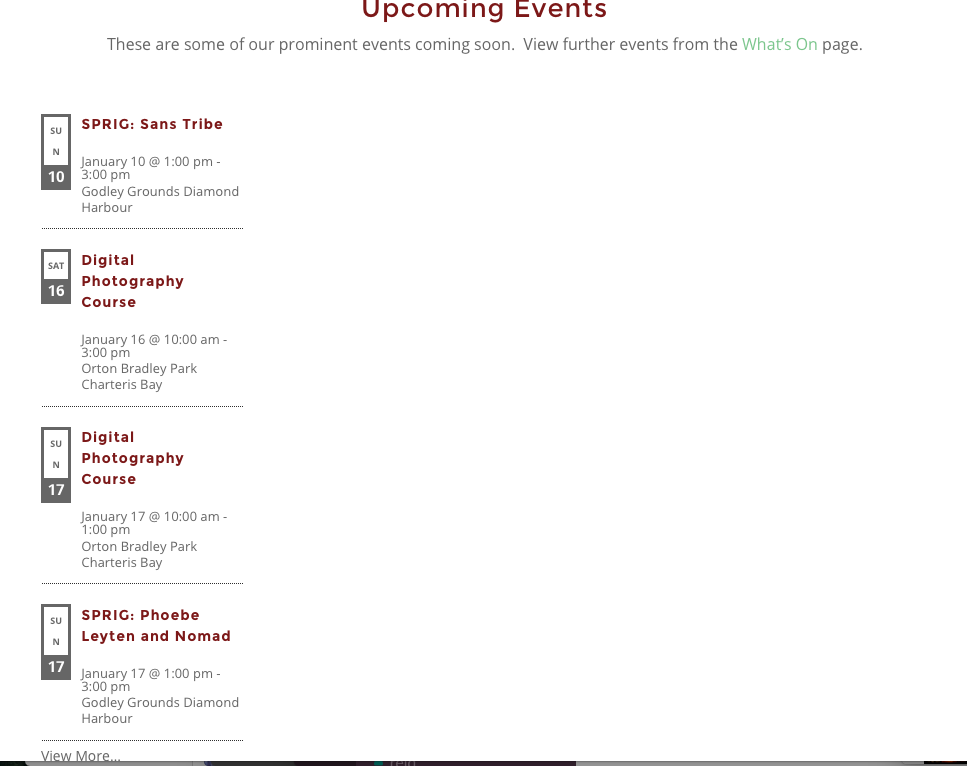
If so, you can get a row layout by adding CSS like this to the bottom of your theme’s style.css file:
.tribe-events-adv-list-widget {

    float: left;

    width: 100% !important;

}
.tribe-events-adv-list-widget .type-tribe_events {
float: left;
margin-right: 6.5%;
width: 20%;
}.tribe-events-adv-list-widget .type-tribe_events:last-of-type {
margin-right: 0;
}
Here’s how that makes things look:
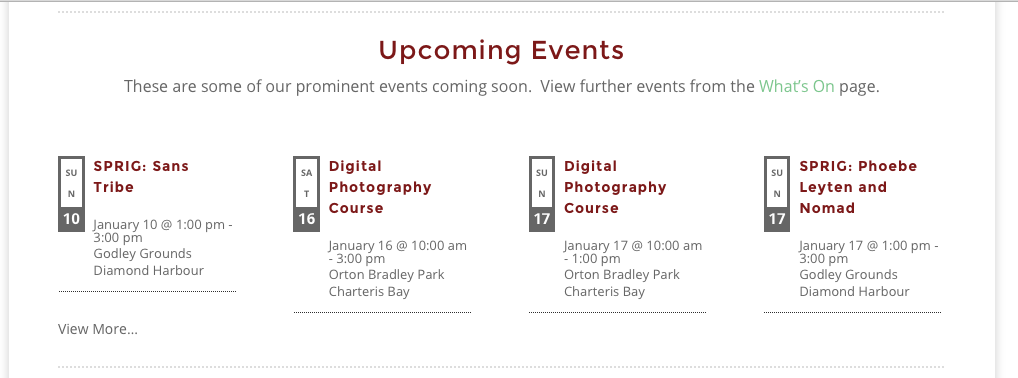
This would still require some tweaking to get the appearance “just right” – since we cannot help with custom code, I’ll leave the tweaking to you 🙂
But I hope this helps you get started!
Cheers,
GeorgeJanuary 7, 2016 at 7:58 am in reply to: ShortCode for Homepage (next 3 Events in a three colum) #1051950ParticipantHey @Andreas,
There is unfortunately not a shortcode for this at this time 🙁
The only shortcode that would work is [tribe_events_list], but then to get a three-column layout, you would have to write custom CSS code.
Sorry to disappoint!
George
ParticipantHey Laura,
Thanks for reaching out about this – you are indeed correct about using the “default-template.php” file that is included in The Events Calendar. This is the one and only default-template.php file in our plugin suite, and it is the “Default Events Template” that is referred to in the Events settings page, in our documentation, and so on…
I hope that information helps. To clarify, The Events Calendar is the “core” piece of software here. Events Calendar Pro and literally every other add-on we sell is, well, an add-on to this core. So Events Calendar Pro just “inherits” a lot of its code from The Events Calendar, and uses many of the template files that exist in it.
default-template.php is itself a sort-of “core” template file, and so yes, it only resides within The Events Calendar. You should NOT be concerned about a different route here – what you are doing is correct 🙂
Cheers!
GeorgeParticipantHi Sebastian,
What you describe is indeed technically possible, however at this time it is not something our plugins can do by themselves. It would take custom coding to make something like this happen. Since we cannot help with custom code, you would have to write this code yourself or hire a professional developer to help you do it.
I’m sorry to bear that news, but hope this information helps you move forward with your project.
Sincerely,
GeorgeParticipantHey @Ashley,
Thanks for the kind words about our plugins! I hope they continue to be useful on your site – in terms of your questions, your description of using The Events Calendar + PRO for events and then Event Tickets + Plus for tickets is indeed accurate.
However, there is nothing within our plugins themselves that would power the actual video streaming 🙁
There are a number of ways to go about having webinars and such, including using “private” video embeds of a YouTube video stream, or a “premium” video platform like Wistia.
Also, there are video-conferencing apps out there of all sorts of variety. For our meetings here on The Events Calendar’s support and development teams, we use (and love!) Zoom → http://zoom.us
Is this information helpful at all? Apologies ahead of time if not. Let me know what you think and what more I can help with here.
Thank you,
GeorgeParticipantHi Brendan,
Thanks for the kind words about the Related Events feature – while we unfortunately cannot help with customizations, the Related Events module is indeed quite flexible and I will address each of your questions as follows:
On a single event listing, there are three recommendations at the bottom of the page. Can I increase this number? If so, how?
Yes, you can do this by adding code like the following to your theme’s functions.php file:
/**

 * Increase number of events in "Related Events" modules.

 *

 * @link http://theeventscalendar.com/?p=1051555

 */

add_filter( 'tribe_related_posts_args', 'tribe_support_1051555' );
function tribe_support_1051555( $args ) {
$args['posts_per_page'] = 9;return $args;
}
Next, you ask this:
Can I place recommended events elsewhere on my page, such as on the bottom of a custom page? If so, how?
Sort of – the related events are retrieved via a simple function called tribe_get_related_posts() which you can find in your Events Calendar Pro plugin files in events-calendar-pro/src/functions/template-tags/general.php
Please read this function to see how it works. We cannot help with custom coding, so you will have to take this function and play around with it, but a word of advice – be sure to supply the $post argument to this function (see and read the function in your code to know what I’m referring to). This $post argument is the post that the function will use as the “base” post, to find posts related to it.
Where would I go to adjust the presentation of recommended events? Can I present it differently on different pages? If so, how?
In terms of presenting things on different pages, see my above reply about doing that. To customize the appearance of things, yes, you can do this CSS. You can write CSS in numerous places, like your theme’s style.css – research online for more information about CSS and how to use it if you are not familiar.
Brendan, I hate to reiterate this point again but I am only doing so because I just recently took another thread where you are asking for some customization help. We try to help as much as possible, especially for you because in your threads you’ve got a good track record of being quite polite and kind 🙂 However, we cannot help with custom coding, and so I just want to state this clearly so that the expectations surrounding these support forums are clear.
See the “Product Support” section on this page for more information before opening any new threads → http://theeventscalendar.com/terms
—
I’m sorry to harp on this disclaimer, Brendan. Please heed it going forward, but also, for now, let me know if any of my advice in this thread is helpful 🙂
Cheers,
GeorgeParticipantHey Brendan,
I’m sorry to bear this news, but we cannot help with customizations and thus I will have to close up this thread 🙁
Please check out the “Product Support” section of this page for more information → http://theeventscalendar.com/terms
Sorry to disappoint. If this is a customization you need, I would recommend hiring a professional developer to help out. We have a list of some here that might help you get started in your search, if you’re going to look for someone to help → http://m.tri.be/18k1
Sincerely,
GeorgeParticipantHey @DeAnne,
We unfortunately cannot help with custom coding 🙁 Please read the “Product Support” section of this page for more information → http://theeventscalendar.com/terms
—
With that being said, I’d still love to help here because this fortunately a somewhat simple customization to make 🙂
To hide the Organizer option on the front-end of your site, add the following bit of CSS to the bottom of your theme’s style.css file:
#event_organizer.tribe-events-community-details {

    display: none !important;

}
To hide the organizer section completely from your admin, you’d unfortunately need to modify some PHP. Namely, you’d need to place the following code into your theme’s functions.php file:
/**

 * Hides the Organizer fields from The Events Calendar in the admin.

 *

 * @link http://theeventscalendar.com/?p=1051416

 */

add_action( 'admin_head', 'tribe_support_1051416' );
function tribe_support_1051416() {
?>
<style>#event_organizer.eventtable { display: none !important;}</style>
<?php
}
I hope this helps! 😀
Cheers,
GeorgeParticipantHi @gregy,
The WooCommerce Tickets plugin is now defunct, and instead we have an all new ticketing system that replaces this plugin (and other platform-specific ticketing plugins like EDD Tickets, Shopp Tickets, etc.).
The disparate and specific functionality of all these separate add-ons have all been rolled into one all-new pair of add-ons:
• Event Tickets – http://wordpress.org/plugins/event-tickets
• Event Tickets Plus – https://theeventscalendar.com/product/wordpress-event-tickets-plus/—
Now, I understand this information might be disheartening at first glance, but don’t worry – the process for updating is quite simple. You basically just need to delete WooCommerce Tickets [which will not erase event or ticket data], and then install the free Event Tickets plugin. Then, install the premium Event Tickets Plus plugin, and see how things behave on your site.
Event Tickets Plus is a premium add-on, but since you are a WooCommerce Tickets license holder, you have free access to Event Tickets Plus 🙂
Learn more about the process of getting up-to-date here → https://theeventscalendar.com/knowledgebase/moving-to-event-tickets-plus/
If issues persist, we can go from there, but updating to this most recent software is the first and most important step.
—
If issues do persist, please post your site’s “system information” in your reply. Here’s how to do that → https://theeventscalendar.com/knowledgebase/sharing-sys-info/
Cheers,
GeorgeJanuary 6, 2016 at 6:56 pm in reply to: Advanced List Widget Graphic Date doesn't match actual date #1051552ParticipantHey @Shannon,
Sorry to see this issue on your site! It’s an odd one, and I unfortunately cannot recreate this on my testing site, so I’m not sure there’s a bug here – there could be a code conflict with your theme [or another plugin]. To investigate if this is the case I would recommend going through all of the steps here → https://theeventscalendar.com/knowledgebase/testing-for-conflicts/
After each step in the process, check on the front-page again and see if anything about this issue changes.
Let us know what you find! I will keep investigating in the meantime, as well, because as noted at this time I cannot recreate this yet.
Thank you,
GeorgeParticipantHey Rhonda,
The Event Tickets plugin does not allow for selling “paid” tickets, so only the free RSVP feature is provided by it – thus, there is not a way to turn of the “FREE” specification for events.
However, you might be able to hide that text with a bit of custom CSS. Can you share a link to an event on your site where this “FREE” text is showing?
I tried to find it on your site, but was not able to see any text saying “FREE” anywhere – like on this event, for example, which has the RSVP tickets but no “FREE” text displaying anywhere: http://www.singletogether.com/event/friday-night-bible-study/
Thanks!
George -
AuthorPosts