
Home › Forums › Calendar Products › Community Events › Changes to organizer-fields.php not showing
- This topic has 3 replies, 2 voices, and was last updated 10 years, 9 months ago by
George.
-
AuthorPosts
-
January 6, 2016 at 9:40 am #1051306
Sandra
ParticipantHello –
I am trying to remove the Organizer Website field from my Add Events form.
The modifications I have made below are not showing on my page. The form is behind a login so I can not share it here. Pls see image at http://imgur.com/iSQ1Sy1
Can you tell me what I have missed?
Thanks!
My Process
I have set up new folders in my theme as follows:
theme name
.tribe-events
..community
>>>edit-event.php
>>>edit-organizer.php
…modules
>>>>organizer.php
>>>>organizer-fields.phpedit-organizer.php calls :
<?php tribe_get_template_part( ‘community/modules/organizer-fields‘ ); ?>I have removed the <tr> that holds the OrganizerWebsite from organizer-fields.php:
<tr class="organizer">
			<td>
				<label for="OrganizerWebsite"><?php esc_html_e( 'Website', 'tribe-events-community' ); ?>:</label>
			</td>
			<td>
				<input type="text" id="OrganizerWebsite" name="organizer[Website]" size="25" value="<?php echo esc_attr( $organizer_website ); ?>" />
			</td>
		</tr>
I have also edited my functions.php file to make the fields in the Organizer section required:
/** Define required field in Add Events form  */
add_filter( 'tribe_events_community_required_fields', 'my_community_required_fields', 10, 1 );

function my_community_required_fields( $fields ) {
    $fields = array(
        'post_title',
        'post_content',
        'organizer',
    );
    return $fields;
}
January 6, 2016 at 6:33 pm #1051536ParticipantHey @Sandra,
I’m really sorry to bear this news, but we unfortunately cannot offer support for any customization processes 🙁 It’s something that customers have to wholly take the reins on, or hire developers to help them with.
To learn more, check out the “Product Support” section of this page → http://theeventscalendar.com/terms
—
With that being said, I still took a quick look over this 🙂
What I would personally recommend is actually a much simpler way of making that Website field hidden for the organizer section – for this method, simply remove all of your PHP customizations completely. No template modifications of any kind required!
Once things are back to basically how they are “out of the box”, just drop some CSS like this into the very bottom of your theme’s style.css file:
#tribe-community-events #event_organizer .tribe-community-event-info tr.organizer:nth-of-type(4) {

    display: none !important;

}
Here’s an example of how this works – this is a screenshot right from my testing site:
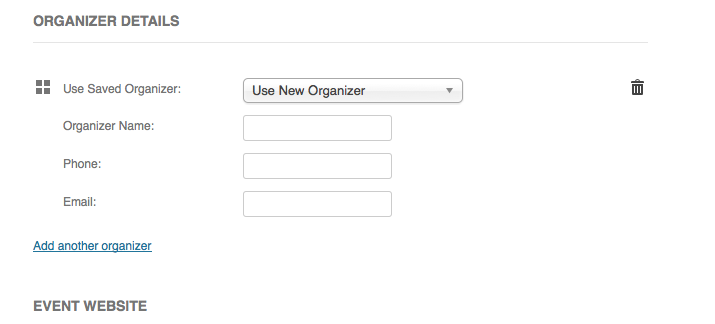
I hope this recommendation is helpful!
Cheers,
GeorgeJanuary 6, 2016 at 6:38 pm #1051540ParticipantThank you, George!
I was unable to find the unique ID for this element. Since the CSS class <tr class=”organizer”> is the same class as all the other rows in that table, I could not figure out how to isolate it.
I really appreciate your help on this!
SandraJanuary 7, 2016 at 3:35 pm #1052192ParticipantNo worries! Glad to have helped – I’ll close up the issue for now, but come back and open a new thread any time if other issues arise.
Cheers,
George -
AuthorPosts
- The topic ‘Changes to organizer-fields.php not showing’ is closed to new replies.