

Forum Replies Created
-
AuthorPosts
-
George
ParticipantHey @Aindreas,
Thanks for your response. When you mention the CSV export not including the file names, just to be clear you mean the “CSV Export” feature of the Attendees table specifically? If not, can you explain which CSV export you are referring to?
If you are referring to attendees CSV export, then to answer your question about where to find the code for that, you would have to head into your Event Tickets plugin files to this file:
src/Tribe/Attendees_Tables.phpCheers!
GeorgeJanuary 18, 2016 at 4:17 pm in reply to: Fix for Next Events / More Events no longer working #1058162ParticipantThanks Benjamin!
The problem is this:
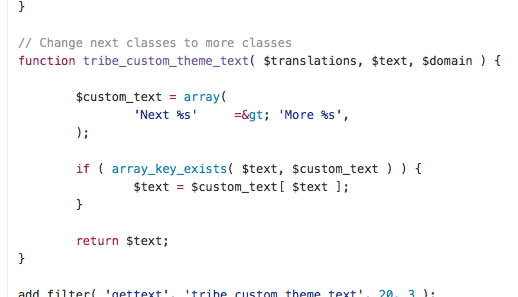
You cannot have this in the file there:
=& gt;You need to have this:
=>I hope this clears things up with that snippet; it should work well!
Thanks for your patience here,
GeorgeJanuary 18, 2016 at 4:15 pm in reply to: Error message on our site regarding the Events Calendar #1058160ParticipantSorry to hear this Justin!
I see the error in the HTML of your page and this is actually a bug that we should’ve fixed in the last release – are you able to access your wp-admin? If so, can you check what version of The Events Calendar is installed on your site? (And versions for any other Modern Tribe plugins, like Event Tickets Plus etc.)
Thanks so much for your patience here!
— George
ParticipantHey @CDC,
I agree that it’s a shame, and we actually do have many (valid!) complaints about the lack of full support.
We have been rolling out updates that specifically add better integration; we’ve already done The Events Calendar, and add-ons like Events Calendar Pro and Community Events are next in line.
I don’t have an ETA on when the compatibility updated for Community Events will arrive, but please do stay tuned to plugin updates and to news at http://theeventscalendar.com/blog – if compatibility is included in a given update, it will be noted in the “changelog” for that update number.
I’ll close up this issue for now, but feel free to open a new thread any time if other questions, comments, or concerns arise.
Thanks,
GeorgeJanuary 18, 2016 at 2:46 pm in reply to: Previous events going back to beginning rather than to previous month #1058113ParticipantThank you for sharing this!
I don’t see anything in this information that is outright problematic, so unfortunately I think that there might be a plugin code conflict here.
Before investigating this though, what are your site’s permalinks settings? These are literally just the settings in your wp-admin Settings > Permalinks page – for example, are they set to /%postname%/?
If not, does setting them /%postname%/ make any difference with the behavior of this issue?
Thanks,
GeorgeParticipantThanks for this information, @jenna!
I took a look at things and don’t see any explicit errors anywhere, so the behavior on your may actually be the correct behavior.
I’m curious about these specific details – can you address them and let me know what you find?
1. Are there any events on your site at this point? The site you linked to me in the private reply, the new site 🙂
2. If so, what is the oldest event the site?
3. If you add a “test” event in, say, April of 2016, can you then page forward into that month?
Thank you!
GeorgeJanuary 18, 2016 at 11:26 am in reply to: Organizer unable to email attendee list in EC Pro 4.03 #1058013ParticipantThanks for mentioning this Barry – I hope it helps, @Ameet!
— George
ParticipantGlad to hear it! 😀
Thanks for the update here – best of luck with your site.
– George
January 18, 2016 at 11:24 am in reply to: Recurring Events on the Same Day & Recurring Events Featured Events #1058009ParticipantThank you both for your information here. I’m sorry for the delayed response over the weekend, and even here on Monday it is Martin Luther King Day here in the US, so I will unfortunately be mostly out-of-office today.
However, I have spun up an all-new testing site fresh to give this another go. It seems like there’s a bug here and I will try to recreate this now on my new testing site.
I will post update here based on my findings – stay tuned!
Thank you for your patience,
GeorgeJanuary 18, 2016 at 11:20 am in reply to: slow, slow, slow – on load and especially inside WP #1058006ParticipantThanks for the update @DeAnne!
I’m glad there’s some progress, despite persisting issues with performance 🙁 I would indeed recommend reaching out to your web host and such, that’s the best way forward on this (although if they share any specific details about our code that might be a factor, or specific error log notices and such, definitely open a new thread any time about that!).
@Allyson – Digital Ocean is a pretty great host, so I’m afraid that I don’t know much else about what could be the problem here. It seems like inherent limitations with our plugin and site performance are the main culprit here, and other code on your site like other plugins or your theme may be a factor as well.Since this thread is DeAnne’s originally, I will close it up because her central issues are resolved.
For you, @Allyson, I would recommend contatcing the Digital Ocean support team and would also recommend deactivating every plugin on your site but The Events Calendar and seeing if this makes a difference at all.
If other specific issues arise, you can open a new thread here too 🙂
Thank you both for your patience here! I will close up this thread and wish you both the best of luck with your projects.
Sincerely,
GeorgeParticipantThis reply is private.
January 15, 2016 at 1:08 pm in reply to: slow, slow, slow – on load and especially inside WP #1056804ParticipantHey @DeAnne,
It seems like there is custom code that is making the “Mobile view” active.
1. Have you written any custom code on your site? If so, try temporarily removing it all, and see if this returns things to the default view. (Make sure you back up your customizations before removing them!)
2. If you are not sure how you enabled this view, or you remove customizations but the issue persists, then I would recommend doing each of the steps on this page → https://theeventscalendar.com/knowledgebase/testing-for-conflicts/. After EACH step in that process, check on the main events page of your site and see if anything changes there in regards to the view.
Let me know what you find!
Thanks,
GeorgeParticipantGlad to hear it 🙂
Best of luck with your customizations!
— George
January 15, 2016 at 1:01 pm in reply to: Shortcode to embed category calendars on home page ? #1056802ParticipantHey @Colinusher,
Thanks for reaching out.
Just to be clear, do you mean “add a calendar” in some sort of way that is not already provided by the widget shortcodes in Events Calendar Pro?
You can learn more about these shortcodes here → https://theeventscalendar.com/knowledgebase/pro-widget-shortcodes/
For example, you can embed an instance of the Mini Calendar Widget onto a page by using the shortcode [tribe_mini_calendar].
If this is not what you’re looking for, can you elaborate a bit on exactly what you mean?
Thanks!
GeorgeParticipantHey @Joe,
Thanks for reaching out.
Creating the exact feature you describe would take custom coding far beyond the scope of the support forums here 🙁
I’m sorry to bear that news!
So, you would have to code this on your own and/or hire a professional to help. We have a list of professional freelancers here that might be helpful if you are interested in hiring someone → http://m.tri.be/18k1
Sorry to disappoint, @joe. Please let me know if there’s anything else I can help with.
Sincerely,
George -
AuthorPosts