

Forum Replies Created
-
AuthorPosts
-
January 15, 2016 at 12:55 pm in reply to: Previous events going back to beginning rather than to previous month #1056795
George
ParticipantHey @Kyle,
Really sorry to hear about these issues – this is not default behavior and so I’m wondering if you could share your “System Information” with us to help us investigate why this might be happening?
Here is how to share System Information → https://theeventscalendar.com/knowledgebase/sharing-sys-info/
Thank you!
GeorgeParticipantHey @Jenna,
Thanks for reaching out.
We unfortunately do not provide custom development and the feature you describe is not a part of our plugins by default 🙁
Sorry to disappoint!
As for the pagination issue, can you share a link to your events page where this issue can be seen firsthand? I will take a look. I went to http://www.ctaintsobad.com/events/ but there was no events feature powered by The Events Calendar there.
If you can also include your “System information” in your reply, that would be very helpful. Here’s how to do that → https://theeventscalendar.com/knowledgebase/sharing-sys-info/
Thank you!
GeorgeParticipantHey JH_,
Thanks for reaching out!
If you are asking if the configuration you presented is possible, it does indeed seem possible with WordPress and The Events Calendar.
However, The Events Calendar itself, nor any of our plugins, handle the creation of these various account types and all that.
You would have to find other plugins that help you make the roles for “Teacher”, “Student”, etc. – here’s an example of one such plugin that might help https://wordpress.org/plugins/members/.
If you’re interested in how to set up user roles and all of that, this is general WordPress-related information and so your best option is to explore http://codex.wordpress.org, or Google searching and similar research like that.
I hope this information helps!
— George
ParticipantHey @Aindreas,
Thanks for reaching out. We unfortunately can only marginally help with customizations – please see the “product support” section of this page for more information: http://theeventscalendar.com/terms.
Now, I only mention our limits there to set your expectations – I’m still happy to try and help! 🙂
I think this indeed might still work well, but needs to use different fields. WooCommerce presents a few options – here’s a screenshot of the main ones in use in our code:
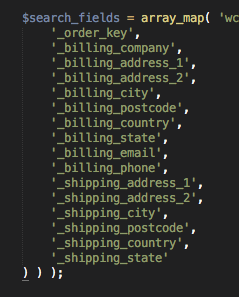
So, then, try _billing_address_1 or _shipping_address_1 instead of the versions of these keys instead of just _billing_address or _shipping_address – let me know if this makes any sort of difference here!
Cheers,
GeorgeParticipantHey @Edwin,
We indeed cannot help with custom coding, and I appreciate your awareness of this rule, but I can share these two CSS selectors with you and use it as an opportunity to also share a recommendation for finding them on your own.
Color of the Next and Previous Month Links
You can change the color of the next and previous month links with CSS like the following:
#tribe-events-footer .tribe-events-sub-nav a {

    color: red !important;

}
So, #tribe-events-footer .tribe-events-sub-nav a is the selector, but you can of course use any color you want other than red 🙂
Color of the Table Header Background
#tribe-events .tribe-events-calendar thead th {

    background: red !important;

}
Color of the Table Header Text
#tribe-events .tribe-events-calendar thead th {

    color: red !important;

}
I hope these selectors help!
If you need to write more custom CSS on your site, definitely check out a [free!] tool like Firebug if you use FireFox, or the Developer Tools for either Safari or Chrome.
They have “Inspector” tools that let you zoom right over the element whose styles you would like to change, and let you find the selectors like in the examples above.
Cheers,
GeorgeParticipantHi Nicki,
Thanks for reaching out. What you are trying to do is indeed possible, but it would require custom coding to implement this on your site.
You do not need Events Calendar Pro or another premium add-on to do this.
We unfortunately cannot help with custom coding, even if you buy a premium license for an add-on here.
However, as a quick example to get you started on this, you can use the WordPress core function get_terms() to display all of the Event Category names. You can learn more about this function here → https://codex.wordpress.org/Function_Reference/get_terms
This is the most basic code required to get all Event Category names:
$categories = get_terms( Tribe__Events__Main::TAXONOMY );foreach ( $categories as $category ) {
// This is where you'd write code to display category and links and such.
}
You’ll have to take the reins from here but I hope this information helps!
Cheers,
GeorgeParticipantHey @Sara,
Thanks for reaching out.
This is unfortunately not possible at this time 🙁
I’m sorry to bear that bad news but hope this information helps you move forward with your project.
Let me know if there’s anything else I can help with!
Thank you,
GeorgeJanuary 15, 2016 at 10:23 am in reply to: calendar doesn't publish, can't be seen by public on my blog. #1056739ParticipantHey Melissa,
Thanks for reaching out. I notice you do not have a license for premium products, so I will unfortunately have to direct you to our free support forums here → http://wordpress.org/plugins/the-events-calendar
The forum that this thread is currently in is the “Pre Sales Questions” forum, so we cannot field technical support requests like this here.
I’m sorry for any inconvenience that arises from this. We check the free support forums once a week and can hopefully get to your issue there soon.
Thank you,
GeorgeParticipantGlad to hear that you found the problem, @Edwin! 🙂
I’ll close this thread, but open a new one any time if we can help with anything else.
Cheers,
GeorgeJanuary 15, 2016 at 10:16 am in reply to: Can ETP send email when RSVP stock is running low? #1056735ParticipantThis is indeed a great feature idea – I believe that we are working on this for some future implementation of the plugin, but is unfortunately not possible at this time without customization beyond the scope of the forums here 🙁
Sorry to disappoint! But yes, this is an excellent feature idea and something we’d love to add to the plugin. Stay tuned to releases to see if something like this ever arrives in the plugin!
Thank you,
GeorgeParticipantHey @Christofer,
Thank you for this information.
To be clear: do things work fine without your customizations? It wasn’t quite clear to me in your first paragraph if you mean this, or if you meant that even WITHOUT your customizations the issue will temporarily be okay but then return somehow.
—
Next, can you confirm if you have any success with simply going into your wp-admin options panel at Events > Settings > Filters, then scroll down and set the “default state” option to “Open”? Here’s an image of that option for reference:

Thank you,
GeorgeJanuary 15, 2016 at 10:09 am in reply to: slow, slow, slow – on load and especially inside WP #1056731ParticipantThank you @DeAnne.
On the page you linked, the “mobile view” of the calendar is active. How specifically was this enabled on your site?
The mobile view does not have tooltips. To be clear, the mobile view is essentially just the use of Dots instead of the “full” view which lists the titles of events. Only the titles in this “full” view have tooltips, so as long as the “mobile view” is being used there will not be tooltips.
Does that make sense? As an example to illustrate the point, take another look at http://wpshindig.com/events. In “full” view, titles of events show up and hovering provides the tooltip, as shown here:
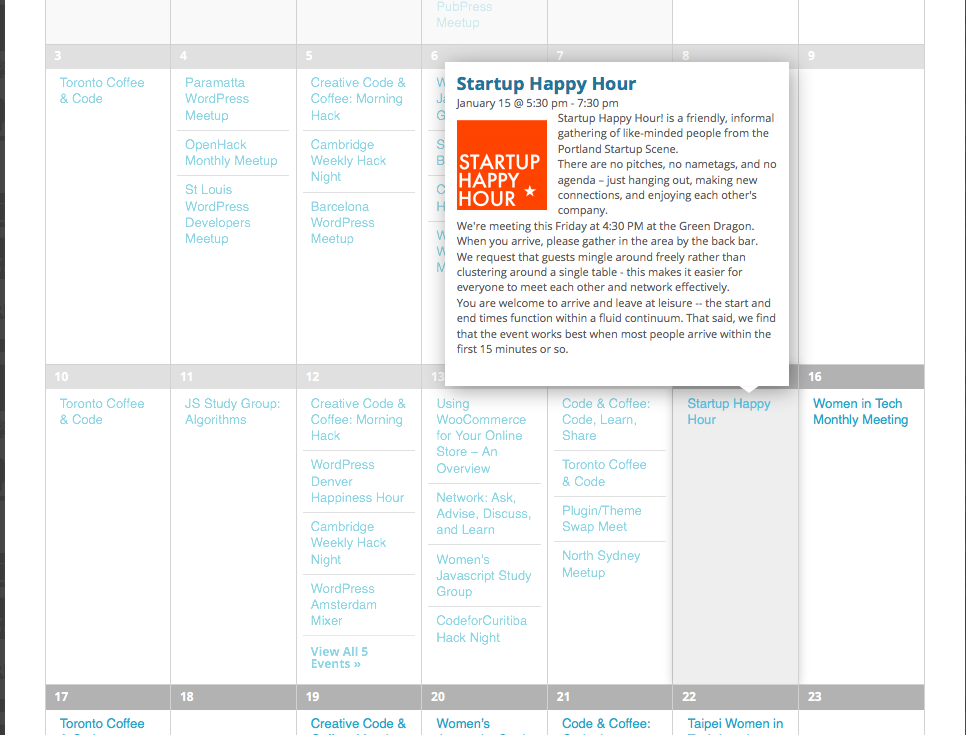
However, if you downsize the browser to trigger the activation of the mobile view, the mobile view is used as shown here with the dots instead of titles:
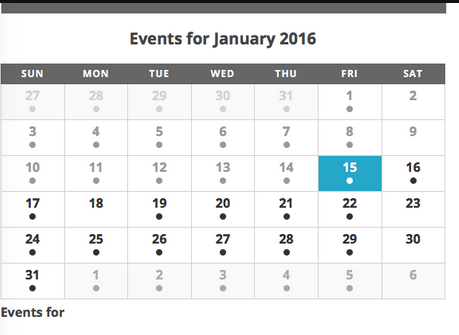
There are no tooltips on hover there, which is by design.
I hope this information helps. You cannot have the mobile view, which uses dots, and tooltips at the same time. Tooltips are exclusive to the “full” view.
Thank you!
GeorgeParticipantThank you for this information! It shows that your version of Events Calendar Pro is out of date – you are using version 3.9.3 when the current version is 4.0.3.
The first step here before anything else can be done is to update your version of Events Calendar Pro to 4.0.3.
You can get the 4.0.3 files any time at http://theeventscalendar.com/my-account/downloads
I would recommend deleting your existing 3.9.3 version of Events Calendar Pro off of your site first, before installing 4.0.3. This will NOT delete event data 🙂
Once you’re up to date, let me know if anything’s improved.
Thanks,
GeorgeJanuary 15, 2016 at 9:55 am in reply to: Fix for Next Events / More Events no longer working #1056722ParticipantHm, I again do not have this error so I am wondering – can you copy and paste your entire functions.php file into a Gist at http://gist.github.com and then share a link here to that Gist?
I’ll take a look and see what I can learn.
Thank you,
GeorgeJanuary 15, 2016 at 9:53 am in reply to: slow, slow, slow – on load and especially inside WP #1056718ParticipantI’m sorry to hear about this second issue, @DeAnne.
By “preview listing”, do you mean a small little tooltip that pops up? Or something more elaborate?
See http://wpshindig.com/events for an example of tooltips. Those are the only thing our plugins show in terms of “preview listing”, so if something else is meant by “preview listing” then it is unfortunately a customization of some kind that we cannot help troubleshoot.
If the “preview listing” you meant IS exactly the sort of tooltip you see on http://wpshindig.com/events, then it sounds like there’s a JavaScript conflict here; in which case can you share a link directly to the pages on the site where the preview listings no longer show?
I will take a closer look there.
Thank you!
George -
AuthorPosts