

Forum Replies Created
-
AuthorPosts
-
George
ParticipantHey Chris,
There are some things here that ARE possible with WordPress and/or our plugins, and some things that are NOT possible – by default, anyways.
I will address various things specifically as follows 🙂
I would like to be able to provide them with a username/password in order for them to access something like a “client portal”. What I am hoping to achieve through your system is the ability for a new client to fill out a custom “new client registration form” which would then trigger an email sent to them with their credentials after which they would be able to manually signup/register/rsvp for various individual events as well as recurring events alike.
Okay, so the basic aspects of user/login stuff you mention are already provided by WordPress itself – to learn about these features, I would recommend an article like this one: http://www.wpbeginner.com/beginners-guide/how-to-allow-user-registration-on-your-wordpress-site/
As for custom client forms like you mention here, our plugins unfortunately do not provide this functionality.
my hope is that your system can be setup to resolve this problem by automatically emailing (hopefully evening texting) parents with a reminder to the recurring events they have signed up for requesting they simply click on a secured link which would simply open up a page where they would be able to validate if their client will or will wont be at the event.
While our ticketing plugins DO have a simple “check-in” feature, they do not have any of the notification features you mention, and there is unfortunately no “pre-check-in” functionality either. So, in other words, we have no notification functionality like you describe at this time. And then when it comes to check-ins; we DO have a feature for checking folks in at the event itself – but there is not an extra layer where folks can “check in” that they will be attending.
what I am hoping your application can achieve for us is the ability for the organization to provide both the “event organizers” as well as the “event supervisors” with a portal they can log into where we would be able to simply present to them a list of all of the events assigned to them along with the ability to access the details for each individual event where they can simply see a list of all the participants who subscribed to recurring event and showing all of the participants who have RSVP’ed and/or canceled along with their dates + participants who have not taken an action yet so the event organizer would be able to contact them directly.
One final capability which is desired is for the event supervisor to be able to manually RSVP or cancel an RSVP at any time including after online registration has closed.
You can create admin users on your site who can do the things you describe here as “event organizers”. However, there a number of specific admin-facing features you list here that are not included, like this one:
would be able to simply present to them a list of all of the events assigned to them along with the ability to access the details for each individual event where they can simply see a list of all the participants who subscribed to recurring event and showing all of the participants who have RSVP’ed and/or canceled along with their dates + participants who have not taken an action yet so the event organizer would be able to contact them directly.
The most logical approach I felt was to simply utilize the client side “RSVP” approach for every individual event. Using this approach my thought was that if your application was able to maintain some type of “current balance” field for every client then upon a client trying to RSVP for an event this balance could get queried and compared to the cost to RSVP for the event in question and if its less the customer simply gets presented with a payment page where they can choose from lets say 3 different amounts to fund their account with.
These features are not possible with our plugins, I am sorry 🙁
So, to summarize, it does not sound like our plugins would meet the needs of this project without a very, very extensive amount of plugin customization.
You can indeed customize the code of our plugins; however, to make them do all of the specific things you list would require a very large amount of code customization. 🙁
I’m sorry to disappoint! I hope my answers are helpful here.
Cheers,
GeorgeJanuary 18, 2016 at 8:48 pm in reply to: How to show specific holidays or special events throughout the year? #1058279ParticipantHey @James,
There is unfortunately not any specific support for this in our plugins at this time 🙁
The closest thing I could think of would be to put “all-day events” for holidays and make them recur every year, and put them in an “Event category” called Holidays or something. Then you could use custom CSS to style these events differently than others.
I’m sorry to disappoint!
— George
January 18, 2016 at 8:45 pm in reply to: Is it possible to display thumbnail images with the event list shortcode? #1058277ParticipantHey Larry,
This is unfortunately not possible without custom coding, which we are not able to help with 🙁
As a brief tip, though, you can get the images to show up by using this function:
tribe_event_featured_image()To place it in your code, I would recommend getting started by reading our Themer’s Guide → https://theeventscalendar.com/knowledgebase/themers-guide/
I hope this information is helpful!
Cheers,
GeorgeParticipantHey Michela,
Thanks for reaching out.
1) I have a Google Calendar with some sub-calendars. Is the plugin able to recognize the sub-calendars?
There are unfortunately no sub-calendar features at this time 🙁
2) Most important events have a featured image. How does that work in this case? Are attachments on Google events imported as well?
Attachments are unfortunately not supported with Google Calendar or the .ics calendar-export format.
Thanks,
GeorgeParticipantHey Linda,
We’re happy to help with this. Can you email [email protected] so we can help with you privately?
Thanks 🙂
GeorgeJanuary 18, 2016 at 7:32 pm in reply to: Event with both ticket and RSVP options displays as FREE – $8 #1058263Participant🙂
ParticipantHey Allison,
Sorry to hear about these issues. It sounds like there is a code conflict arising from your theme, or perhaps from another plugin on your site.
To help investigate this, can you first link to your site’s events page? I will look at the issues you describe first-hand and see what I can learn.
Next, can you include your system information in your response? Here’s how to do that → https://theeventscalendar.com/knowledgebase/sharing-sys-info/
Thank you!
GeorgeParticipantHey Sara,
Thanks for pointing out some of these issues – I actually agree with you completely about the awkwardness of this message. We can do better.
I can make a development ticket for these fixes so that they will be fixed in a future release, though at this time I’m afraid there’s not much immediate action that can be taken here.
If you happen to have any further comments, or if there’s anything else I can help with, let me know!
— George
January 18, 2016 at 5:53 pm in reply to: jquery error stopping me from editing tickets… or post, please help! #1058219ParticipantSorry to hear about this Aaron!
I’m wondering – you mention that you’ve tried turning off every other plugin to no avail, but what if you deactivate your current theme?
Try activating a “default” WordPress theme, something like Twenty Sixteen; when this theme is active, do you get the same error?
If so, then in your reply can you include your “system information” with us? Here’s how to do that → https://theeventscalendar.com/knowledgebase/sharing-sys-info/
Thank you!
GeorgeParticipantHey Simon,
Thanks for reaching out.
Can I add a new organizer to an existing event such that they are able to edit that event?
Only users of your site with accounts can edit events.
At this time there’s not a way to make an actual user on your site out of an event’s “organizer” field.
Organizers do not have user accounts created for them, and these are separate things. “Users” can only be added with the sort of methods that are described in this blog post for example → http://www.wpbeginner.com/beginners-guide/how-to-allow-user-registration-on-your-wordpress-site/
—
and how to apply to both Community events and events I have submitted myself. The key function I am looking to create is the ability to edit an event for a subsidiary user/member.? Also if I add a new event editor, are they automatically informed?
Unfortunately, I was not able to fully understand what you mean by your question quoted above. Can you clarify what you mean here? Sorry to misunderstand, I just want make sure I know what you’re talking about so I can best help out! 🙂
Cheers,
GeorgeJanuary 18, 2016 at 5:44 pm in reply to: Event with both ticket and RSVP options displays as FREE – $8 #1058217ParticipantHey Barback,
Thanks for reaching out.
Unfortunately, at this time the only to remove this text would be to add a function like the following to your theme’s functions.php file:
add_filter( 'tribe_get_cost', 'tribe_remove_free_text_from_cost_range', 10, 3 );function tribe_remove_free_text_from_cost_range( $cost, $post_id, $with_currency_symbol ) {
return str_replace( 'Free -', '', $cost );
}
This works well for me and I hope it does for you, too.
Cheers,
GeorgeJanuary 18, 2016 at 4:55 pm in reply to: mobile events not showing – free version limitatio #1058200ParticipantHey Amin,
Sorry to hear about these issues on your site!
This is not a limitation of the free version or anything like that. These issues are emerging from JavaScript errors on your site which are coming from your theme or from other plugins, here is a screenshot:
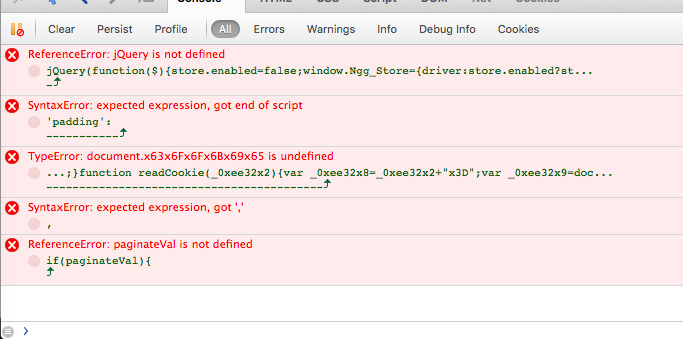
I hope this information is helpful for your project!
— George
ParticipantSounds good Linda, thank you for the update. I will close up this thread for now but if other questions, comments, or concerns arise, open a new thread any time!
Cheers,
GeorgeParticipantSorry to hear this Edwin…hm…what admin user role is your account when you have tried the QR code check-ins? Is it a full admin account? Or something like an “editor” account, “author”, “subscriber”, anything at all other than the main admin account for the site? If so, try this main admin account and see if the check-ins work that way.
—
Also, what your site’s permalinks settings? These are in “Settings > Permalinks” in the wp-admin – are they set to /%postname%/, for example? If not, does changing them to this help at all here?
Thanks,
GeorgeParticipantHey Brigit,
Events Calendar Pro is currently at version 4.0.4, so you should be replacing the 3.9.3 version of it on your site with the 4.0.4 version.
To get the files for 4.0.4, head to http://theeventscalendar.com/my-account/downloads
You should see Events Calendar Pro listed on this page; then, select 4.0.4 from the option next to it, and download the files. Then replace 3.9.3 on your site with 4.0.4.
Let me know if this makes sense, and if updating helps here.
Thanks!
George -
AuthorPosts