

Forum Replies Created
-
AuthorPosts
-
George
ParticipantHey @Angie,
We unfortunately cannot provide any assistance with color changes, page design, theme customization, etc. Please see the “Product Support” section of this page for more information → http://theeventscalendar.com/terms
Now, I mention this disclaimer mainly to set your expectations reasonably, and to prevent getting your hopes up about a total solution being shared here. I do not mean to say that I cannot at least try and help! 🙂
To get started on trying to fix things here, and adjust the coloring, can you share a link directly the the events page on your site?
I’ll take a look at it and try to share some custom code so that you can change this issue:
but now it has an obnoxious green color for the days of the week heading as well as individual events.
Thank you,
GeorgeJanuary 25, 2016 at 5:58 am in reply to: Moving the Tickets Plus form 'code' crashes the site #1061543ParticipantHi @Colby,
We unfortunately cannot provide any support for customizations, or problems that arise from making customizations 🙁
Please see the “Product Support” section of this page for more information → http://theeventscalendar.com/terms
Now, despite the notice I wrote above, if you can copy and paste your entire, un-edited functions.php file into a Gist at http://gist.github.com, and then share a link to that Gist, I will gladly take a look and try to spot the problem!
🙂
Cheers,
GeorgeParticipantHey @conor,
Thanks for reaching out!
I see in your account that the license actually is already used on this domain name: http://www.wineacademyitalia.com
Is this an error?
If so, what I would recommend is heading to your “License Keys” management page here → http://theeventscalendar.com/license-keys
If you see http://www.wineacademyitalia.com listed there, use the license controls on the page to “Disconnect” that domain name from your license.
Once disconnected, you should then be able to use the license on your development domain without issue 🙂
Cheers,
GeorgeParticipantHey Daniel,
Thanks for reaching out.
If by “new order e-mail” you mean an email sent by WooCommerce itself, then your best bet is to head over to the WooCommerce documentation to a page like this one → https://docs.woothemes.com/document/template-structure/
You can modify the HTML templates there to include the date where you’d like.
If you mean the tickets emails themselves, however, then instead head over to this page of our own documentation: https://theeventscalendar.com/knowledgebase/themers-guide/
To make the customizations, you’d apply the information in the above article to this file inside the Event Tickets plugin:
event-tickets/src/views/tickets/email.php
I’m sorry that our ability to help with customizations is so limited; but I hope this information helps you at least get started on things! 🙂
Cheers,
GeorgeJanuary 24, 2016 at 5:26 pm in reply to: Threads that are not resolved should no be closed. #1061445ParticipantThanks Douglas. In your screenshots, your “timezone” is set to “Los Angeles”, the named timezone. Just to be clear, what I mean is setting it “UTC-8”, the numeric version, and then letting several event imports happen with the site’s timezone setting at “UTC-8”.
Apologies if you have done these exact steps, it just wasn’t clear from the screenshots so I wanted to mention these details.
—
Unrelated to this issue, but worth mentioning, is also that the Event times are not valid for the event whose edit screen you included a screenshot of.
(What I mean is that the event’s start time and end time in your wp-admin were 7pm on the same day. This is not valid because it would mean the event does not happen, because it starts and ends at the same time. If the Facebook event doesn’t have an explicit end time, I understand how this can happen! I just recommend adjusting those times so that it has a start time and end time that are different from each other, it should reduce the potential of other issues arising with the event on your site).
Thanks,
GeorgeParticipantHey @Paulzz,
You can definitely find all of the stylesheets and any code that loads them inside the plugin code itself. All of the stylesheets are in src/resources in your plugin files for The Events Calendar, for example – so definitely dive in and make any changes you would like 🙂
SASS is not currently used in the plugins.
One thing I should point out here is that we cannot help with customizing CSS at all (or any other customization), and nor can we help with any issues that arise from your customizing the styles. Just wanted to put out this disclaimer clearly and early – check out the “Product Support” section of this page for more information → http://theeventscalendar.com/terms
Best of luck with your customizing!
GeorgeParticipantHey Anthony,
Thanks for this information. I will investigate to see if this bug is still happening; at this time, it may still unfortunately not be possible to have recurring events on the same day in the same series.
For your events above, for the time being, I would recommend having the 2pm-4pm events be part of a recurring series together; then, the 7:30pm-9:30pm can be created separately as its own standalone event. If you want to make sure that people in the 2pm-4pm events can see links to the 7:30pm-9:30pm event, I would recommend manually adding text at the top or bottom of the event saying “Note: we also have an event at 3/5 at 7:30pm-9:30pm, click here to learn more.”, with the “click here” being a link to the 7:30-9:30 event of course…
I’m really sorry about this situation, I know that it would be ideal to have all three events in one series together. But there seems to still a bug preventing this and I have no ETA on when a bugfix will arrive, which could be weeks from now, so I would recommend the simple manual solution above for the time being.
I’m sorry about this Anthony! Let me know what you think and if you have any more comments, questions, or concerns.
Sincerely,
GeorgeParticipantHi Kyle,
I’ve gone ahead and built a custom support plugin for you which you can download here:
• http://m.tri.be/add-events-to-woo-my-account
All you have to do is upload and install this like a “normal” WordPress plugin. When activated, it’ll show upcoming events for which the currently-logged-in user has bought tickets.
Here’s a screenshot of the bare bones styling this plugin provides:
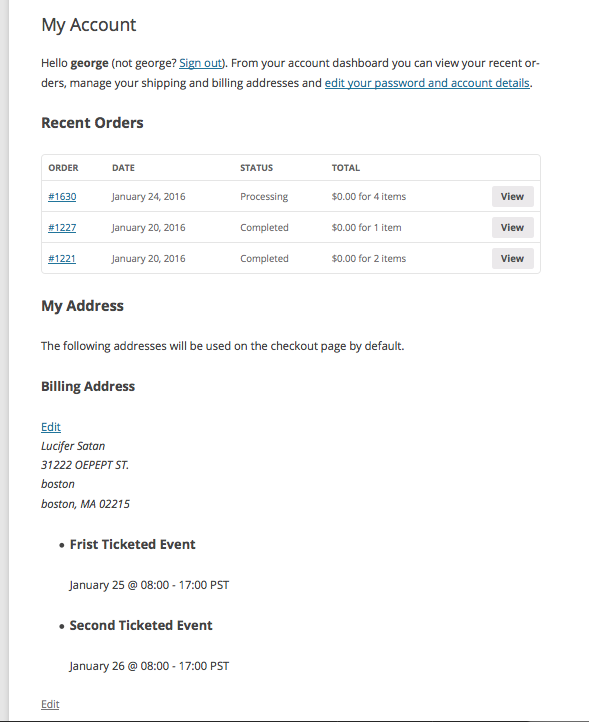
The point of this plugin is just to get you started with this – you’ll have to take the reins on styling and on getting things looking “just right” for your project needs.
But this is all set up and ready for more tweaking. Basically, the plugin’s render() function is where the events are looped through, and data displayed. Right now it’s just a list with the event title and schedule details, as seen in the image above. But you can get fancy with this and make tables, and use any of The Events Calendar’s handy template tag functions which are located in your The Events Calendar plugin files here:
src/functions/template-tags
There’s a bunch of functions you can use there to display different event data, and so with this and a bit of Googling and tinkering I hope you can pull off what you want.
Best of luck with your customizing!
Cheers,
GeorgeParticipantThat’s great feedback, Andrea – thank you. We can definitely do a better job of clarifying these details.
I’ll close this thread for now but come back and open a new thread any time if any questions, comments, or concerns ever arise 🙂
Cheers!
GeorgeParticipantApologies for the delay here, I wanted to check with a developer on this to provide an accurate answer here.
Subdomains like you listed in your example should be recognized as different domains by our licensing system, whereas ewh.ieee.org/icx-dev and ewh.ieee.org/icx will not
If the subdomain activation does not work, that is a bug that we will have to correct; but it is indeed supposed to work and recognize those domains as separate installations.
I appreciate your patience here, please keep me posted on things and let me know if I can help with anything else.
Sincerely,
GeorgeJanuary 24, 2016 at 10:20 am in reply to: Threads that are not resolved should no be closed. #1061382Participant(And just to be clear, my “End of day cutoff” is 3am and the timezone setting is the “Use local timezones for each event” option – I will be leaving these options this way as testing continues.)
January 24, 2016 at 10:18 am in reply to: Threads that are not resolved should no be closed. #1061381ParticipantHey Douglas,
It’s Sunday the 24th here and I’ve been running event imports since the 21st; I wanted to report that I am not seeing the specific date display issue you had, an showed in the screenshots you posted above.
I have adjusted some settings now to see if I can get the issue to appear. So I am still actively testing this.
However, in the meantime I was wondering if you could clarify your timezone setting. I know this seems trivial, when you head to Settings > General in your wp-admin, and scroll down to the timezone setting, do you have it set to UTC-8 explicitly in this “numeric” format like in this screenshot:
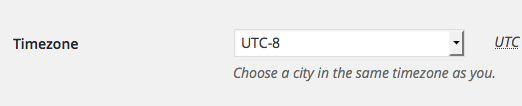
Or do you have it set to the “named” version of the timezone, “Los Angeles”, like in this screenshot:

As I mentioned, I know this detail seems trivial and irrelevant; however, we have had issues in the past with both our Facebook Importer and Eventbrite Importer plugins with “named” timezones. So if you have it set to the “named” version of “Los Angeles”, I would recommend temporarily changing it to “UTC-8”, saving the changes, and letting more imports run. Does the behavior change at all when you do this?
I have had it at the numeric version, “UTC-8”, thus far – and have not created the issue you have in your screenshots and such. So now I will be setting it to the named version to see if things behave any differently.
Thank you for your patience,
GeorgeJanuary 22, 2016 at 5:16 pm in reply to: Licensing issue with WooTickets / Event Tickets Plus #1060772ParticipantRight on 🙂
ParticipantThanks Fabian!
I do not have a specific update at this time but I can assure you we are trying to get to respond to all of our applicants by the end of next week.
I’m sorry for the delays and really appreciate your patience 🙂
Thank you!
GeorgeParticipantHey Kris,
I’m sorry to hear this!
1. Can you share a full-page screenshot of your admin page at Events > Settings > Default content? I do not have the issue you describe so am curious what is there for you. You can do so by uploading the screenshot to Imgur.com, Flickr.com, CloudUp.com, or any similar image-hosting site; then just share the links to those images here and I’ll take a look.
2. Can you share your “system information”? Here’s how → https://theeventscalendar.com/knowledgebase/sharing-sys-info/
Thank you!
George -
AuthorPosts