

Forum Replies Created
-
AuthorPosts
-
January 25, 2016 at 8:05 am in reply to: we have a problem with 404 soft errors and the events calendar pro #1061829
George
ParticipantThank you for clarifying this!
This is good news because as long as those errors only come up in the Google Webmaster tools, there is no actual technical error here. The reporting of those soft 404s is just Google’s Webmaster tools saying – “hey, you might want to make sure these 404s are actually 404s.”
And in the context of The Events Calendar, they are 404s.
So reporting them as 404s is the correct thing to do here. I know how alarming it can be to see a bunch of notices in the Webmaster tools, but that is just diagnostic information and the soft 404s are actually a good thing, especially when SEO is a priority.
To read more about this, check out our knowledgebase article here on the topic: https://theeventscalendar.com/knowledgebase/404_and_seo/
That explains a bit more about what these 404s are, and how search engines handle them.
I hope this helps!
ParticipantSure thing Keith!
And yes, you can absolutely add categories and such in that hook, using the event_id and WordPress core functions.
We are not able to help with custom coding here, so you’ll have to take the reins on that – but just as a quick link that might be helpful, I would recommend exploring the wp_set_object_terms() function that WordPress provides. You can read about this function here → https://codex.wordpress.org/Function_Reference/wp_set_object_terms
Best of luck with your customizing!
— George
January 25, 2016 at 7:55 am in reply to: Can I make paid events using Community Events? And some more.. #1061819ParticipantHey Leia!
Thanks for your questions and interest in our plugins. I will address your questions in order here as follows:
1. I wonder if there is possible to make charge for submitting community events?
YES – This is possible if you use the Community Events add-on and the Community Tickets add-on. You can learn more about this add-on here: https://theeventscalendar.com/product/community-tickets/
It is not possible to charge for community event submissions without that add-on; the only other way to achieve this would be to custom-code a solution.
2. I also wonder if it is possible to hire someone to do some formatting on the search filter bar. And change the design so its over the listing instead of in the sidebar?
YES – While we ourselves cannot make such customizations, we maintain a list of highly-rated developers and customizers here → http://m.tri.be/18k1. We have no affiliation or financial relationship with these folks, they are just well-respected folks in the community and so we like to share their details with people who are looking for developers to hire.
3. Is it possible to search for venues/organisers and make them as custom post types?
YES – Venues and Organizers are both already custom post types. They are also searchable inside the wp-admin already with our plugins. If you mean searching them on the front-end, then there are unfortunately only limited searching for these specific things by default. You can get a sense of the available search/filter abilities by playing around with the live demo of the calendar at http://wpshindig.com/events, for example.
I hope all of this information helps! Please let me know any more questions, comments, or concerns you might have 🙂
Cheers,
GeorgeJanuary 25, 2016 at 7:47 am in reply to: Shortcode or way to embed ticket form in any other pages? #1061815ParticipantHey Patrice!
Thanks for reaching out.
At this time, unfortunately the closest thing to this “out-of-the-box” with the plugins is to use the Ticket Settings section of Event Tickets Plus to add tickets to various post types.
Here’s a screenshot of the option where you can do this:
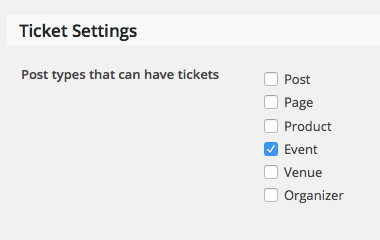
This will make it so that you can add tickets to those post types. If you add tickets, then the ticket form will show up at the bottom of the content.
I hope this helps – let me know if it does! There is unfortunately not a shortcode or similar option at this time 🙁
Thank you,
GeorgeParticipantHey Megan,
I’m sorry to bear this news, but unfortunately neither of the things you posit here are possible with The Events Calendar out-of-the-box. Events Calendar Pro does not add these features either, nor do our other add-ons 🙁
I’m sorry about this! Extensive custom coding would be the only way to implement both ideas.
Let me know if there’s anything else I can help with!
Sincerely,
GeorgeParticipantHey Aaron,
Unfortunately, we cannot help much with customizations. See the “Product Support” section of this page for more information → http://theeventscalendar.com/terms
Now, I only mention that to set your expectations and such – I’m still happy to try and help here! 🙂
You can modify the labels in the tooltips to anything you’d like with a bit of custom code in your theme’s functions.php file. These labels are “Event:” and “Address:” by default. To change that to “Show:” and “Location:”, for example, you could add code like this to your theme’s functions.php file:
if ( function_exists( 'Tribe_ECP_Load' ) ) {
/**
* Modify 'Event:' and/or 'Address:' text in Map View tooltips.
*
* @return array
*/
function tribe_support_1052594( $data ) {if ( tribe_is_map() ) {
$data['map_tooltip_event'] = 'Show:'; // Default is 'Event: '.
$data['map_tooltip_address'] = 'Location:'; // Default is 'Address: '.
}return $data;
}add_filter( 'tribe_events_pro_localize_script', 'tribe_support_1052594' );
}
If you want to remove these labels altogether, you can do so by making the values in the above code equal to just an empty string. Like this:
$data['map_tooltip_event']   = '';

$data['map_tooltip_address'] = '';
Changing other content inside the tooltips is unfortunately much harder. But I hope this helps with modifying the labels!
Best of luck with further customizations on your site.
Sincerely,
GeorgeParticipantHi Dennis,
We unfortunately cannot provide any support for customizations here, even for users with premium licenses.
Please see the “Product Support” section of this page for more information → http://theeventscalendar.com/terms
Further, you do not have any premium licenses, at least associated with the email address you used to post this specific question.
This forum is called “Pre-Sales Questions”, so we cannot field technical support requests and nor we can field customization-based questions like this one, for the reasons listed above.
So I will close this thread.
I’m sorry about this! Even if you did have a premium license, we cannot help with customizations or with issues that arise from customizations. So your best bet regardless, in my opinion, is to hire a professional developer to assist you in your customizations.
We have a list of some highly-rated developers that might help in terms of finding someone to assist you. We have no affiliation or financial relationship with these folks, their reputations in the community are just notably good and so we’ve compiled this list to try and help folks looking for developers
Here is the list: http://m.tri.be/18k1
Best of luck with your customizations!
GeorgeParticipantHey Mark,
Category filtering is currently not something provided by any of our add-ons other than the Filter Bar plugin.
Meanwhile, Events Calendar Pro is the only add-on that provides recurring events.
So if you need both of these features, then at this time, yes you would have to purchase two licenses: one for each of the add-ons listed above.
There are no discounts or bundles at this time – I’m sorry Mark! 🙁
— George
ParticipantHey Bob,
Thanks for reaching out!
There are no limits to themeing and customization whatsoever 🙂 The code is entirely open-source and extensible, and the only limits in place are your imagination and coding skill level.
One thing worth noting is that we are not able to help with customizations, even for folks with premium licenses.
I hope this information is helpful; if not, please let me know any more details I can provide and any other questions you might have!
Sincerely,
GeorgeParticipantHey Ashley,
You can use shortcodes and any of the default HTML allowed by “normal” posts within events. So, this includes things like header tags, bold text, paragraphs and lists, and all of that.
And then also WordPress shortcodes.
If you need to add JavaScript tags, however, this is not possible at this time and would require code-customization to achieve.
I hope this information helps!
GeorgeJanuary 25, 2016 at 6:33 am in reply to: we have a problem with 404 soft errors and the events calendar pro #1061761ParticipantHey @Lion,
Just to be clear, do you mean that you see all of these soft-404 errors within Google Webmaster Tools? If not, then can you clarify you see all of these errors?
Thanks!
GeorgeParticipantHey Keith,
Sure thing, there’s indeed a new hook now that fires when a Facebook Event is created inside your wp-admin site.
The hook is this: tribe_events_facebook_event_created.
It offers the following three arguments: $event_id, $organizer_id, and $venue_id.
Those variable names are very literally in their naming – the $event_id is the ID of the event inside wp-admin that was just created, and the $organizer_id and $venue_id variables are the IDs of the organizer and venue of that event, respectively.
To use this in code, you’d write something like this:
function tribe_support_example( $event_id, $organizer_id, $venue_id ) {
// Do stuff with $event_id, or $organizer_id, or $venue_id, or with all three!
}add_action( 'tribe_events_facebook_event_created', 'tribe_support_example', 10, 3 );
I hope this all helps!
Cheers,
GeorgeJanuary 25, 2016 at 6:23 am in reply to: Threads that are not resolved should no be closed. #1061757ParticipantThanks for testing this Douglas.
With all of the same settings I have not yet personally created the issue on my own local site, but I am not doubting the existence of this bug. The related code is this line of code from Importer.php, inside the Facebook Importer add-on of ours:
$start_date = date_i18n( $this->date_format, strtotime( $fb_event->start_time ) );
That bit of code, $fb_event->start_time, is indeed where the discrepancy seems to be arising from.
I will create a bug ticket for our developers to investigate this more closely, though I’m afraid at this time there aren’t any other immediate courses of action I can recommend.
I’m sorry about this state of things. There are essentially two bugs now, both of which we have to work on bugfixes for and release those fixes in upcoming releases of the plugins. I do not have ETAs on these fixes, though Brian has already shared a code solution for the first bug and so that fix should be included in the very next release coming out. I hope the same for the second bug.
Thank you,
GeorgeParticipantHey @Paulzz,
Sounds good – I’m sorry that, at this time, there are no options for this inside the plugins themselves.
I will go ahead and close up this thread for now, but I wish you the best of luck with your customizations.
Cheers,
GeorgeJanuary 25, 2016 at 6:06 am in reply to: Non-paid-version or Premium Version for Multisite use? #1061749ParticipantHey Jörg!
Thanks for reaching out. You do not need Events Calendar Pro or any other add-on to be able to use the plugins on a multisite installation.
I hope this answer is clear and helps you move forward with your project – let me know if there’s anything else I can help with! 🙂
— George
-
AuthorPosts