
Home › Forums › Calendar Products › Events Calendar PRO › Loading too many CSS files
- This topic has 5 replies, 2 voices, and was last updated 10 years, 8 months ago by
George.
-
AuthorPosts
-
January 22, 2016 at 2:38 am #1060276
paulzz
ParticipantLove your calendar but it’s adding 9 css files to my homepage.
Is there an easy, say way to concatenate them?
Until I’m on http2, that’s a hell of a performance hit.
ThanksJanuary 22, 2016 at 11:09 am #1060643ParticipantHey @Paulzz,
Sorry to be flooding your page with all of those files – it’s indeed something we aim to improve in future releases.
Can you share a link to your page with all of the css files? I will take a look just to make sure nothing is loading out-of-place.
There is not a way to concatenate them easily within the plugin or anything at this time. I would recommend a caching plugin, because some of them like W3 Total Cache do include features to minifiy/combine styles and scripts, but these features often break the styles and/or JS. So if you go this route, tread lightly and be sure to test thoroughly!
Unfortunately the only other option here is the “stylesheet” option in Events > Settings > Display in your wp-admin, as shown in this screenshot:
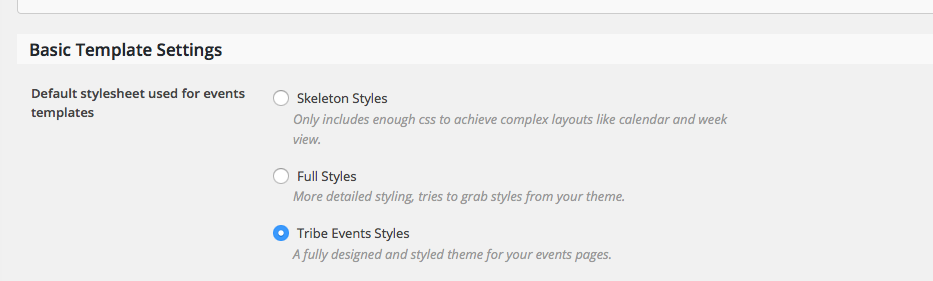
If you do not need or want all of our custom styles, you can disable them by choosing “Skeleton Styles” and then just write your own custom CSS at the bottom of another file that already loads on the page, like your theme’s style.css file.
I’m sorry that there are not more options at this time! Let me know if this information helps at all.
Cheers,
GeorgeJanuary 23, 2016 at 2:59 am #1060837ParticipantThanks George
Do you have anywhere (or can I glean it from the plugin) all the stylesheets involved? Quite happy to modify in my own css. Don’t suppose you use SASS?
January 24, 2016 at 5:19 pm #1061442ParticipantHey @Paulzz,
You can definitely find all of the stylesheets and any code that loads them inside the plugin code itself. All of the stylesheets are in src/resources in your plugin files for The Events Calendar, for example – so definitely dive in and make any changes you would like 🙂
SASS is not currently used in the plugins.
One thing I should point out here is that we cannot help with customizing CSS at all (or any other customization), and nor can we help with any issues that arise from your customizing the styles. Just wanted to put out this disclaimer clearly and early – check out the “Product Support” section of this page for more information → http://theeventscalendar.com/terms
Best of luck with your customizing!
GeorgeJanuary 25, 2016 at 12:02 am #1061500ParticipantThanks again George.
The first thing I’ll try is simply creating one css file with all your styles included. Will you know how I get on.
January 25, 2016 at 6:09 am #1061753 -
AuthorPosts
- The topic ‘Loading too many CSS files’ is closed to new replies.