

Forum Replies Created
-
AuthorPosts
-
George
ParticipantGood call on the Private Reply, there – and thank you for sharing these files!
I’ve been taking a look through them, and have found that ACF’s loading of its own version of Select2 is pretty straightforward. It labels its script simply ‘select2’, so to make it load everywhere it seems like copying and pasting its enqueue functions into the dequeue function I wrote above would do the trick here.
So, like this:
if ( function_exists( 'acf_get_dir' ) ) {add_action( 'wp_enqueue_scripts', 'tribe_events_disable_select2', 999 );
add_action( 'admin_enqueue_scripts', 'tribe_events_disable_select2', 999 );function tribe_events_disable_select2() {
wp_dequeue_style( 'tribe-events-select2-css' );
wp_dequeue_script( 'tribe-events-select2' );wp_enqueue_style( 'select2', acf_get_dir( 'assets/inc/select2/select2.css' ), '', 'TribeTempFix' );
wp_enqueue_script( 'select2', acf_get_dir( 'assets/inc/select2/select2.min.js' ), array('jquery'), 'TribeTempFix', true );
}
}
I hope this does the trick – note that is a replacement of the original function I shared, so try deleting the old; adding the new; and seeing if anything improves. I apologize in advance if it doesn’t. Let me know!
Thank you for your patience with this bug,
GeorgeP.S.
The bug has been reported in another, separate thread, which means we can bump the priority of the bugfix. I’ve done that, so hopefully it will lead to some more urgent allocating of attention on this bug.ParticipantFor sure, Mark – it’s a great tool and one I’m happy to share. In our Non-Profit Partnership Program email exchanges, from time to time folks will ask some general WP questions and that guide is bookmarked as a tool for those situations.
As for the fix, thank you for being patient with it! I’ve bumped the priority on our bug ticket. And while our next release, 4.1, is in its final pre-launch stages–which means that fitting in a bug fix or other small tweaks is very unlikely, save for security-related issues–hopefully we can get this fixed in the releases following that one.
Dequeueing scripts may indeed be a helpful, if temporary, solution. Check out the other thread about this bug if you’re interested in this; I shared some code there that you might be able to copy-and-paste to save some time.
For now, mind if I close up this thread? I’m inclined to close both this and that other bug-report thread to contain the issues, and to make it so that if others have the issue they make a new thread which will only add even more urgency to the fix.
Let me know what you think and if there’s anything else I can help with in this thread!
Cheers,
GeorgeParticipantHey @Michel,
This is unfortunately not possible with some extensive code customization. Are you comfortable with customizing code?
While we cannot help with custom code, we do have a knowledgebase article that covers a lot of the basics of how you might go about making this sort of change. You can check that article out here: https://theeventscalendar.com/knowledgebase/themers-guide/.
I hope that helps; let me know what further questions you might have based on this initial information! 🙂
— George
ParticipantHey Keith,
I’m really sorry to hear about all of these issues. I would like to address a few things separately as follows:
First, a bit out of order but quite relevant, is the fact of our site currently down. This is terribly-timed fluke issue, and I’m really sorry about this! We’ve been having issues since early this morning with our domain registrar. We’ve resolved most of these issues, but the problem is that these issues related to DNS records; so that means that it’ll take time for these fixes to propagate across networks.
Many users in the US, especially on the East Coast like myself, are able to use the site fine. We are still getting some reports of outages from folks on the West Coast, Canada, Europe, South America, and beyond, and are working with our registrar to try and speed up the propagation of these changes.
As for your other issues, there are two main things that are seemingly causing most of the trouble:
• Our incompatibility with WPML.
• Our duplicate-venue/duplicate-organizer/duplicate-event issues with Facebook Importer.
I would just like to touch on the origins of these issues and the scope of our relationship with them. First is WPML – we have long had some sever incompatibilities with WPML and have been trying to roll out releases to address that in the last few months. The problem is that WPML does a lot of weird, specific things – it has myriad features and requires lots of specific development.
So, at this time, The Events Calendar core plugin is the only plugin in our lineup that has any meaningful integration with WPML.
As for the duplication issues with Facebook Importer, these too have been very hard to pin down. We’ve literally been working on that bug for over a year, but the problem has been that it behaves very inconsistently. Sometimes we can reproduce the bug in a consistent way, and then we fix it, but then some weeks later the bug resurfaces as a result of some other steps.
And so the process repeats, and here we are after almost a year with the issue still persisting. (Facebook totally revamped their API earlier last year, to boot, so we also had to rewrite much of the plugin to accommodate their changes.)
Both issues are serious issues, and I don’t write the above elaborations to try and deny that in any way. We have not resolved these issues and that is our fault completely.
I’m sorry about both issues conflating on your site and rendering it basically un-launchable. What can we do to try and make this right? I looked at your licenses and found that they were purchased in October; this makes it impossible for us to process a refund, unfortunately – not by our own choosing, but by limitations imposed by our payment processors themselves (PayPal and Stripe).
If a refund is something you very much want to obtain regardless, then I would recommend emailing us at [email protected] with copies of your order receipts and a link to this forum thread for reference – we can try to get a refund going and I would be happy to try and work with PayPal or Stripe to make that happen.
Are there any other ideas you have for how we can help from here? Part of the reason I wanted to elaborate on the bugs above is to illustrate that these are big, complicated problems – and so unfortunately we cannot get a quick fix out the door for them 🙁
Let me know what you think, Keith. I’m sorry about this situation.
Sincerely,
GeorgeParticipantHey Roger,
Thanks for reaching out!
We do indeed hope to ship some features like this in either the next release or the one immediately after it – so, 4.1 or 4.2, depending on a few different things.
We’re aiming for 4.1, which should be arriving some time in the next month or two if all goes to plan. This is subject to change, and I unfortunately do not have a more specific ETA to work with, but I hope this information is generally useful….
Let me know if that’s the case or if I can help with anything else!
Cheers,
GeorgeParticipantHey Rob!
We have a plugin that does all of these exact features! It’s an add-on for The Events Calendar, called “Community Events.”
You can learn more about it here: https://theeventscalendar.com/product/wordpress-community-events/.
To use this, you would need the following plugins installed and activated on your site:
• The Events Calendar [core plugin – free]
• The Events Calendar: Community Events [the add-on linked above – starts at $89/year]We do not have any other solutions at this time 🙁
I hope this information helps – let me know!
— George
ParticipantHey @Kadi,
You can, indeed, reorganize the Community Events submission fields with almost no limit. However, reorganizing the fields requires code customization.
We cannot help with code customization, so I would only recommend embarking on those customizations if you are comfortable tinkering with code.
If so, then first check out our Themer’s Guide here for some general overview of customizing template files in our plugins: https://theeventscalendar.com/knowledgebase/themers-guide/.
Once you’ve gleaned the basics of how our templates work from that article, you can start tinkering; you’ll have to take the reins on your reordering of the fields, but for most reordering it should be rather simple.
You’d have to head to this file in your Community Events plugin files:
/src/views/community/edit-event.phpHere you’ll find code like in this screenshot:
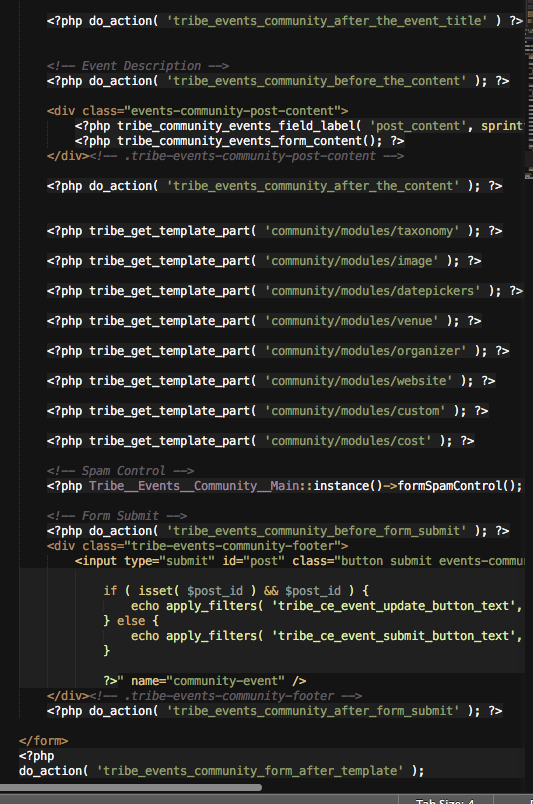
Do you see all those calls of tribe_get_template_part()? Well, simply copying and pasting those into a different order will rearrange the submission form components. Then above these tribe_get_template_part() calls you have code that loads the title and description field and such.
We’re limited in how much we can help with customizations, but I really do hope this information helps, and am happy to try and answer any further questions you might have.
Let me know what you think.
Sincerely,
GeorgeParticipantHi there,
This appears to be a problem stemming from your theme. If you activate a default theme like Twenty Twelve or Twenty Sixteen, do these issues persist?
If so, then how about if you continue with the rest of the troubleshooting steps outlined here: https://theeventscalendar.com/knowledgebase/testing-for-conflicts/?
Thank you,
GeorgeParticipantI am closing this thread; it is a duplicate of this one: https://theeventscalendar.com/support/forums/topic/pop-up-issue-with-month-and-week-view/.
— George
February 2, 2016 at 6:50 am in reply to: Submissions with Errors Create Duplicate Organizer Details Fields #1066384ParticipantHey Jonathan,
Thanks for reaching out, and for including your site’s “System Information”.
I tried recreating this issue several times on my testing site and was unable to reproduce the bug. I’m using a default theme and am wondering if you, too, would be willing to test this bug when you have a default theme active on your site.
A default theme is something like Twenty Twelve, Twenty Sixteen, or any other of the “year name” themes released by WordPress officially.
I would recommend activating one of these themes, and then trying to recreate the bug on your site.
This will be useful because there might be a JavaScript error within your theme that is working causing the organizer elements to break; perhaps not, but this testing will reveal that definitively.
Let me know what you find! If the theme change makes no difference, and you still get the exact same bug, then we can explore some other possibilities from there.
Thank you,
GeorgeParticipantI’m sorry about that, @Bart. We might be referring to different instances of the phrase “Upcoming Events”, of which there are many instances throughout our plugin….
So to help ensure we’re referring to the same exact string, can you take a screenshot of the exact “Upcoming Events” phrase on your site that you’re referring to? You can then share image here by uploading the screenshot to Imgur.com, Flickr.com, CloudUp.com, or any similar image-hosting site; then just share the links to those images here and I’ll take a look.
Thank you!
GeorgeParticipantHey Mark,
Apologies if this isn’t appropriate for a support exchange, but right off the top I’d love to comment on how awesome the Non-Profit WordPress guide is. Saw it on WP Tavern recently and thought it was really well done! We <3 non-profits and work a lot with them, I can see us sending many a folk to that guide for more information on the whole deal…
Anyways–and, seriously, apologies for that personal bit–I appreciate you reaching out about this bug.
This has recently come to light as a bug with our code and ACF, which we are actively working on to fix. Check out this other thread where it came up in the last few days → https://theeventscalendar.com/support/forums/topic/acf-conflict-with-relation/
Now, since this has only come to light in the last few days, we don’t have an immediately-available fix yet. But having an additional report of this bug only drives up the priority of the bug ticket, so thanks for all of the information you’ve included here.
I’m sorry that I don’t have any immediate recommendations; please let me know if you have any more thoughts on this bug or if there’s anything else I might be help with in the meantime!
Thanks,
GeorgeParticipantHey Roger,
Thanks for reaching out!
When it comes to a trial period, we unfortunately do not have a trial method for “testing” our software 🙁 The best we have at this time is our no-questions-asked refunds policy, which is that if you request a refund within 30 days of your original license purchase – regardless of reason! – we will give the refund in full immediately 🙂
Many folks use this as an alternative to a “real” trial program. I hope it’s helpful in your case!
Next, in regards to the licensing question, you do not need two licenses. To be clear, if you don’t enter a license key, the plugin will work 100% exactly the same as if you did enter a license key. The license key makes no difference in plugin functionality; it simply signs up the licensed domain name for updates and support.
And so in most cases, folks with a test-site/”real”-site setup like you describe simply add the license key on the “real”/production site, and then for the test site, they just manually update the plugin themselves every so often – which is easy, because you can get the latest version of plugin files any time at http://theeventscalendar.com/my-account/downloads once you have a license.
I hope this information helps! Let me know if that’s the case and/or if there’s anything more I can help with.
Cheers!
GeorgeParticipantHey @Alvaro,
I’m really sorry about the persistence of this bug! I will need to investigate this more deeply and will update this thread as soon as I have more information.
Until now, we have not heard of any similar behavior, and nobody our team has recreated your bug thus far. This does not mean the bug doesn’t exist! We’ll just have to tinker a bit to recreate the bug; once we do this, we can work backwards and try to fix it.
I’m sorry that I don’t have an immediate fix at this time, but I will investigate this closely and update you as soon as possible.
Thank you for your patience!
GeorgeParticipantHey @Pete,
Unfortunately, the filter URLs do not work without the AJAX functionality 🙁
As for what the URLs look like, they will look like the URL you gave as an example, with “tribe_event” and “tribe_paged” and such.
You can technically change these tribe_ terms to something else, but this would be a massive, complicated code rewrite. There is no easy way to change this.
Sorry to bear some of this bad news here, @Pete! Please let me know what you think.
Sincerely,
George -
AuthorPosts