
Home › Forums › Calendar Products › Community Events › Can I reorganize front-end submission form?
- This topic has 9 replies, 3 voices, and was last updated 10 years, 7 months ago by
Support Droid.
-
AuthorPosts
-
February 1, 2016 at 11:05 pm #1066125
Kadi Driscoll
Participantis there a way to reorganize content on the front-end submission form? I would like to move some of my Additional Fields to the top of the form rather than having them grouped together at the bottom. Thanks
February 2, 2016 at 7:05 am #1066395George
ParticipantHey @Kadi,
You can, indeed, reorganize the Community Events submission fields with almost no limit. However, reorganizing the fields requires code customization.
We cannot help with code customization, so I would only recommend embarking on those customizations if you are comfortable tinkering with code.
If so, then first check out our Themer’s Guide here for some general overview of customizing template files in our plugins: https://theeventscalendar.com/knowledgebase/themers-guide/.
Once you’ve gleaned the basics of how our templates work from that article, you can start tinkering; you’ll have to take the reins on your reordering of the fields, but for most reordering it should be rather simple.
You’d have to head to this file in your Community Events plugin files:
/src/views/community/edit-event.phpHere you’ll find code like in this screenshot:
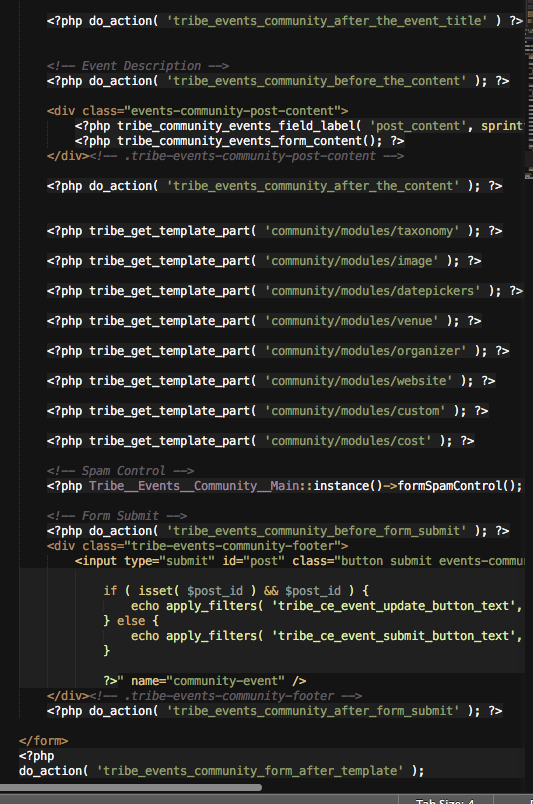
Do you see all those calls of tribe_get_template_part()? Well, simply copying and pasting those into a different order will rearrange the submission form components. Then above these tribe_get_template_part() calls you have code that loads the title and description field and such.
We’re limited in how much we can help with customizations, but I really do hope this information helps, and am happy to try and answer any further questions you might have.
Let me know what you think.
Sincerely,
GeorgeFebruary 3, 2016 at 11:57 pm #1067389ParticipantThanks so much for this REALLY helpful info, it took me a few days to get back but this has really helped. I do have 2 follow up questions
I may have asked the additional fields but I can’t find a response so I’ll toss it out there, if you have answered please forgive me and send a link to the response. If not… No harm, anyway they questions are:
1. Can the content in the “additional fields” be broken up so that one filed can go to the top of the form and another one can go at the end?
2. Is there a way to shorten the drop downs for the beginning/end times so that they fit on one line (they seem to be taking up way more space then needed)?
Thanks so much.
February 4, 2016 at 12:18 am #1067393ParticipantAlso can I rename the “ADDITIONAL FIELDS” label? I tried using the directions for the venue & organizer fields in the functions php file but it didn’t help & I can’t find directions anywhere else.
Thanks so much!
February 5, 2016 at 8:41 am #1068324ParticipantHey @Kadi,
Thanks for your follow-up questions. Just to be reiterate a point I mentioned earlier, we cannot help with plugin customization-related questions, and so I will unfortunately have to close this thread soon. Please see the “Product support” section of this page for more information → http://theeventscalendar.com/terms
As for your follow-up questions here in this thread:
1. Can the content in the “additional fields” be broken up so that one filed can go to the top of the form and another one can go at the end?
Yes, but this could potentially lead to bugs so please tread lightly while you make these sorts of edits! To do this, just head to the file being called for a specific “section” of field content. So when you see this bit of code:
tribe_get_template_part( 'community/modules/taxonomy' );If you would like to make more granular edits to the taxonomy section’s actual content, then just head to the file in views/community/modules/taxonomy.php and then edit this file’s contents directly.
2. Is there a way to shorten the drop downs for the beginning/end times so that they fit on one line (they seem to be taking up way more space then needed)?
This sounds like the result of some CSS and style weirdness arising from the styles on your site. YES there are ways to fix this, but you will have to use developer tools to find the CSS causing this spacing and write CSS to fix this.
Also can I rename the “ADDITIONAL FIELDS” label? I tried using the directions for the venue & organizer fields in the functions php file but it didn’t help & I can’t find directions anywhere else.
Yes. This would require CSS customizing which I mentioned above, but try and be a bit more helpful here, here’s some CSS you could add to hide that label:
#event_custom #event-meta .tribe_sectionheader {

    display: none !important;

}
We cannot help with customizations or any further questions related to customizations. If you have other questions that fall within the “Product support” section of this page please let me know and I’ll try and help!
Sorry to enforce a policy this way, @Kadi. I do sincerely wish you the best of luck with your site.
If you have no further questions here, let me know and I will close up this thread.
Sincerely,
GeorgeFebruary 5, 2016 at 8:35 pm #1068607Participantthank you for getting back to me, Please bear with me as I’m very new to this and I don’t understand what you mean when you say “customization”. I’m assuming you are saying that some of the things I’m looking for are not standard to your supported plugin, but i’m not sure how to tell the difference between something you can assist with vs something you can’t in advance so if it’s ok with you I would like to throw the questions out there & if you can’t/don’t want to help me with them that’s fine please just let me know.
The problem is mostly that I don’t know enough to identify this in advance or what type of help I need to ask for from someone who isn’t familiar with the plugin. Does that make sense?
anyway, regarding the date/time dropdowns I haven’t changed anything related to this, can you look at the page to see it this is how the drop dows are supposed to be displayed? If not can you help me identify the issue as I don’t think it’s related to any customization.
Thanks
February 6, 2016 at 7:15 am #1068859ParticipantHey @Kadi,
The “Product Support” section of this page provides a detailed overview of what “counts” as something we can help with, along with examples of the sorts of things we cannot help with → http://theeventscalendar.com/terms
Please read that and let me know what further thoughts you have.
I cannot provide further assistance with your code. When it comes to the date dropdowns, you may not have changed something related to them yourself, but your question is “how to make them be on one line” because they are not currently on one line; how to customize their appearance, essentially; a customization.
If you have a separate question about drop-downs other than “how to fit them on one line”, please let me know, and sorry in advance for misunderstanding your question!
Sincerely,
GeorgeFebruary 6, 2016 at 8:07 am #1068869ParticipantGeorge, did you look at them? are they currently displayed as they should be?
February 8, 2016 at 4:58 pm #1069867ParticipantWhen I go to the Community Events submission page on your site, I’m unfortunately met with a login prompt as shown in this screenshot:
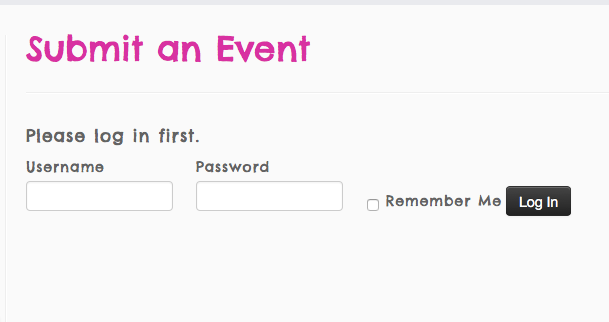
We cannot log into user sites for any reason, so please do not post login information on this site anywhere.
I unfortunately cannot help with any further customization-related questions.
If you think there is a “bug” or other issue with your datepickers that is not a matter of how they look, but a matter of how they function, then please temporarily disable your “Community Events” login requirement so that the page is temporarily visible to anyone with the link.
Then, we will take a look at the issue on the page and continue with troubleshooting those technical issues. I will work quickly so that you can put the page back under login protection as soon as possible.
Thank you,
GeorgeFebruary 23, 2016 at 8:35 am #1080792KeymasterThis topic has not been active for quite some time and will now be closed.
If you still need assistance please simply open a new topic (linking to this one if necessary)
and one of the team will be only too happy to help. -
AuthorPosts
- The topic ‘Can I reorganize front-end submission form?’ is closed to new replies.