
Home › Forums › Calendar Products › Events Calendar PRO › Major bug preventing me launching website.
- This topic has 9 replies, 2 voices, and was last updated 10 years, 8 months ago by
George.
-
AuthorPosts
-
February 2, 2016 at 7:17 am #1066400
Keith
ParticipantI’m surprised this hasn’t been reported before. I don’t know if that means not many people are using WPML, or if means that the people using it haven’t spotted it and are filling up their databases with invalid data.
If you have WPML enabled, when you create a new event and fill in the fields to create a new organizer or new venue, neither the event nor the organizer is created correctly. A record is written to the database, but the newly created event is not assinged to the new ogranizer/event. Neither the event nor the organizer appear in the relevant list in the dashboard. If you subsequently create more events for the same venues/organizes, duplicate records are written to the database.
Geoff suggested a workaround in this post. That is not going to work for me because I’m using Community Events. There is no way I could include instructions for that workaround on the website for end-users.
I currently have a lot of duplicate venues and organizers in my test databases. At this point, I don’t know if that is due to the duplicates bug in the Facebook importer, or if it is due to this bug with WPML. I’m also creating a lot of events programatically. I don’t know whether events created directly with tribe_create_event are also subject to this WPML bug. I’m unable to investigate tribe_create_event further, because as I write this theeventscalendar.com is down with a “domain expired” notice.
I’m perplexed that a bug in something as fundamental as creating an event would be present in the live code. Geoff mentioned that he can’t commit to a date for a fix for this. As you will understand, this is major problem for me. I was intending to launch the website this week. I don’t see how I can go ahead as things stand.
February 2, 2016 at 8:29 am #1066455ParticipantHey Keith,
I’m really sorry to hear about all of these issues. I would like to address a few things separately as follows:
First, a bit out of order but quite relevant, is the fact of our site currently down. This is terribly-timed fluke issue, and I’m really sorry about this! We’ve been having issues since early this morning with our domain registrar. We’ve resolved most of these issues, but the problem is that these issues related to DNS records; so that means that it’ll take time for these fixes to propagate across networks.
Many users in the US, especially on the East Coast like myself, are able to use the site fine. We are still getting some reports of outages from folks on the West Coast, Canada, Europe, South America, and beyond, and are working with our registrar to try and speed up the propagation of these changes.
As for your other issues, there are two main things that are seemingly causing most of the trouble:
• Our incompatibility with WPML.
• Our duplicate-venue/duplicate-organizer/duplicate-event issues with Facebook Importer.
I would just like to touch on the origins of these issues and the scope of our relationship with them. First is WPML – we have long had some sever incompatibilities with WPML and have been trying to roll out releases to address that in the last few months. The problem is that WPML does a lot of weird, specific things – it has myriad features and requires lots of specific development.
So, at this time, The Events Calendar core plugin is the only plugin in our lineup that has any meaningful integration with WPML.
As for the duplication issues with Facebook Importer, these too have been very hard to pin down. We’ve literally been working on that bug for over a year, but the problem has been that it behaves very inconsistently. Sometimes we can reproduce the bug in a consistent way, and then we fix it, but then some weeks later the bug resurfaces as a result of some other steps.
And so the process repeats, and here we are after almost a year with the issue still persisting. (Facebook totally revamped their API earlier last year, to boot, so we also had to rewrite much of the plugin to accommodate their changes.)
Both issues are serious issues, and I don’t write the above elaborations to try and deny that in any way. We have not resolved these issues and that is our fault completely.
I’m sorry about both issues conflating on your site and rendering it basically un-launchable. What can we do to try and make this right? I looked at your licenses and found that they were purchased in October; this makes it impossible for us to process a refund, unfortunately – not by our own choosing, but by limitations imposed by our payment processors themselves (PayPal and Stripe).
If a refund is something you very much want to obtain regardless, then I would recommend emailing us at [email protected] with copies of your order receipts and a link to this forum thread for reference – we can try to get a refund going and I would be happy to try and work with PayPal or Stripe to make that happen.
Are there any other ideas you have for how we can help from here? Part of the reason I wanted to elaborate on the bugs above is to illustrate that these are big, complicated problems – and so unfortunately we cannot get a quick fix out the door for them 🙁
Let me know what you think, Keith. I’m sorry about this situation.
Sincerely,
GeorgeFebruary 2, 2016 at 9:16 am #1066490ParticipantHello George,
What I want is to get my site working. I don’t want a refund. As you can see I bought the licenses in October. I’ve been working on the site since then. The time I have invested in this project dwarfs the cost of the licenses.
I have to say that since I’ve been reading these forums I have noticed a pattern.
When I was first evaluating the various Event Calendar products, one of the major deciding factors in choosing The Events Calendar was that it seemed to be well supported. The license fees are much higher than those of the competitors, many of whom have a one-time payment model and free support for life, but it seemed to me that paying extra for TEC licenses would be money well spent, if it meant getting solid support.
What I regularly see in the forums however is the kind of reply you have written above. It’s very friendly, very apologetic, but the message is always the same: we will fix it when we can. We can’t say when that will be. Sorry. End of story.
It’s weak to say that WPML is hard and weird and so you haven’t been able to fix it in over a year. You’re charging substantial license fees. People paying those fees have a right to expect the people receiving them will be professional and capable of dealing with hard problems. That’s what you pay professionals to do.
What possible ideas can I have about how to fix it? To fix it you need to allocate resources to it. You need to prioritize it. You could allocate someone to it and tell that person to keep this thread updated. The Facebook problem I can deal with myself by manually deleting duplicates. Not so for the WPML one.
Regards,
KeithFebruary 2, 2016 at 10:31 am #1066516ParticipantHey Keith,
I appreciate your thoughtful reply and cannot disagree with much of it. The crux of the problem in this present moment comes down to what you wrote here:
What possible ideas can I have about how to fix it? To fix it you need to allocate resources to it. You need to prioritize it.
The problem is that, if the nature of the bug is that it’s elusive and complicated, then even when we do the things you mention, a successful outcome is not guaranteed.
Both of the bugs that are inhibiting your site launch are elusive and complicated.
As an example, here’s a Pull Request one of our developers submitted for the Facebook issue in just the last few days:
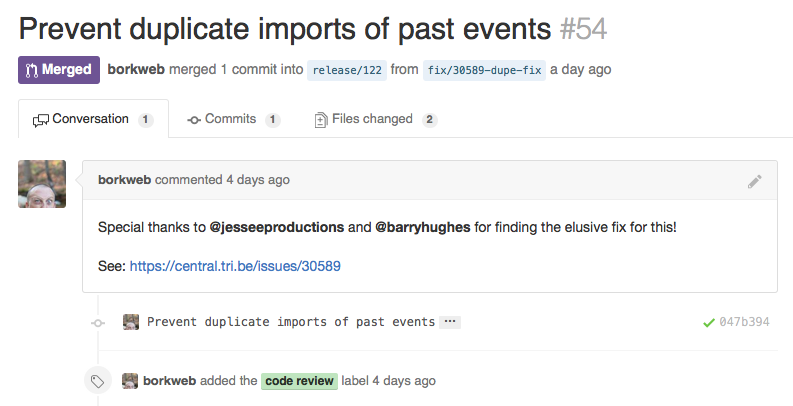
That’s great news, right?
Well, unfortunately, yesterday that fix failed a QA pass 🙁 And then arises the issue I mentioned earlier, where the behavior is inconsistent and we sometimes can produce the same errors, sometimes not, etc. As evidence of this, here’s a screenshot where the QA Engineer and the Developer have different results:
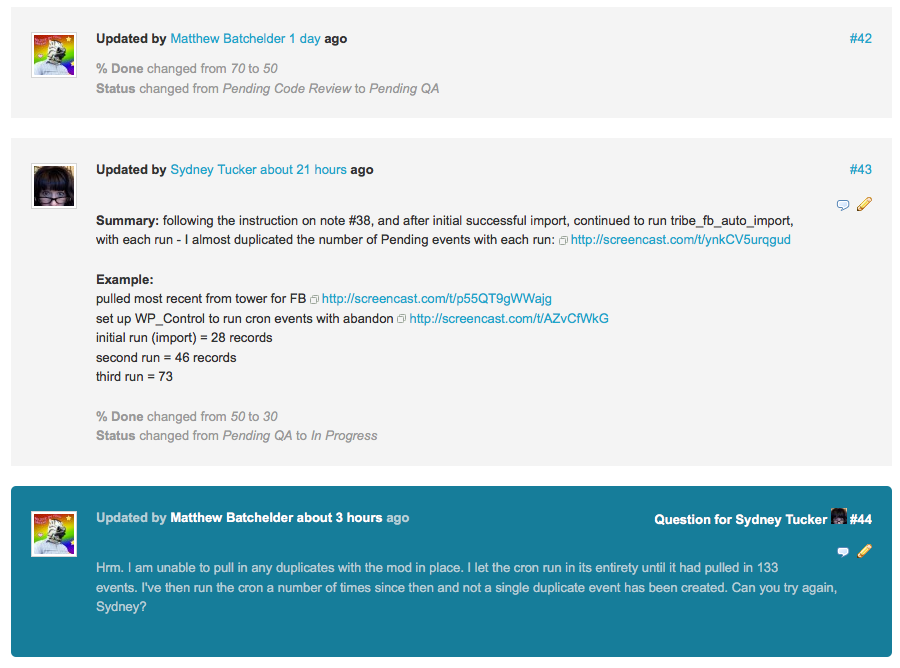
These screenshots do not fix the bugs on your site and do not change the frustrations here; however, I hope they at least prove that I am not being dishonest.
When it comes to WPML, the bug-tracking conversations are just as complicated and hard to pin down. WPML does many non-standard things to power its translation features–which is wonderful! It’s their inventive approach to languages that makes it a useful plugin to begin with.
However, their non-normative approaches to WordPress plugin development make it an enormous investment of time to itemize, develop, code review, and QA the reformatting of huge parts of our code–across all 11 of our products–to adhere to the way WPML decides to do things.
We have done this with The Events Calendar itself; but we are still in the process of completing the transition with our other products.
Your feedback is appreciated and, as I said, I cannot disagree with much of it. However, a code fix for either issue will not happen in the short-term. I am genuinely sorry about this, Keith.
– George
February 2, 2016 at 10:44 am #1066525ParticipantGeorge,
Leaving aside the Facebook issues and concentrating on the specific WPML issue I have raised.
You have mentioned twice in this thread the core TEC is compatible with WPML. Elsewhere on the site it says that you support it. I remember reading a blog post about WPML when I was looking at the various Event Calendar options. That post talked about how exited you all were to officially support WPML. It was another deciding factor in my decision to choose the TEC over its competitors.
The bug that I have raised in this thread IS core TEC. How much more core can you get than creating an event? The links to Organizer and Venue are part of Pro, but the creation of an event is clearly part of the core.
I don’t believe this problem is anything that you have yet investigated. To re-iterate: if you create an event using the core event page, and include a new venue or organizer, neither is created correctly. Is that not core TEC?
This bug must be affecting everyone with WPML installed.
Regards,
KeithFebruary 2, 2016 at 10:58 am #1066530ParticipantHi @keith,
I will investigate your bug anew to see if I find the same results; at this time, there is no report of this exact behavior from other users or in our bug tracker. [which doesn’t mean the bug doesn’t exist, of course; I’m just relaying that it isn’t presently logged anywhere]
Before I begin investigating, I took a look at your other thread with Geoff B. I appreciate the screenshots you shared there and will be using your information there to try and recreate the issues.
Can you confirm if you have you set up WPML on your sites with The Events Calendar exactly as described in this KB article: https://theeventscalendar.com/support/forums/topic/404-error-for-new-organizer-created-with-new-event/?
If not, does ensuring things are configured in line with that article make any difference with the behavior of these issues?
Thank you,
GeorgeFebruary 2, 2016 at 11:02 am #1066533ParticipantHi George,
I did set up the sites according to the guidelines. Further, Geoff said that he reproduced the problem. I don’t know if he used the log-in I provided to my site or used his own test site. I had the impression that he’d used his own site, although he didn’t specifically say so. I’m sure if he used his own site, it would have been set up correctly.
Regards,
KeithFebruary 2, 2016 at 12:01 pm #1066561ParticipantHey Keith,
Geoff has been a huge help on this and I’ve been able to confirm that the issue exists as you’ve described; this is a new bug, and I’ve elevated its priority so that we can hopefully get more urgent attention on this bug.
We will not be able to fix this in time for the forthcoming 4.1 release, and I am sorry about this Keith. But the bug does exist and I will push this for to be among the main bugs of the maintenance release we are also working on, which should arrive in a few weeks at most after the 4.1 release.
Thank you,
GeorgeFebruary 3, 2016 at 2:39 am #1066739ParticipantHi George,
Please update the thread when the fix is available.
Regards,
KeithFebruary 3, 2016 at 8:46 am #1067081ParticipantHey Keith,
We unfortunately do not provide per-thread updates for fixes. There are some cases where, for example, if a fix were to be coming in the next few days I would definitely leave the thread open and manually update this thread.
However, while the ETA for the fix in question here is not definite, it is definitely not going to arrive within 2 weeks, which means that our Support Droid will be auto-closing this thread after 2 weeks anyways.
In the “Changelogs” of our updates, you will see all of the fixes and additions in that release; if something as big as a WPML incompatibility fix is included in a given release, it will be noted right there in the changelog.
These logs are readable inside your wp-admin when updates are available; and release notes are also published at http://theeventscalendar.com/blog.
I would recommend updating every time there is an update available; each update includes stability and security fixes. So: update every time, and check the changelogs for the updates as you manage your site going forward. This compatibility fix will be noted there when it arrives.
That could be several weeks from now, or a few months from now. I am sorry that I don’t know more, Keith, and it’s this ambiguity that makes leaving this thread open for updating untenable over time.
I will close this thread for now. If possible, I will try to update this thread despite what’s written above, but wanted to set your expectations here about our per-thread updating policy.
I sincerely wish you the best with regards to your project.
— George
-
AuthorPosts
- The topic ‘Major bug preventing me launching website.’ is closed to new replies.