

Forum Replies Created
-
AuthorPosts
-
George
ParticipantHey @Bart,
Thanks for the fast reply here.
Your question is interesting, and it is possible that simply adjusting the load order of plugins would make a difference here. This is, however, admittedly quite unlikely in my opinion.
Regardless of that opinion, manually dictating the plugin load order is something quite complicated and not something that I would personally recommend. It’s not something we can assist with, either 🙁
But it is possible. Here’s a plugin that allegedly lets you control plugin load order: https://wordpress.org/plugins/plugin-organizer/
I have no experience with that plugin and cannot attest to its quality, but there’s also manual code you can try, such as that exemplified in this blog post: http://stv.whtly.com/2011/09/03/forcing-a-wordpress-plugin-to-be-loaded-before-all-other-plugins/
I hope these links help!
Best of luck with your customizing,
GeorgeParticipantHey @Bart,
Thanks for this update. In the future, you should be able to use Yoast SEO without issue; I appreciate your patience with us in the meantime, while we work on better compatibility with that plugin.
Thank you!
GeorgeParticipantNice!
Best of luck with your project 🙂
— George
February 1, 2016 at 9:26 pm in reply to: Moving the Tickets Plus form 'code' crashes the site #1066088ParticipantAwesome! Thank you for the update Colby. Glad you’ve got this fixed.
I will close up this thread for now, but please open a new thread any time if other questions arise.
Best of luck with your project!
GeorgeParticipantHey Eric,
Thanks for the link and information here.
Items #1 and #3 in your above reply are a bit complex and would require template-level tweaks, for which I would recommend reaching out to the Avada folks if you want these features over all.
To implement #2 that you gave though, you can do that by adding the following CSS to the bottom of your theme’s style.css file:
body.single-tribe_events .sidebar.fusion-widget-area .tribe-events-event-meta {

    display: none !important;

}
Here’s how that makes things look:
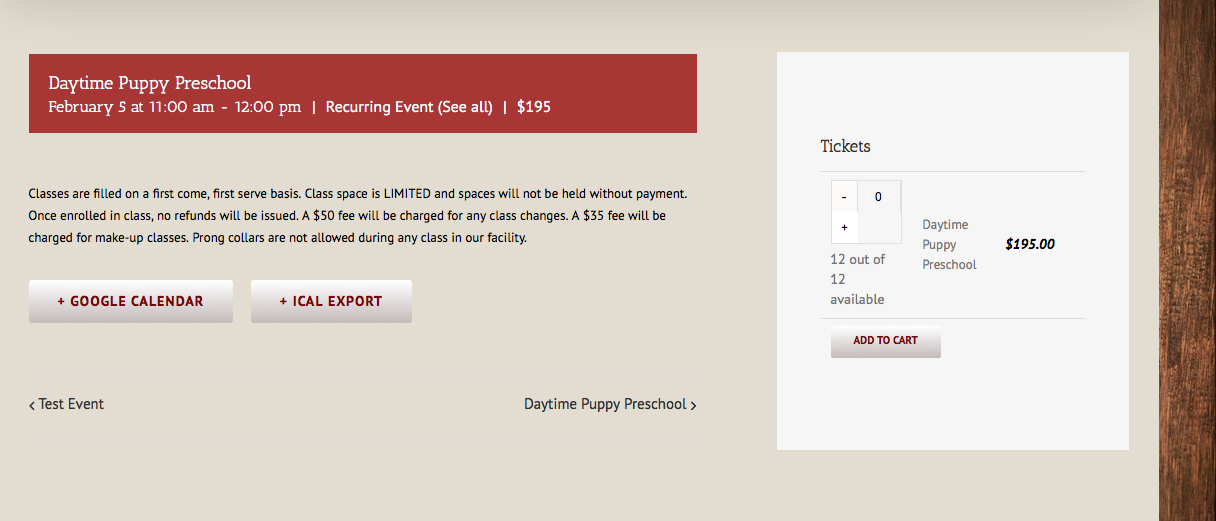
I hope that helps! For more advanced tweaking, reach out to the Avada folks and/or consult our “themer’s guide” here to learn how to do template-level customizing → https://theeventscalendar.com/knowledgebase/themers-guide/
Cheers,
GeorgeFebruary 1, 2016 at 1:13 pm in reply to: Change Upcoming Events Thumbnail From Circle to Square #1065958ParticipantNice – best of luck with your site 🙂
— George
ParticipantHey @Alvaro,
Thanks for this – I see a JavaScript error on your single-event pages that is coming from an outdated version of the Twenty Sixteen theme. If you delete your existing version of the Twenty Sixteen theme and then download a fresh copy of it from wordpress.org, then install and activate this fresh version, does the issue persist?
Here’s where to get a fresh copy of the theme → https://wordpress.org/themes/twentysixteen/
Deleting the existing copy of the theme will not erase site content data, though backing up your site beforehand is a good idea no matter what the risk! 🙂
Let me know what you find!
GeorgeParticipantHey Fabian,
I do not see the application in our system; perhaps it was accidentally labeled “spam” by our spam filters? I would recommend submitting again – sorry for the trouble here!
— George
ParticipantSounds good Keith!
Let’s go over adding a featured image – this is also referred to as “post thumbnail” throughout WordPress Core, so while it sometimes might seem inconsistent, know that both terms are referring to the same thing.
To add a post thumbnail the image needs be in the Media library and needs to have an attachment ID. If you’re not sure what these things imply then, unfortunately, elaborating on these details is a bit outside the scope of support we can provide but you can learn more on http://codex.wordpress.org and other resources.
But as long as the image has an attachment ID, you can use the WordPress Core function set_post_thumbnail().
An example would look like this:
// $event_id is the ID of the event.

if ( $thumbnail_id ) {

    set_post_thumbnail( $event_id, $thumbnail_id );

}
Learn more here → https://codex.wordpress.org/Function_Reference/set_post_thumbnail
As for adding images to content, this is a bit simpler because the images DO NOT have to be in the media library. Literally all you need to do is have the HTML for an img tag in the text content, and you’re good to go.
tribe_create_event() is just a wrapper for wp_insert_post(), so learn more about wp_insert_post() here for starters → https://developer.wordpress.org/reference/functions/wp_insert_post/
So, you’d just need to add your img HTML tag to ‘post_content’.
Let’s take the arguments from the original example you linked to:
$my_post = array(

   'post_title'       => 'My post',

   'post_content'     => 'This is my post.',

   'post_status'      => 'publish',

   'post_author'      => 1,

   'EventStartDate'   => '',

   'EventEndDate'     => '',

   'EventStartHour'   => '2',

   'EventStartMinute' => '29',

    ... MORE EVENT DETAILS ...

);
That’s not all of the args, just a snippet to make the point.
To add an image to the post_content you would just add the image tag to the post_content. Let’s say the image is this one: https://cldup.com/78orE8fvms-3000×3000.png
Here’s the args with that img in the post_content:
$my_post = array(
'post_title' => 'My post',
'post_content' => 'This is my post, and here now is an image: .',
.',
'post_status' => 'publish',
'post_author' => 1,
'EventStartDate' => '',
'EventEndDate' => '',
'EventStartHour' => '2',
'EventStartMinute' => '29',
... MORE EVENT DETAILS ...
);With this information, researching online, and tinkering around with things a bit, I’m sure you’ll be able to put together the solution you want.
Best of luck with your custom development!
Cheers,
GeorgeParticipantThank you for searching for that, and for your patience here!
I did some more digging and found the problem, and found that it’s actually stemming from the way Filter Bar constructs the filter tabs. They actually don’t even use translatable strings, they are auto-generated in the code.
This means that, unfortunately, the only way to translate the text of that “Event Category” filter title is to add code like the following to your theme’s functions.php file:
function tribe_translate_filterbar_filter_title( $title, $slug ) {if ( ! empty( $slug ) && 'eventcategory' == $slug ) {
$title = 'New Title';
}return $title;
}add_filter( 'tribe_events_filter_title', 'tribe_translate_filterbar_filter_title', 10, 2 );
Where you see the text that says ‘New Title’, you can add your Russian version of the phrase “Event Category” and it should replace it correctly.
I’m sorry that this is required to change the text! We can definitely improve this over time. But I hope this code and suggestion help for now.
Thank you,
GeorgeParticipantHey Francisco,
Thank you for sharing this information!
Unfortunately, what you describe is a straightforward case of a plugin code conflict. Code within the WP-Smush is breaking calendar features 🙁
We do not make or support WP-Smush, so your best bet would be to reach out to the developers of that plugin for some further assistance and investigation as to why that would break this.
I will try to help investigate this a bit, but wanted to write the above disclaimers to set your expectations and not get your hopes up about this.
For starters, can you confirm if by “WP-Smush” you mean this plugin? → https://wordpress.org/plugins/wp-smushit/
If not, then can you link to the specific plugin you are referring to?
Thank you!
GeorgeParticipantHey Alexander,
No worries, it’s translated in a number of locations in the file and I would recommend using the “find” feature of a code editor; there are many free code editors like Sublime Text if you don’t have one on your computer already.
But then once you have a code editor with a “find” feature, simply search for these terms in the file:
Archiveand:
%s ArchiveI recommend this approach because .mo and .po files change quite often, so if I were to list out line-numbers based on my own file it may not be accurate. And this method of searching will work for all future file versions, too 🙂
I hope this helps! If you see the word “Archive” on the front-end on your site and cannot find it in the mo or po files, then can you take a screenshot of this specific place on the front-end? We may have a bug where that specific instance of the word is not translatable, which we can fix in an upcoming release…
Thank you!
GeorgeParticipantNo problem! I unfortunately don’t have any more updates at this time, but we’ve introduced a number of translation-related fixes in the next release. So, stay tuned for that when it comes out — it’s coming some time in the next few weeks, and should address a number of issues.
Some strings will not be translated upon release, of course, because translations are community-submitted. So it might take some time for any new translations to be posted. But more strings should be translatable, which is a huge part of some of the issues touched on in this thread…
I’ll close up this thread for now. Best of luck with your projects in the meantime 🙂
Cheers,
GeorgeParticipantHey @ejimford,
Thanks for being cool despite a frustrating plugin conflict here, and for your patience with the delayed reply over the weekend. Happy Monday 🙂
In regards to the bug, the bug ticket is created and as we near the launch of a new release, developer time will be newly allocated for the next release cycle and hopefully this is one of the bugs that makes it into that release.
In the meantime, when it comes to enqueueing a better version of Select2, I downloaded the free version of Advanced Custom Fields to try and find the script; it turns out that it doesn’t exist in the free version of the plugin.
So then it’s likely originating from a premium add-on for Advanced Custom Fields. Does this sound appropriate? Do you have any premium add-ons for Advanced Custom Fields on your site?
If so, I would recommend uploading zips of these of these add-ons to a site like http://cloudup.com or http://ge.tt, and then sharing links to those zips. I will download them and look for the script there.
Please note that this is not a shady file-sharing sort of thing 🙂 The plugins, even if premium, are GPL-licensed, so sharing them this way is at least legal and above-board. However, to be clear, I’m only requesting these files because I do not have them myself. I don’t use ACF so I’m only using these files to search for the script in regards to this issue.
Once I’ve download the files I can let you know and then you can delete those links or anything you’d like – for this case, uploading the files to Dropbox might be a great alternative, too, since deleting posted files from that is quite easy…
Apologies for the long post – let me know what you think here, and if you are able to post the files for your premium ACF add-ons, let me know what the download links are for those! 🙂
Cheers,
GeorgeParticipantHi @Bart,
This “from” address is configured by WordPress, not by our plugins.
That is why it’s [email protected], which means that to change this, then, you would need to use some custom coding or a plugin on your site.
To learn about how to change this, you will have to do some research on “how to change the from address in wp_mail()” – you should end up on pages like this one: https://developer.wordpress.org/reference/hooks/wp_mail_from/
That function there is a filter you can use to change the address – try it out and research any aspect of this that you’re not familiar with, and you should be able to arrive at a solution that works well for your project.
Cheers!
George -
AuthorPosts
