

Forum Replies Created
-
AuthorPosts
-
George
ParticipantHi @Bart,
If the issues only occur when you activate that plugin, then unfortunately I’m sorry to admit that this sounds like a straightforward plugin conflict. This means that no, there are no workarounds at the moment.
The behavior is indeed interesting, in that it works with some views but not others; but the plugins cannot currently be used together without issue, it seems.
I’m sorry about this! 🙁 Please let me know what you think and if there are any further questions I can help address.
Sincerely,
GeorgeParticipantHi @Bart,
At this time you can only change this with some custom coding.
For example, if you wanted to use “Our Classes” instead of “Upcoming Events”, you would add code like the following to your theme’s functions.php file:
add_filter( 'tribe_events_title', 'tribe_change_upcoming_events_text' );function tribe_change_upcoming_events_text( $title ) {
return 'Our Classes';
}
I hope this helps – cheers! 😀
— George
ParticipantHi @Bart,
For your first issue, I’m curious – do you happen to have Yoast SEO installed on your site?
If so, I would recommend the first code snippet that Brian shares in this other thread about this → https://theeventscalendar.com/support/forums/topic/events-page-title-and-section-title-incorrect/
Add that code to your theme’s functions.php file and see if it helps at all.
Next, for your second issue – I did not see the h1 you are referring to specifically, but did see an empty h1 tag so I assume it’s the same thing. To remove this, try adding the following CSS to the bottom of your theme’s style.css file:
body.post-type-archive-tribe_events .page .post-wrap h1 {

    display: none !important;

}
I hope this helps!
GeorgeFebruary 1, 2016 at 8:44 am in reply to: Community Event Calendar – 2 Calendars Public and Private #1065805ParticipantHey @AD,
This is unfortunately not possible with our plugins at this time 🙁
Sorry to disappoint! Let me know if there’s anything else I can help with.
Thank you,
GeorgeFebruary 1, 2016 at 7:48 am in reply to: Need the recurring events toggle on "My Events" page #1065769ParticipantHey @Teresa,
Thanks for reaching out. I can confirm that, at this time, there is not support for instance-toggling of recurring events in Community Events. It’s a great idea and definitely something that we should implement.
I will look to see if we have any current plans or developer tickets for this feature at this time; if not, I’ll make one myself and get it posted for an upcoming release!
I’m sorry that this isn’t available at this time 🙁 But thank you for making your voice heard and putting this on our radar!
Let me know if there’s anything else I can help with!
Sincerely,
GeorgeParticipantHey @Keith,
Thanks for reaching out.
When you say “add an image to the event”, do you mean that you want that image to be the “Featured Image” of the event? Or are you trying to add the image to event content, inline with the text of the description and such?
We cannot help with custom coding, but if you clarify the goal here I will try to write an example of code that you could take and tinker around with 🙂
Thanks!
GeorgeParticipantHey @Alvaro,
Really sorry to hear about this!
I’m afraid that there’s unfortunately little we can do help troubleshoot your issue here until we are able to see see the problems first-hand on your site. You mention this:
The site is currently in “Coming Soon” mode, so I´m afraid I can´t provide al ink right now.
I totally understand “coming soon” mode! No worries here, it’s just that I, for example, cannot recreate this bug on my own local testing site. I have searched our bug tracker for reports of this and see no such reports; so to investigate this I would need to see your site firsthand.
Would you be at all able to temporarily, for the duration of this support thread only, make your site publicly visible and then share a link to some single events where we can take a look?
We cannot log into customer sites for any reason, so you unfortunately cannot post login information that we could then take to log into your site and see it; the site would have to be made publicly-visible for a temporary bit of time.
I’m sorry about this @Alvaro! Please let me know what you think and if you could be able to open up the site temporarily for viewing. If so, by the way, I will prioritize this issue and work as quickly as possible to minimize the amount of time your site is just sitting there in public while still in “Coming soon” mode!
Sincerely,
GeorgePS: No worries about the double-post 🙂
ParticipantHey Pete,
Thanks for reaching out.
If you only want to use existing calendar features, then the most straightforward way of implementing something like this would be to just use Event Categories.
You’d basically one Event Category for each city, and then one Event Category for each activity/event-type.
Then you could offer filters for events that are in various combinations of categories.
So, for example, “Sports” events in City1 and City2 would be events that have the “Sports” category and then also a category of City1 and City2, but not if it has a category of city3 or no city-related category at all.
You could quite clever with this.
Now, how would you actually build interfaces in your theme so users could select such categories easily?
If you check out our demo site at http://wpshindig.com/events/, you’ll see that the “Event Category” filter there allows for multi-category filtering like this.
This requires The Events Calendar and the premium add-on The Events Calendar: Filter Bar.
If you need any other type of UI for these filters, then unfortunately none of our plugins provide that UI and so you would have to custom-build the filters for your site. This is especially true if you do not want “cities” to be categories, but you want some sort of auto-filtering/matching based on the Venue location of the event and such.
I hope this information helps! Let me know.
Cheers,
GeorgeFebruary 1, 2016 at 7:07 am in reply to: compatible with sharepoint? colour coded categorization? #1065725ParticipantHey Nat,
Thanks for reaching out. There’s good news and bad news here, the bad news being that there is no special integration with SharePoint 🙁 Maybe our plugins are still things you could find useful, but in terms of features related to SharePoint integration specifically, we have none.
The good news is that yes, you can do category-based colorization very easily. This is another thing that is not included in our code by default, but there is a free (unofficial and not supported by us, but free and well-made) plugin for this on WordPress.org → https://wordpress.org/plugins/the-events-calendar-category-colors/
I hope this information helps!
Cheers,
GeorgeParticipantHi @Jill,
Is this thread also written by you? → https://theeventscalendar.com/wp-admin/post.php?post=1065431&action=edit
I know the names are different, but these threads were posted very, very close in time to each other and are very similar in content, so was just wondering. No worries either way 🙂
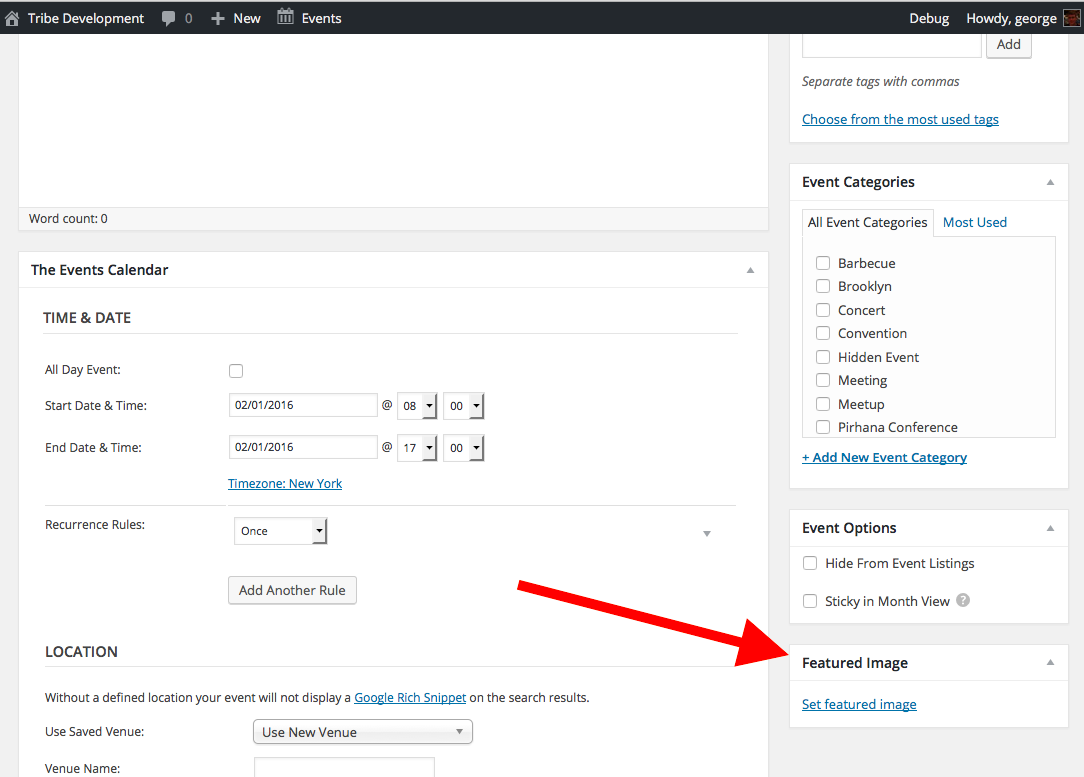
As for your actual questions, it seems like you mean that the literal “Set featured image” box is not showing in the admin. Is this correct? The box I am referring to is in the screenshot below:
If the issue is indeed the absence of this box, then can you start by going to the top-right corner of this admin screen and looking for the tab that says “Screen options”? Another screenshot for reference:
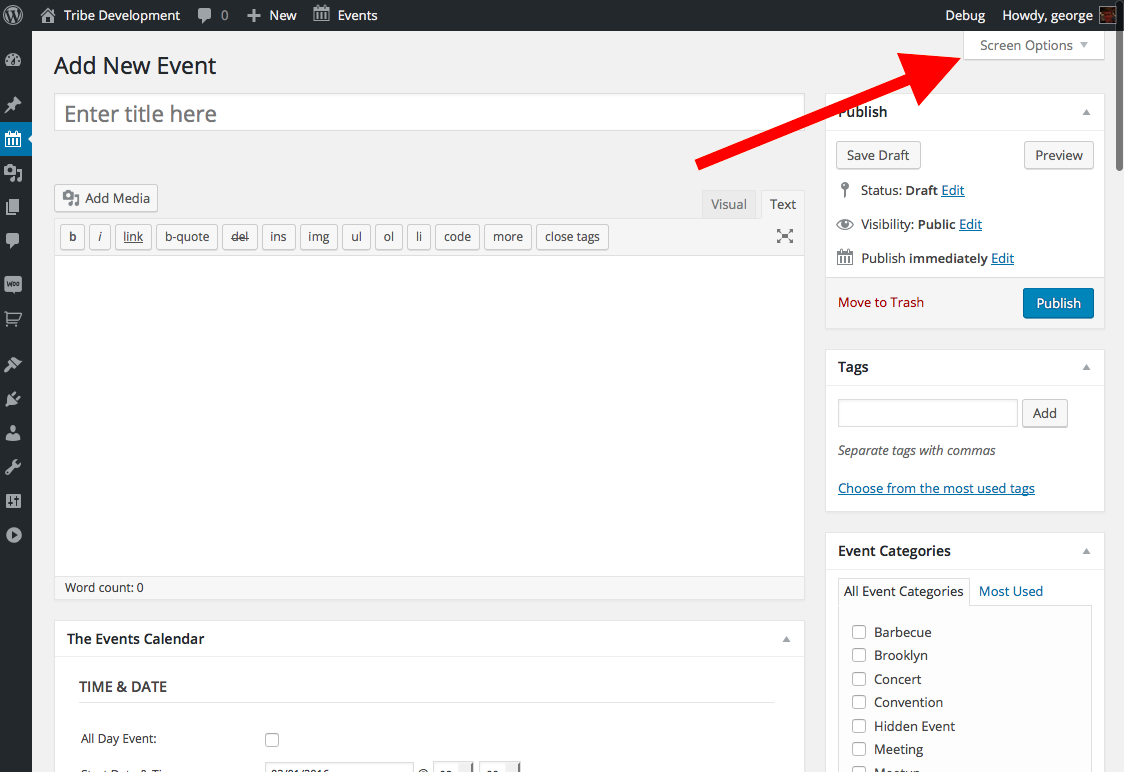
Click “screen options”, which should reveal a drawer of checkboxes.
1.Do you see a checkbox called “Featured Image” in this drawer of checkboxes? Screenshot:
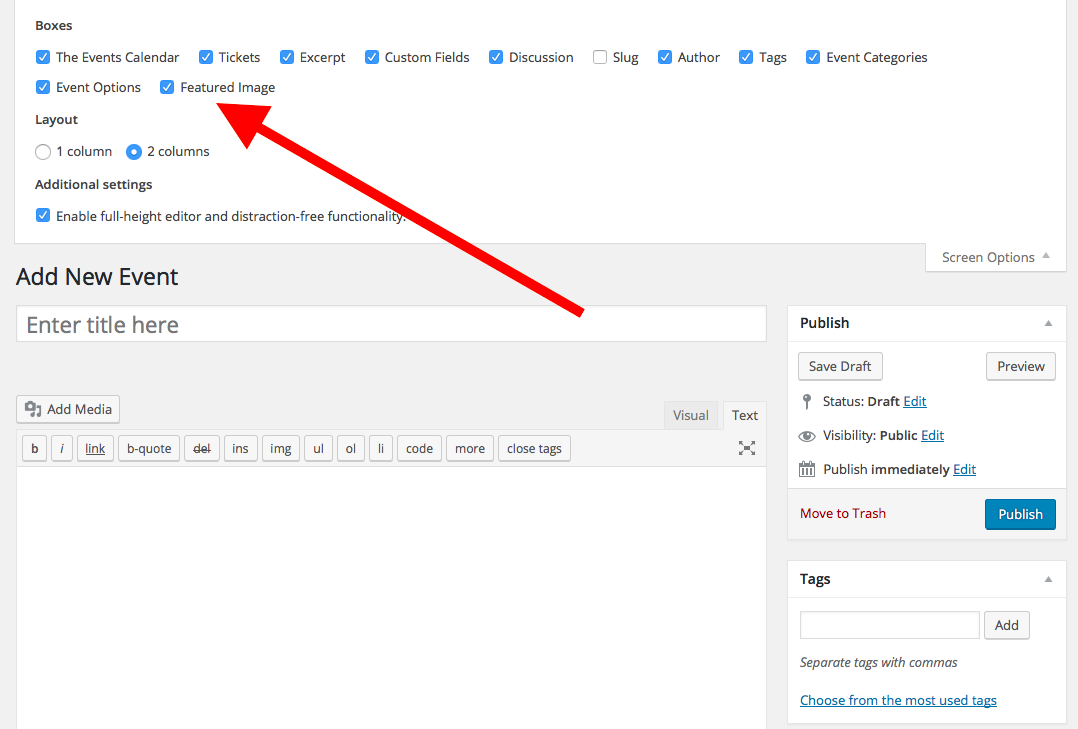
2. If “yes” for #1, does checking that checkbox solve the problem?
3. If “no” for #1, then I would recommend running through all of the troubleshooting steps outlined on this page → https://theeventscalendar.com/knowledgebase/testing-for-conflicts/. After each step in that process, check the “screen options” tab for that checkbox and see if you can get the box to appear.
I recommend all of the steps above because nothing stood out to me as problematic in your “system information”, and so the above investigation is the best set of steps for revealing more about this issue. We can try other things based on your findings here, but these steps are important, so let me know what you find!
Cheers,
GeorgeFebruary 1, 2016 at 6:48 am in reply to: Change Upcoming Events Thumbnail From Circle to Square #1065718ParticipantHey @Brahim,
This is not a widget that our plugins are generating. This is a widget from some other plugin or from your theme that is using the ‘av-‘ prefix in its CSS.
We unfortunately cannot help with software that is not our own, especially when it comes to custom coding and design-related things.
That being said, I did take a quick look at your site – I’m not quite sure why your CSS didn’t take effect, but what I would recommend is to go to the very bottom of your theme’s style.css file and add the following bit of code there:
.av-upcoming-event-entry .av-upcoming-event-image {

    border-radius: 0 !important;

}
If this does not help, then unfortunately the best step I could recommend from there would be to contact the developer of that widget for further assistance.
Thanks,
GeorgeParticipantHey @arleym,
Cool, I really appreciate your patience here even though I had to bear some bad news about, for example, our ability to help with custom code and such.
Thanks for your politeness and for the interesting questions – we don’t see Require JS come up much around here! 🙂
Best of luck with your site! And if you’re ever looking for developers to help with customizations, here’s a list of folks who we have no affiliation with but are just well-respected names in the community → http://m.tri.be/18k1
Cheers,
GeorgeJanuary 31, 2016 at 7:32 pm in reply to: Avada Theme – The Events Calendar Pro not being recognized #1065429ParticipantAwesome! Thanks for the update here Peggy.
I’ll close up this thread for now but open a new one any time if other issues arise 🙂
Cheers,
GeorgeJanuary 31, 2016 at 7:31 pm in reply to: Trying to activate Community Events plugin takes down website #1065428ParticipantAwesome! Glad to hear this. Thanks for your patience with the process here 🙂
I’ll close this thread for now, but open up a new one any time if other issues arise!
Cheers,
GeorgeJanuary 31, 2016 at 7:30 pm in reply to: Would like to sell ads to display in calendar area #1065425 -
AuthorPosts