
Home › Forums › Calendar Products › Events Calendar PRO › Deleting standard sidebar
- This topic has 6 replies, 2 voices, and was last updated 10 years, 8 months ago by
George.
-
AuthorPosts
-
January 29, 2016 at 2:46 pm #1064713
Eric
ParticipantFor the life of me, I can’t figure out how to get rid of (or at the very least, modify the colors) in the sidebar where it says “Details” and “Organizer”. Where can I modify the content or turn it off?
I’m running the latest version of Avada as my theme.
Thanks!
https://www.dropbox.com/s/rymir51qnymp06w/Screen%20Shot%202016-01-29%20at%205.44.25%20PM.png?dl=0
January 30, 2016 at 6:17 am #1065000ParticipantHey Eric,
This is a theme and design-related question so there is unfortunately only a limited amount of things we can help with here – I only mention this to set your expectations and such, but am still happy to help 🙂
Can you share a link to this page directly, so I can check out? Also, can you clarify exactly what you would want here? Are you hoping to remove the organizer and details modules completely, or simply change the green background text in the image to be the same background as the rest of the module container?
Thanks,
GeorgeFebruary 1, 2016 at 8:51 am #1065813ParticipantHere’s what I’d like to be able to do. Either:
1) Change the colors and be able to modify the contents (what information is shown).
2) Get rid of the module, but be able to keep the ticketing area (for the Events plugin) so that people can buy tickets.
3) #1 plus the ability to move where the buy tickets button is placed.
February 1, 2016 at 8:51 am #1065814ParticipantThis reply is private.
February 1, 2016 at 1:17 pm #1065962ParticipantHey Eric,
Thanks for the link and information here.
Items #1 and #3 in your above reply are a bit complex and would require template-level tweaks, for which I would recommend reaching out to the Avada folks if you want these features over all.
To implement #2 that you gave though, you can do that by adding the following CSS to the bottom of your theme’s style.css file:
body.single-tribe_events .sidebar.fusion-widget-area .tribe-events-event-meta {

    display: none !important;

}
Here’s how that makes things look:
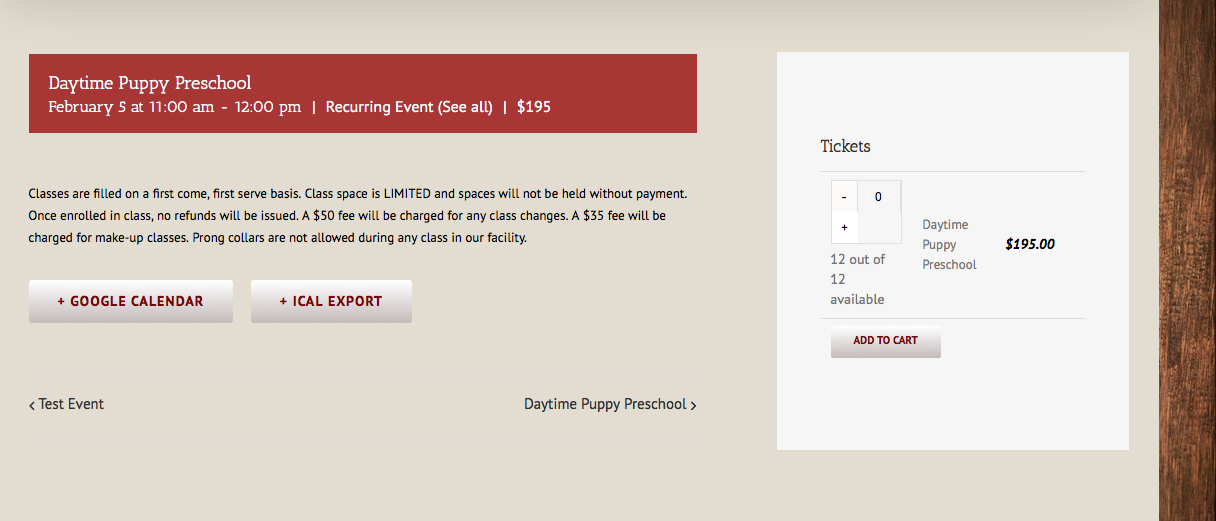
I hope that helps! For more advanced tweaking, reach out to the Avada folks and/or consult our “themer’s guide” here to learn how to do template-level customizing → https://theeventscalendar.com/knowledgebase/themers-guide/
Cheers,
GeorgeFebruary 1, 2016 at 1:22 pm #1065967ParticipantUnderstandable on #1 and #3. #2 will work perfectly for the time being and I’ll reach out to Avada about the other inquiries. Thanks so much for your help George!
February 2, 2016 at 11:07 am #1066536ParticipantThanks for the update @Eric – I’m sorry about not being able to dive into #1 and #3, but indeed hope #2 is a good temporary fix for now.
Best of luck with your project! 🙂
Cheers,
George -
AuthorPosts

- The topic ‘Deleting standard sidebar’ is closed to new replies.