

Forum Replies Created
-
AuthorPosts
-
George
ParticipantSounds good Roger! Thanks for the fun replies here. I hope our products work well for your project–and if not, please be sure to request a refund before 30 days from your date of purchase!
[More info on that, and steps on getting a refund in general, here → https://theeventscalendar.com/knowledgebase/refund-policy/%5D
Cheers!
GeorgeParticipantHey Angela,
Sorry for the delayed response here!
1. Question One
I’m curious, do you mean that in your wp-admin you do not even have the “Featured Image” metabox as shown in this screenshot:
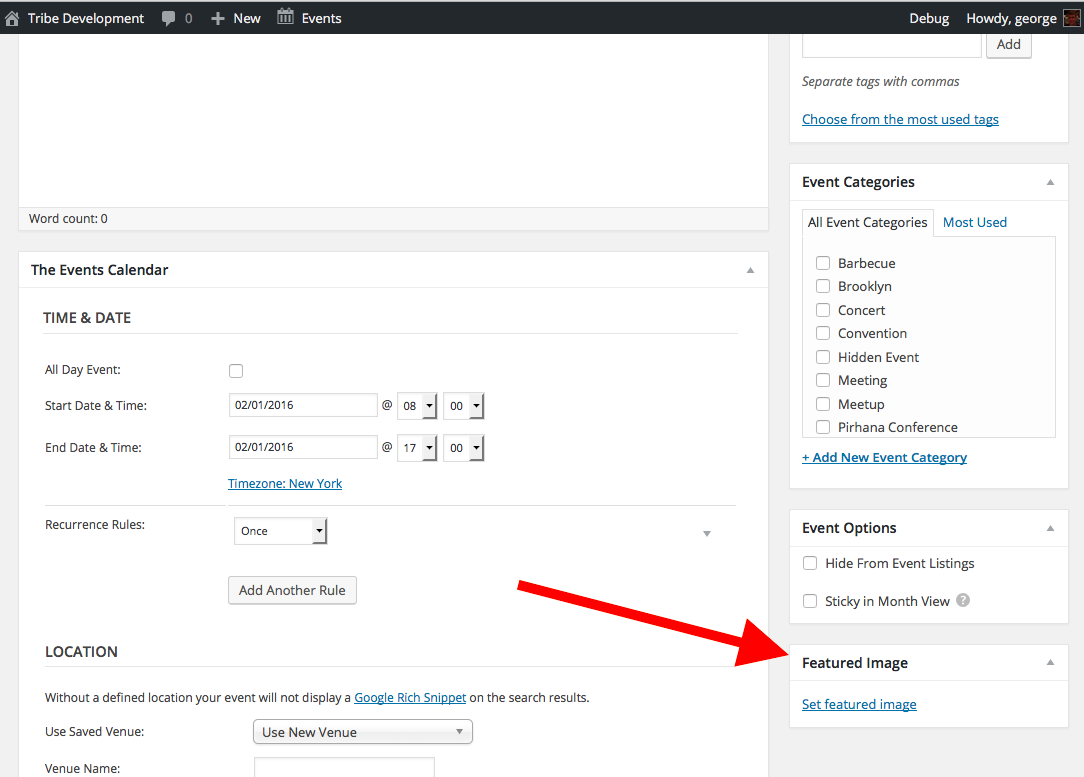
If this is what you mean, then does anything change if you use the “Screen Options” tab to reveal this metabox? This process is demonstrated in these two screenshots:
• https://cldup.com/bboWaFhNO4-3000×3000.png
• https://cldup.com/MghDpmAZLA-3000×3000.png
2. Question Two
If that “Featured Image” metabox does show up on edit-event screens, then can you clarify when the bug actually arises? Does it manifest as:
• The “featured image” metabox shows up, but when you try adding an image using it, the image disappears when you save the event?
OR
• The “featured image” metabox shows up, and it saves the images you choose fine. But it just doesn’t show up on the front-end?
3. Question Three
Can you include your “system information” in a reply on this thread? Here’s how to do that → https://theeventscalendar.com/knowledgebase/sharing-sys-info/
If you address each of the 3 main questions here, that will give us a much clearer picture of your issues and a lot of information to work with to facilitate the investigation of their source.
Thank you!
GeorgeParticipantHey Mark,
Thanks for reaching out and for your interest in our plugins! The list here is indeed quite detailed.
There are enough details that our plugins do *not* provide that, unfortunately, I’d have to admit that our plugins are probably not the right tool for the job.
Could our plugins be modified to meet all of your needs, in theory? Yes. But in terms of “out of the box” functionality, things like your breakdown of “fee info fields” and the integration with Library PIN card systems are very far outside the scope of what our plugins provide.
The Events Calendar itself is free, so perhaps your best bet is to play around with that firsthand and see if it’s something that’s worth trying to hack to meet your specific project needs.
Event Tickets is free as well; we’ve got a no-questions-asked 30 day refund policy if you’d like to tinker with any of our Premium Plugins, too.
I hope this approach is a helpful one. Best of luck with your experimentation!
Sincerely,
GeorgeParticipantHey Susan,
Thanks for reaching out.
Can you clarify your exact question here? For example, your post opens with “Would we be able to then merge the 2 event pages” – is this thread a continuation of another conversation from elsewhere? If so, share a link to the other thread that leads here.
As for your questions, there are no event-merging features and there is not a way to add “tabs” on the list view without custom coding those in place. We cannot help with that custom coding so you would have to hire a developer to do that for you, or build it yourself if you are comfortable editing code.
As for color-coding different events, yes, you could give the events different categories and use a plugin like this one–which is not an official plugin we make, but is very handy for many users!–to color them differently: https://wordpress.org/plugins/the-events-calendar-category-colors/
I hope this information helps!
Cheers,
GeorgeParticipantHey @Dr. A,
There’s definitely an option here that would remove all of the cost listings. To do that, head to the bottom of your theme’s style.css file and add this block of code there:
span.tribe-events-cost,

div.tribe-events-event-cost {

    display: none !important;

}
I hope that helps!
— George
ParticipantHey Keith,
Geoff has been a huge help on this and I’ve been able to confirm that the issue exists as you’ve described; this is a new bug, and I’ve elevated its priority so that we can hopefully get more urgent attention on this bug.
We will not be able to fix this in time for the forthcoming 4.1 release, and I am sorry about this Keith. But the bug does exist and I will push this for to be among the main bugs of the maintenance release we are also working on, which should arrive in a few weeks at most after the 4.1 release.
Thank you,
GeorgeParticipantHey @Dr. A,
This is an interesting question; because of the way the plugins are currently coded, there is unfortunately not a way to show pricing manually like you describe 🙁
It would unfortunately require a more complicated code customization than we can help with here on the forums. I’m sorry about that!
Let me know what you think and if there are any other things I can help with.
Sincerely,
GeorgeFebruary 2, 2016 at 11:24 am in reply to: Events appearing to "smear" down the page when hovered over #1066544ParticipantHe LeAnne,
Thanks for posting here. Can you share your “System Information” with us? Here’s how to do that → https://theeventscalendar.com/knowledgebase/sharing-sys-info/
Next, can you share links to where we can see this issue firsthand? I’ll take a look; this is likely the result of a theme conflict, but will look at it firsthand to confirm if that’s the case.
These things will just get us started on investigating this.
Thanks!
GeorgeParticipantHi Joe,
This is our “Pre-sales Questions” forum; we are unable to field technical support requests here.
If you have a premium license, please log into the account on this site which the license belongs to, and then post this question in one of the Premium Forums. We’ll get to your thread as soon as possible.
If you do not have a premium license, then please post your question on our free support forums at http://wordpress.org/plugins/the-events-calendar. We will try to get to your question in our weekly support pass there.
Thank you,
GeorgeParticipantThanks for the update @Eric – I’m sorry about not being able to dive into #1 and #3, but indeed hope #2 is a good temporary fix for now.
Best of luck with your project! 🙂
Cheers,
GeorgeParticipantHi @keith,
I will investigate your bug anew to see if I find the same results; at this time, there is no report of this exact behavior from other users or in our bug tracker. [which doesn’t mean the bug doesn’t exist, of course; I’m just relaying that it isn’t presently logged anywhere]
Before I begin investigating, I took a look at your other thread with Geoff B. I appreciate the screenshots you shared there and will be using your information there to try and recreate the issues.
Can you confirm if you have you set up WPML on your sites with The Events Calendar exactly as described in this KB article: https://theeventscalendar.com/support/forums/topic/404-error-for-new-organizer-created-with-new-event/?
If not, does ensuring things are configured in line with that article make any difference with the behavior of these issues?
Thank you,
GeorgeParticipantAh, apologies for not addressing that specific use-case head on. I’m glad to hear you were able to concoct a solution nonetheless.
Best of luck with your project!
GeorgeParticipantHey Keith,
I appreciate your thoughtful reply and cannot disagree with much of it. The crux of the problem in this present moment comes down to what you wrote here:
What possible ideas can I have about how to fix it? To fix it you need to allocate resources to it. You need to prioritize it.
The problem is that, if the nature of the bug is that it’s elusive and complicated, then even when we do the things you mention, a successful outcome is not guaranteed.
Both of the bugs that are inhibiting your site launch are elusive and complicated.
As an example, here’s a Pull Request one of our developers submitted for the Facebook issue in just the last few days:
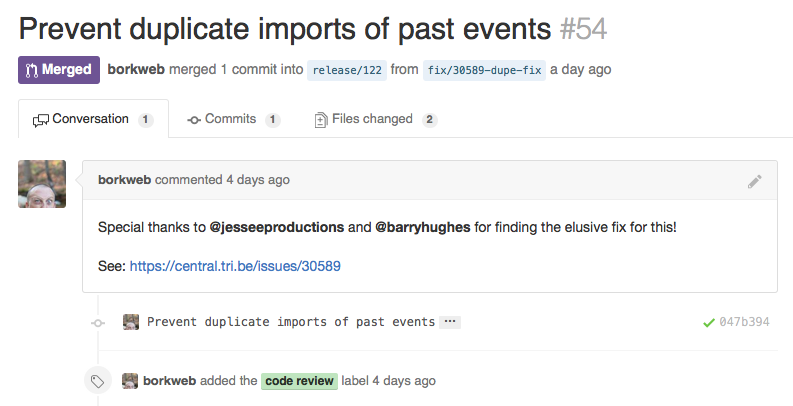
That’s great news, right?
Well, unfortunately, yesterday that fix failed a QA pass 🙁 And then arises the issue I mentioned earlier, where the behavior is inconsistent and we sometimes can produce the same errors, sometimes not, etc. As evidence of this, here’s a screenshot where the QA Engineer and the Developer have different results:
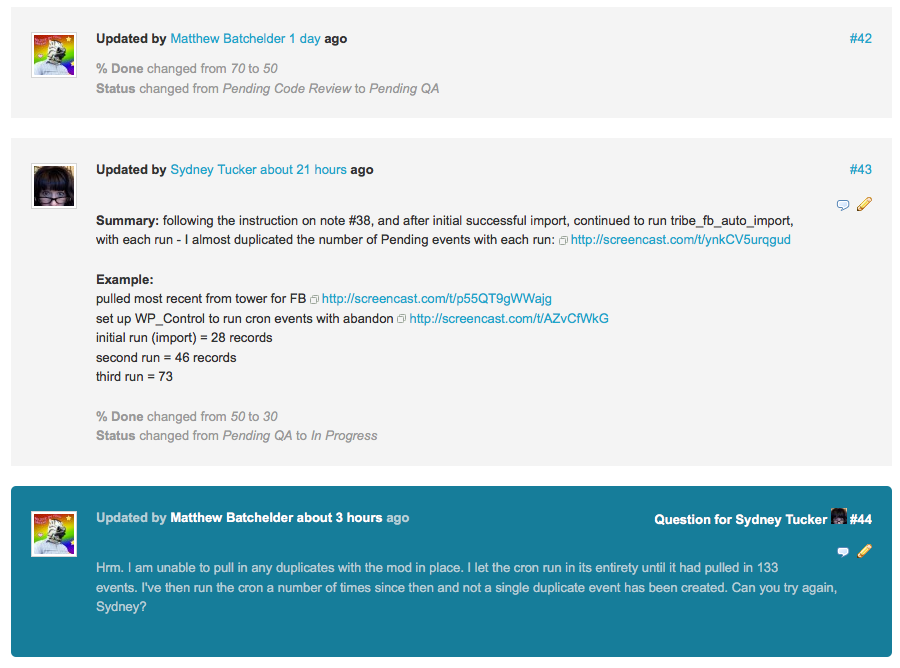
These screenshots do not fix the bugs on your site and do not change the frustrations here; however, I hope they at least prove that I am not being dishonest.
When it comes to WPML, the bug-tracking conversations are just as complicated and hard to pin down. WPML does many non-standard things to power its translation features–which is wonderful! It’s their inventive approach to languages that makes it a useful plugin to begin with.
However, their non-normative approaches to WordPress plugin development make it an enormous investment of time to itemize, develop, code review, and QA the reformatting of huge parts of our code–across all 11 of our products–to adhere to the way WPML decides to do things.
We have done this with The Events Calendar itself; but we are still in the process of completing the transition with our other products.
Your feedback is appreciated and, as I said, I cannot disagree with much of it. However, a code fix for either issue will not happen in the short-term. I am genuinely sorry about this, Keith.
– George
ParticipantGlad to hear it! 😀 Best of luck with your site.
Sincerely,
GeorgeParticipantHmm, really sorry about this @Alexander – if you’ve searched and have replaced everything and issues still persist, then there might be a bug at play here.
Have you done this search and replacement in both The Events Calendar and Events Calendar Pro? If not, I would recommend this as well to see if that helps.
Thank you so much for your patience with this, @Alexander! I’m sorry about the difficulty in translating this; we’ve got some missing strings that are fixed in the next release and so your current limitation might be a result of these not-yet-fixed bugs.
Thank you,
George -
AuthorPosts
