

Forum Replies Created
-
AuthorPosts
-
February 3, 2016 at 1:54 pm in reply to: Email notifications, adding extra fields – using Event Tickets Plus #1067263
George
ParticipantHey @Ray,
While capturing the “business name” is not quite possible at this time without extensive code customization, getting the emails as you describe should indeed be possible.
To be clear, when you say “whenever a guest registers for an event”, do you mean when a user RSVPs? Or purchases a ticket?
I ask this because RSVP does not have email notifications by default, but ticket-purchase notifications should already be being sent out by WooCommerce. Do you indeed get email notifications from WooCommerce when purchases are made? Or do you not get any emails out of your site?
Thanks!
GeorgeFebruary 3, 2016 at 1:43 pm in reply to: question pre-buy and integrated with clinico theme #1067256ParticipantHey Ricardo,
Thanks for reaching out, and for your interest in our plugins!
There is unfortunately no specific integration with our plugins and the Clinico Theme at this time. When you download our plugins and activate them, the way they work and function within the Clinico Theme “out of the box” is the extent of integration; to add other integrations would require custom coding by yourself, or by a freelance developer that you hire for example.
As for a list of appointment staff, this is not something our plugin provides “out of the box” either. If each “staff member” is an “Organizer” of events, then there is a simple shortcode you can use to display a simple list of all of the “Organizers” (and then just say “this is our appointment staff:” before the list).
Let me know if this information is helpful, and if there’s anything else I can help with.
Thank you,
GeorgeFebruary 3, 2016 at 1:39 pm in reply to: Modify Tribe Events Cost if Event Ticket is a Simple Subscription Product. #1067251ParticipantHey @bkozlowski,
Thank you for reaching out!
Unfortunately our ticketing plugins do not support “simple subscription” product types at all 🙁
I’m sorry about this!
— George
ParticipantHey Shannon,
I’m sorry to hear that your maps start out zoomed out to such an extreme scale; that is not normal, and it seems like there could be other issues on your site influencing this.
Your theme could be a culprit here, and it also might be the case that your events don’t have their latitude and longitude being properly generated. If this is something you’d like to explore, open up a new thread here on this site with that same link to your events page and your site’s “System Information” (https://theeventscalendar.com/knowledgebase/sharing-sys-info/).
As for this feature itself, we agree with you that better control over these would be handy. It’s a bit tricky to pull off, but is something we’re working on nonetheless. I’m sorry that the ETA is so ambiguous 🙁 I do not know when we will have these features improved sufficiently to be released in a plugin update.
I appreciate your feedback and patience with this!
Cheers,
GeorgeParticipantThanks for confirming, @Bart! Sorry for the back-and-forth on this.
I’ve modified the original code snippet a bit and hope that this version helps!
add_filter( 'tribe_get_events_title', 'tribe_alter_upcoming_events_title' );function tribe_alter_upcoming_events_title() {
return 'Something Else';
}
Cheers!
GeorgeParticipantHey Aindreas,
Thanks for the update. The specific file I’m referring to is inside the Event Tickets plugin, so its full path from wp-content would look like this:
wp-content/plugins/event-tickets/src/Tribe/Attendees_Table.phpIf you do not see this file, then in your reply can you include your “System Information” as described in this article? → https://theeventscalendar.com/knowledgebase/sharing-sys-info/
Thanks!
GeorgeFebruary 3, 2016 at 1:01 pm in reply to: Organizer unable to email attendee list in EC Pro 4.03 #1067236ParticipantHey @Ameet,
The final stable release for 4.1 have not been published yet; this specific issue’s bugfix is slated for inclusion in the official release.
So, when the entire plugin suite – The Events Calendar, Event Tickets, Community Tickets, everything – is officially released and at version 4.1, this issue should be resolved.
I will pass along the news that the Release Candidates didn’t fix things to our developers; if the bug persists, then unfortunately a fix is not likely to arrive until the maintenance release after the final launch of 4.1.
Thank you,
GeorgeParticipantThanks @Bart! To be 100% clear, do you mean the text that I’m pointing out with a red arrow in this screenshot:
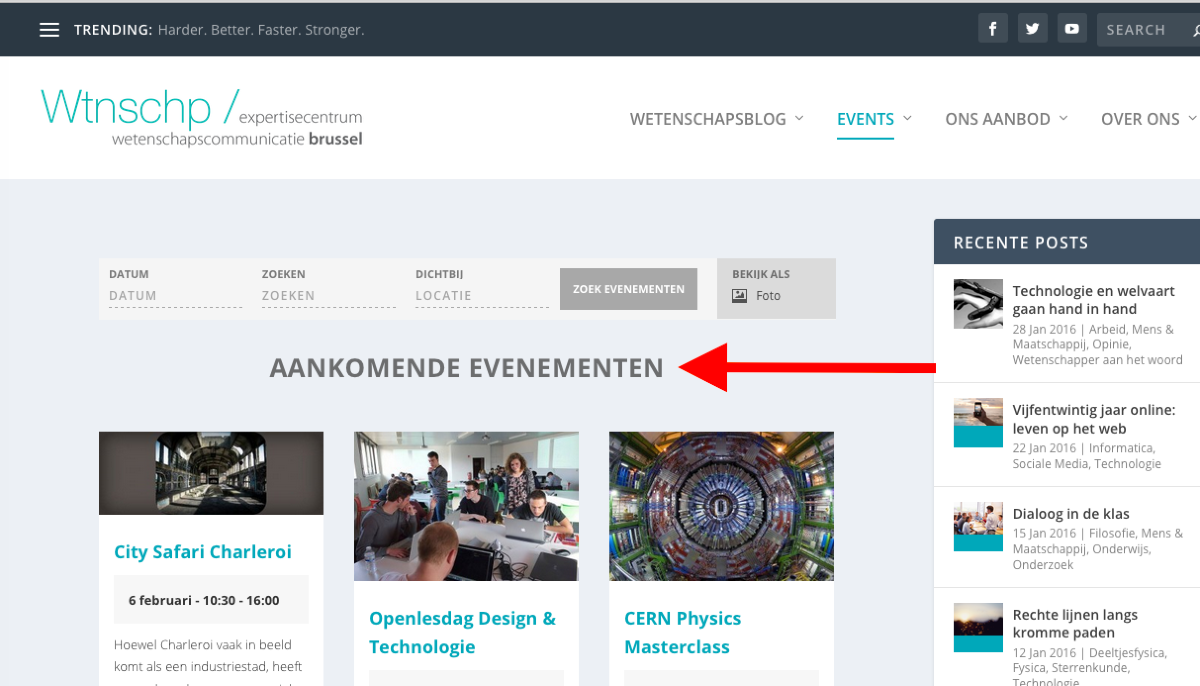
Thank you,
GeorgeParticipantHey Ian,
Thanks for reaching out!
Yes, this is possible. What you would have to do is make the events for the “attending sessions” and such, and then on the first event, add tickets for the whole course.
Do not add any tickets for the rest of the courses.
You unfortunately cannot sell tickets with Events Calendar Pro’s recurring-events feature, by which I mean you cannot have these events all exist as one “series” together and sell tickets for them all in unison.
But you can have tickets on the first event, which will create an Attendees List which you, as the event organizer, can then check against for the rest of the “attending sessions” and such.
Let me know if this information helps!
Cheers,
GeorgeFebruary 3, 2016 at 12:44 pm in reply to: No response to formal request for non-profit license #1067224ParticipantThank you!
We’ll respond to the application as soon as possible if it arrives intact; if not, for whatever mysterious reasons prevented it from reaching us to begin with, then I’m sorry in advance about that!
Stay tuned for an email response. If you don’t hear anything in 5 or so days, open a new thread on these forums.
Really sorry for the trouble here!
Thanks,
GeorgeParticipantHey Alvaro,
Can you clarify what you mean when you say this:
Unfortunately we couldn’t use your map system and had to do it some other way so Im not sure how useful it´s going to be.
Just to be clear, do you mean you’ve written custom code on your site related to maps in any way?
If so, does removing this custom code effect the behavior of this bug at all?
I have tried recreating this issue on my site numerous times to no avail. 🙁 I’m really sorry @Alvaro! This bug is perplexing!
Thank you for your patience with this so far…this is a very odd bug.
Sincerely,
GeorgeParticipantGlad to hear it Mikhail; this is definitely a bug nonetheless and I’ve made a bug ticket so that our developers can find and fix the problem.
Thanks for your patience with things while we work on that bugfix–I hope this temporary solution is an adequate one in the meantime!
I’ll close up this thread for now, but feel free to open a new thread any time if we can help with anything else.
Cheers,
GeorgeParticipantHey Keith,
We unfortunately do not provide per-thread updates for fixes. There are some cases where, for example, if a fix were to be coming in the next few days I would definitely leave the thread open and manually update this thread.
However, while the ETA for the fix in question here is not definite, it is definitely not going to arrive within 2 weeks, which means that our Support Droid will be auto-closing this thread after 2 weeks anyways.
In the “Changelogs” of our updates, you will see all of the fixes and additions in that release; if something as big as a WPML incompatibility fix is included in a given release, it will be noted right there in the changelog.
These logs are readable inside your wp-admin when updates are available; and release notes are also published at http://theeventscalendar.com/blog.
I would recommend updating every time there is an update available; each update includes stability and security fixes. So: update every time, and check the changelogs for the updates as you manage your site going forward. This compatibility fix will be noted there when it arrives.
That could be several weeks from now, or a few months from now. I am sorry that I don’t know more, Keith, and it’s this ambiguity that makes leaving this thread open for updating untenable over time.
I will close this thread for now. If possible, I will try to update this thread despite what’s written above, but wanted to set your expectations here about our per-thread updating policy.
I sincerely wish you the best with regards to your project.
— George
ParticipantRight on–stay tuned to our next several updates! Something like this would definitely be noted in the “Changelog” of its associated release.
Cheers!
GeorgeParticipantNo worries! 😀 Glad to have helped here, Rob. I’ll close up this thread but please post again any time if there’s anything else we can help with.
Best of luck with your project!
George
-
AuthorPosts