

Forum Replies Created
-
AuthorPosts
-
February 4, 2016 at 6:35 pm in reply to: Show event description in Stripe after order to easily reconcile #1067963
George
ParticipantHey @John,
Thanks for reaching out!
What you describe is unfortunately not an option, or even something dictated by our code at this point; this is definitely something we can investigate and could be a feature some day. I can see the utility of this and will make a feature ticket for our developers to investigate the possibilities here.
Even if that goes well, and we decide to implement this, that unfortunately would not happen for several weeks at the earliest. I’m sorry about this! I just want to be frank at the time it takes to develop something like this into the plugin.
I’m sorry that I don’t have any immediately-actionable recommendations for the moment. Please let me know if there’s anything else I can try to help with!
Thanks,
GeorgeParticipantHey @vchealthcare,
Sorry to hear about this! Can you email us at [email protected] about this so we can try and help in the context of the more “private” setting of email?
Thank you!
GeorgeParticipantHey Alan,
We sent a response earlier this week so your spam filter may indeed be the culprit. Can you send another email to [email protected] with a link back to this forum thread for reference? I don’t mean another Non-Profit Partnership Program application; just a personal email (with perhaps a cc: of a secondary email of yours, just in case this reply doesn’t make it to the first address?) with a link to this thread.
Really sorry for the extra steps here!
Sincerely,
GeorgeParticipantHey Jacob,
Thanks for reaching out! We unfortunately are not available for hire for this sort of custom work, but we do have a list of customizers here that might be helpful → http://m.tri.be/18k1
We have no affiliations with any of those folks; they’re simply some well-respected names in the community that we’ve compiled to share in situations like this one 🙂
Cheers!
GeorgeParticipantHey Tyler,
Thanks for reaching out. We don’t have a “bundles” feature on this site yet, or something similar to that by way of coupons and discount codes; but we’ve been working on a “bundles” feature and are hoping to introduce bundles before the second half of 2016 is upon us 🙂
I’m sorry to offer such a vague ETA, and one that’s subject to change, but I hope this information is helpful nonetheless.
Let me know if there’s anything else I can try to help with.
Sincerely,
GeorgeParticipantSounds good Ian; I’m sorry that our products aren’t quite what you need, but I wish you the best of luck with your project nonetheless.
Cheers!
GeorgeParticipantHey Darshana,
I’m really sorry to hear this!
We don’t have any explicit rules in place that would restrict access from different locales. However, in the last 24-48 hours we did have some DNS issues with our own site.
Most of those issues have been resolved, so if your client tries purchasing again, do things work now? Or do issues persist?
If issues do persist, can you clarify exactly what is happening?
Is the client not even able to load http://theeventscalendar.com? Can they load the site but then the checkout process fails or something?
Let me know!
Thank you,
GeorgeParticipantHey Alessandro,
Thanks for reaching out!
Unfortunately, for both of your questions the answer is that yes, could theoretically implement these features but not, they are not features that come with our plugins by default.
So, to limit events to specific user groups, you would have use other plugins to handle the user access, or write custom code.
And for the custom email alerts a day before the event, the same thing is true: you would have to use other plugins to implement this, or write custom code.
In either case, you could also hire someone to build these features for you. Here’s a list of some great customizers we have collected here – we have no affiliation with these folks, this is just a list of well-respected folks in the community: http://m.tri.be/18k1
Cheers!
GeorgeParticipantHey @Teubl,
I’m really sorry to hear about this incompatibility 🙁 Brian’s summation of the issues in that thread is spot-on, and so I will quote it here:
In this case the Bridge Theme uses Ajax to load pages and when it does it does not load the scripts and stylesheets of that page. So in the case of the Events Calendar it looks so bad because the theme did not load the scripts or stylesheets after the ajax call.
Are you able to turn off Ajax loading in the theme? That should resolve the issue.
If you can turn off the theme’s AJAX, then the pages might load.
Otherwise getting the pieces of software to work together would take a significant amount of custom coding, which we unfortunately cannot help with 🙁
Sincerely,
GeorgeFebruary 4, 2016 at 8:33 am in reply to: Custom CSS classes or other ways to feature events #1067733ParticipantHey Steve!
Thanks for reaching out. While there is not a way to add custom CSS classes via the admin, unfortunately, the good news is that you are not stuck with just the specific event IDs.
We use the post_class() WordPress function in our templates, which function provides a litany of item-specific classes based on its category, post status, etc. For example, here are all of the CSS classes on one event from my own site, in the “Barbecue” category and also “Convention” category:
.tribe-events-category-barbecue

.tribe-events-category-convention

.post-1763

.tribe_events

.type-tribe_events

.status-publish

.hentry [note: this one is specific to my site]

.tribe_events_cat-barbecue

.tribe_events_cat-convention

.cat_barbecue

.cat_convention

.tribe-recurring-event

.tribe-recurring-event-child

.tribe-events-venue-1186

.tribe-events-organizer-1657

.tribe-events-last
When you consider that each event has classes like this, then hopefully you can see just how creative you can get.
Writing custom code is not something we can do, but what I can recommend is that you check out a [free!] tool like Firebug if you use FireFox, or the Developer Tools for either Safari or Chrome.
These tools themselves all have “Inspector” tools that let you zoom right over the element whose styles you’d like to change. I literally used this “Inspector” tool to zoom over an event on my site to find all of those classes, and you can too.
Here’s a screenshot of how I found those classes using the Inspector tool in Firebug, because I use Firefox:
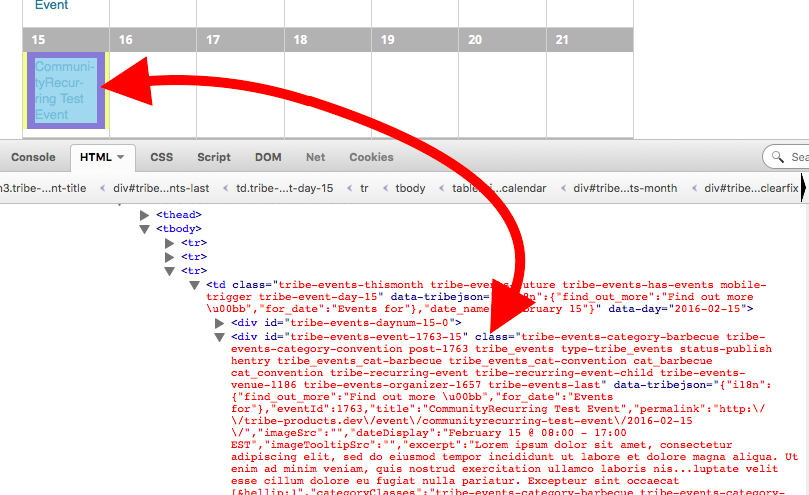
I hope this helps! 🙂
— George
ParticipantHey Ingrid,
Thanks for reaching out!
There is NO difference, and in fact, one thing I would like to clarify are that Events Calendar Pro is not a “pro version of” The Events Calendar.
The Events Calendar is not just free, it’s the “Core” plugin. So it will need to remain active and installed even if you add Events Calendar Pro or any other plugin here on http://theeventscalendar.com.
Events Calendar Pro and our other premium plugins are “add-ons” to the core plugin The Events Calendar.
So if you buy Events Calendar Pro, then on your site you will have The Events Calendar AND Events Calendar Pro both activated and installed on your site.
Does this make sense, and hopefully help clarify things a bit?
If so, then when it comes to organizers, those are a “core” feature; The Events Calendar handles Organizers. All of the other plugins just “use” that core organizer type.
Let me know if this helps!
— George
ParticipantHey @Wildersites,
Really sorry to hear this! This is not an error I can reproduce–perhaps your theme has some custom code that is causing this?
To that end I would recommend activating a “default” theme, like Twenty Twelve or Twenty Sixteen or any similarly-named themes.
When one of these themes is active, does the error remain?
Thanks,
GeorgeFebruary 3, 2016 at 5:11 pm in reply to: Problem with the past and next event link on list view #1067313ParticipantHey Rudy,
There is no premium license associated with your email address. If you have an account on this site with another email address which does have premium licenses, then please log into that premium account so that we can provide support in one of our premium support forums here.
This is our “Pre Sales Questions” forum, not a forum where we can field technical support requests.
If you do not have a license for any of our products then please post your question, with links to the issue on your site, to the free support forums at http://wordpress.org/plugins/the-events-calendar
We will try our best to get to the thread there in our weekly pass of the free support forums.
I will close this thread for now.
Thank you,
GeorgeParticipantHey Patti!
Thanks for reaching out. The best option we have along these lines is the “hide from event listings” checkbox that you should see in the edit-event screens when creating or updating events. Here’s a screenshot for reference:
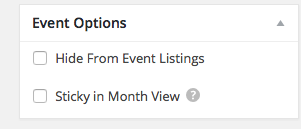
When checked, this will leave the event in Mont View and Week View but should leave it absent from List View, Photo View, Day View, etc.
This is the only option along these lines that we have at this time, unfortunately 🙁 I hope this is helpful!
Cheers,
GeorgeParticipantHey Paul,
Thanks for reaching out and for the interesting question. There are a few likes I’d like to mention.
For starters, and just to be clear and frank, what you mention here is currently the only viable solution for your predicament:
Day 2 could possibly be identical to Day 1 but without the option to purchase a ticket, in effect forcing the doctor to purchase Day 1?
Now, aside from this answer, I would like to mention that we agree with about the limitations that arise from the way events currently work. We actually get questions like this often–it’s a harder problem to solve than it seems, though, and so at this time we don’t have any specific workarounds other than what you describe above.
Recurring tickets, and a way to link events together in a “series” of events for which tickets can be bought for the whole series, are things we are hoping to really nail down in the coming year and beyond.
I’m sorry that, at this time, such features do not exist! But I hope the current workaround is sufficient, at least, and that the information I’ve shared here is helpful.
Let me know what you think and if I can help with anything else!
Cheers,
George -
AuthorPosts