
Home › Forums › Calendar Products › Events Calendar PRO › Custom CSS classes or other ways to feature events
- This topic has 4 replies, 3 voices, and was last updated 10 years, 7 months ago by
Support Droid.
-
AuthorPosts
-
February 3, 2016 at 5:10 pm #1067312
Steve
ParticipantRelated to https://theeventscalendar.com/support/forums/topic/feature-request-add-class-for-sticky-events/
How can I most effectively highlight/style certain events? I had been targeting non recurring events, but now I really need something that only targets certain events. Is there a way for me to add custom CSS classes via the admin? Otherwise I’m left with targeting specific event ID’s which requires stylesheet changes each new event. Any insight would be appreciated, thanks!
February 4, 2016 at 8:33 am #1067733George
ParticipantHey Steve!
Thanks for reaching out. While there is not a way to add custom CSS classes via the admin, unfortunately, the good news is that you are not stuck with just the specific event IDs.
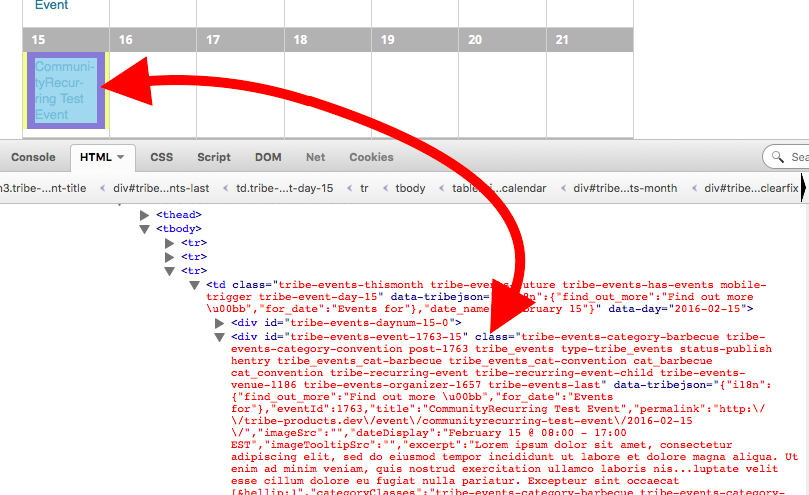
We use the post_class() WordPress function in our templates, which function provides a litany of item-specific classes based on its category, post status, etc. For example, here are all of the CSS classes on one event from my own site, in the “Barbecue” category and also “Convention” category:
.tribe-events-category-barbecue

.tribe-events-category-convention

.post-1763

.tribe_events

.type-tribe_events

.status-publish

.hentry [note: this one is specific to my site]

.tribe_events_cat-barbecue

.tribe_events_cat-convention

.cat_barbecue

.cat_convention

.tribe-recurring-event

.tribe-recurring-event-child

.tribe-events-venue-1186

.tribe-events-organizer-1657

.tribe-events-last
When you consider that each event has classes like this, then hopefully you can see just how creative you can get.
Writing custom code is not something we can do, but what I can recommend is that you check out a [free!] tool like Firebug if you use FireFox, or the Developer Tools for either Safari or Chrome.
These tools themselves all have “Inspector” tools that let you zoom right over the element whose styles you’d like to change. I literally used this “Inspector” tool to zoom over an event on my site to find all of those classes, and you can too.
Here’s a screenshot of how I found those classes using the Inspector tool in Firebug, because I use Firefox:
I hope this helps! 🙂
— George
February 4, 2016 at 3:35 pm #1067923ParticipantThanks George. Yeah, that’s the right idea using categories and then targeting those classes. I was looking for a way to not make any extra categories in order to keep the category list simple.
I think the solution for now is to use tags and then hide them from the single event display. In future it might be cool to provide the ability to add custom css classes or a ‘Featured Event’ checkbox that could add a new class. Cheers!
February 5, 2016 at 4:30 pm #1068581ParticipantHey Steve,
Thanks for the update. Your “featured event” idea is an interesting one…you should post it on tribe.uservoice.com, where other users can “vote up” ideas for features that they like.
We often incorporate features from that page, so it’s a great step to take towards making that idea a reality.
Best of luck with your customizing!
Cheers,
GeorgeFebruary 23, 2016 at 8:35 am #1080761KeymasterThis topic has not been active for quite some time and will now be closed.
If you still need assistance please simply open a new topic (linking to this one if necessary)
and one of the team will be only too happy to help. -
AuthorPosts
- The topic ‘Custom CSS classes or other ways to feature events’ is closed to new replies.