

Forum Replies Created
-
AuthorPosts
-
George
ParticipantHey Jeanine,
Thank you for this information. Can you indeed share a screenshot of the issue? You can do so by uploading the screenshot to Imgur.com, Flickr.com, CloudUp.com, or any similar image-hosting site; then just share the links to those images here and I’ll take a look.
I mention a screenshot because, even though you shared that link, it led me to just a post on your site…I wasn’t able to see the date/time you are referring to.
Thank you for your patience with me here!
Cheers,
GeorgeParticipantHey Aindreas,
No worries! As for the transfer of your existing ticket data, there should be no issue here; the tickets should remain intact and no data should be lost.
That being said, we always recommend backing up your site before installing or updating any plugin or theme – not just our own software! It’s a great habit to develop when maintaining a site.
There are many methods for backing up a WordPress site; I would recommend researching online a bit to find a method you find easiest to do, assuming that you’ll be doing backups often….
Then, use this method to back up your site before transitioning to Event Tickets and Event Tickets Plus. That transition should not cause problems, but I do not recommend embarking on any major site change without a backup.
I hope this information helps!
Cheers,
GeorgeParticipantHey @Swacoop,
I’m sorry that didn’t help!
Just to be clear, did the methods in that article move the ticket form at all for you? Or just not where you want it to be?
Can you clarify exactly where on your page you’re trying to move the ticket purchase form? More involved theme customization may unfortunately be required to achieve what you’re trying to do. Share a screenshot of your ideal destination for the ticket form, if possible. You can do so by uploading the screenshot to Imgur.com, Flickr.com, CloudUp.com, or any similar image-hosting site; then just share the links to those images here and I’ll take a look.
Thank you!
GeorgeParticipantHey @aafhl,
Thank you for testing that! And to be clear, I definitely am investigating the code you’ve been pointing out; the thing is that I cannot reproduce your exact problems.
1. Are Event Tickets, Event Tickets Plus, and WooCommerce all installed and activated on your site? I do not get the behavior you describe with the code above, where it returns nothing for you, so am wondering if you can confirm that all of these three plugins are installed and activated.
2. I’m curious about there being a code conflict here–your site’s “system information” reveals that you have 73 plugins on your site, which is quite a lot of surface area on which code conflicts can arise.
With that in mind, and the fact that I cannot reproduce your specific problems, I would recommend trying the following process:
• Deactivate ALL of your plugins except for these four plugins, only these four: WooCommerce, The Events Calendar, Event Tickets, and Event Tickets Plus.
• “Buy” a test ticket on that test event you created.
• Does the attendees list remain empty?
• If so, then how about if, in this state with all plugins except the above 4 deactivated, you try creating another new test event with test tickets and try buying those?
—
Let me know what you find!
Thank you so much for your patience here, @aafhhl! I’m really sorry that we don’t have a definitive answer as to why this issue is happening on your site; however, after some intensive investigation I cannot recreate your issues and so the above steps will hopefully be very helpful in what they reveal.
Sincerely,
GeorgeFebruary 8, 2016 at 8:16 pm in reply to: Submissions with Errors Create Duplicate Organizer Details Fields #1069901ParticipantHey Jonathan,
To address things in reverse order, I would first just like to say that I’m really sorry that our pace of getting a bugfix out the door has been frustratingly slow (in regards to your other issue). We are nearing the release of a large maintenance release with many bugfixes in it; and, more importantly, after this release we are implementing some changes in our development team structure to facilitate speedier bugfix releases. The changes should be quite significant; however, we finalized the changes while more than halfway into the current release cycle, and so we are working quickly to get this release out the door and then implement our team changes.
I only mention this to provide some context for the slowness of the bugfix. We agree with you that we have been dropping the ball on the speed of fixes recently, and fixing this problem is one of the biggest priorities of 2016 for us (if not the biggest priority outright).
Now, back to the duplicate-organizer issue. Thanks for the link to this! I remain stumped by your bug because I can create it on your site; however, when I try all of the exact same steps on my own site (same theme etc.), I cannot produce the problem.
I’m not giving up on the problem, but I just wanted to be clear that we’re still investigating it and working on it. Once we find the problem we can release a fix, but until then I’m still trying to get the problem to happen.
I’m sorry about the current situation with these two issues, Jonathan. Please let me know your thoughts on all of this.
Sincerely,
GeorgeParticipantI’m glad to hear that! I would recommend disabling the AJAX as your theme authors instruct/recommend, and then the calendar should work well. If you find other issues on your site, open a new thread any time! 🙂
Cheers,
GeorgeParticipantHey @Gregy,
The plugins are not designed to stop working forever, so if there are issues on your site, the issues could be coming from a number of different places.
I’ve added a new license for Event Tickets Plus to your account for free.
I would recommend deleting WooCommerce Tickets and then installing and activating:
• Event Tickets
• Event Tickets PlusDeleting WooCommerce Tickets should not delete any data from your site, but I would recommend backing up your site and database before these steps anyway just for good measure. There are many ways to do backups, so if you’re not sure how to do that, I would recommend looking up different methods and choosing the right method for you.
This article covers the process of moving from WooCommerce Tickets to Event Tickets Plus → https://theeventscalendar.com/knowledgebase/moving-to-event-tickets-plus/
Cheers,
GeorgeFebruary 8, 2016 at 7:35 pm in reply to: Remove suffix "th" after date format in the Week View widget. #1069895ParticipantHey David,
Sorry I missed that detail! This unfortunately requires a bit of custom coding – you would have to paste a code snippet like this one into your theme’s functions.php file:
add_filter( 'tribe_events_this_week_date_format', 'tribe_events_simplify_date_format' );
function tribe_events_simplify_date_format() {
return 'j';
}
That should do it!
Cheers,
GeorgeParticipantHey Yalcin,
Have you been able to modify the necessary WordPress files to allow for the necessary increase in PHP max limits?
— George
ParticipantHey Paul,
Apologies for the frustrations and confusion here. I would like to highlight two things you wrote in your replies here. First, this:
We bought the iCal plugin to consume ics feeds and import into your events product.
Next is your statement of your goals here:
I have an XML feed that I want to convert to an ical feed.
Our plugin only does the, “consume ics feeds and import into your events product” part.
It does not do the, “I have an XML feed that I want to convert to an ical feed,” part.
None of our advertising/marketing/blog content promises this as a feature or implies the possibility of it with our product.
The xml2ical function in our codebase does not mean we include or support that functionality. iCal Creator is a vendor script, it is a code library with many features to it.
As is the norm when including vendor scripts, we include the whole library, even though our plugin itself only uses a subset of the library features.
If you would like to use features of iCal Creator that are not included in our plugin, then I would again recommend to explore the iCal Creator documentation here → http://kigkonsult.se/iCalcreator/index.php
We do not support or provide help with software we do not make, nor with customization projects in general. Please read this page for information about what our support services entail → https://theeventscalendar.com/knowledgebase/what-support-is-provided-for-license-holders/
Thank you,
GeorgeParticipantWhen I go to the Community Events submission page on your site, I’m unfortunately met with a login prompt as shown in this screenshot:
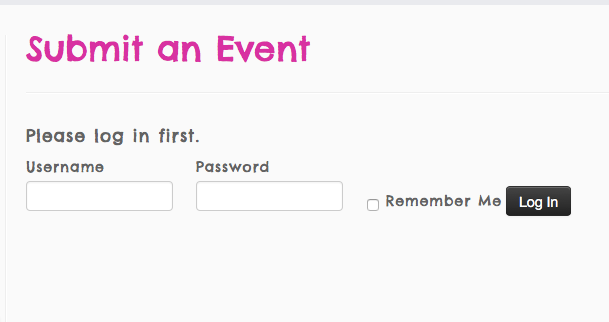
We cannot log into user sites for any reason, so please do not post login information on this site anywhere.
I unfortunately cannot help with any further customization-related questions.
If you think there is a “bug” or other issue with your datepickers that is not a matter of how they look, but a matter of how they function, then please temporarily disable your “Community Events” login requirement so that the page is temporarily visible to anyone with the link.
Then, we will take a look at the issue on the page and continue with troubleshooting those technical issues. I will work quickly so that you can put the page back under login protection as soon as possible.
Thank you,
GeorgeParticipantThank you for the update @Jill, glad to hear about the resolving of this issue.
Best of luck with your site!
GeorgeParticipantHey @Fabrice,
Thanks for sharing all of this! I looked into the information and wasn’t able to spot a specific problem. However, in your screenshot I noticed that there are up arrows and down arrows on the right side of each of the menu items.
Here’s a screenshot of the arrows I mean:
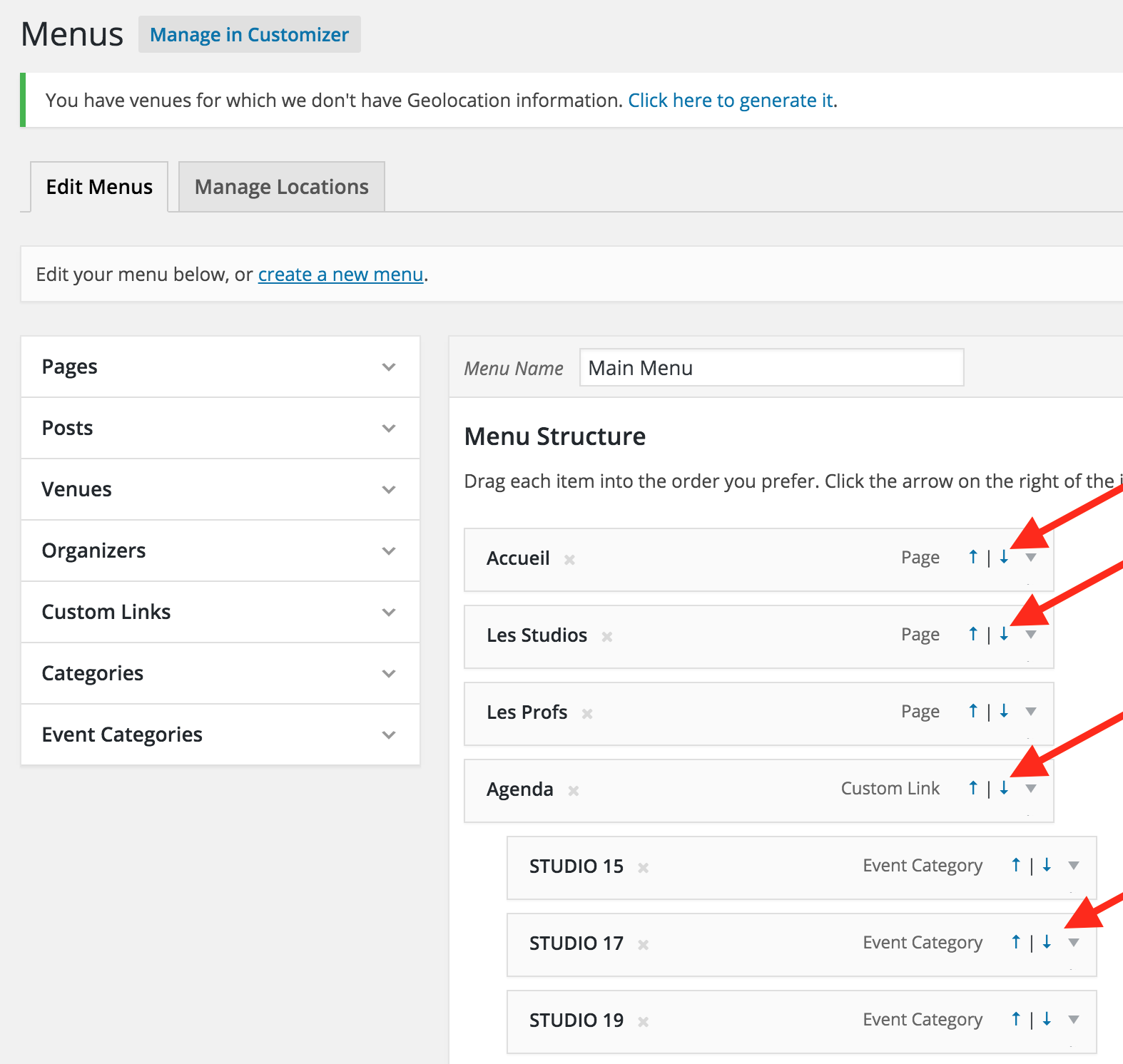
Those are not default in WordPress, so I’m wondering, are these arrows coming from a plugin or something on your site? If so, try deactivating that plugin and see if anything is improved.
I also recommend that you proceed with the rest of the steps here if that plugin test does not help → https://theeventscalendar.com/knowledgebase/testing-for-conflicts/
Let us know what you find!
Thank you,
GeorgeParticipantHey Bob,
There should be no difference in how Filter Bar works based on whether or not Community Events is activated on your site. Also, events that are created by site admins in wp-admin and events that are submitted through Community Events are all “filterable” in the exact same ways; they work exactly the same with Filter Bar.
Does this information address your questions? If not, let me know what other specific things I can try to help clarify.
Also–apologies for the delayed response on this!
Sincerely,
GeorgeParticipantHey @Mikael,
At this time, you would have to make the events that go from 6pm–8pm one event, and the events from 8pm–10pm their own separate event. There’s unfortunately not a way to have this series be one “recurring event,” for example.
I hope this information helps!
George -
AuthorPosts