
Home › Forums › Calendar Products › Events Calendar PRO › Hidden Date/Time
- This topic has 8 replies, 3 voices, and was last updated 10 years, 7 months ago by
Support Droid.
-
AuthorPosts
-
February 8, 2016 at 5:07 am #1069264
Jeanine McAdam
ParticipantI would like to post an event but I don’t want the date/time to publicly appear. This event basically has no starting or ending date. It’s a content driven event and I want it to appear within the entries of my “Events Calendar”. Thank you for your help!
February 8, 2016 at 8:01 am #1069542George
ParticipantHey @Jeanine,
Thanks for reaching out. Hiding the event dates on the front-end of your site is something that you can definitely do with a bit of custom CSS. Can you share a link to one of these events on your site, so that I can take a look and recommend some specific CSS for that?
Also, you mention this in your question:
I want it to appear within the entries of my “Events Calendar”.
Can you clarify what this sentence means? Are you saying that you don’t want the date and time to display, and then also want one event to show up in every single date on the calendar? If not, then what do you mean?
Thanks!
GeorgeFebruary 8, 2016 at 10:30 am #1069638ParticipantHi George:
Thank you for getting back to me so quickly.
I’d like this “Green Energy” event without a date/time to appear after the 2nd event post.
I’m trying to create content advertising space among the events but they need to have the same look / feel as the events.
Do you have a place I can attach a screen shot of what I’m talking about?
Or go to:
http://www.heightsites.com/?p=4440&preview=1&_ppp=f2eff71d66
Thank you!
JeanineFebruary 8, 2016 at 8:52 pm #1069909ParticipantHey Jeanine,
Thank you for this information. Can you indeed share a screenshot of the issue? You can do so by uploading the screenshot to Imgur.com, Flickr.com, CloudUp.com, or any similar image-hosting site; then just share the links to those images here and I’ll take a look.
I mention a screenshot because, even though you shared that link, it led me to just a post on your site…I wasn’t able to see the date/time you are referring to.
Thank you for your patience with me here!
Cheers,
GeorgeFebruary 9, 2016 at 10:23 am #1070384ParticipantGeorge:
The screen shot I will give you is exactly the same as the link I gave you below.
I want to be able to create an event without the date/time information appearing. I want the date time hidden. However I want that event (without the date/time) to appear in my Events Calendar among all my other events.You will notice on the link below – there is not a date/time. That is exactly what I want to create in Events Calendar.
Here’s the same info on flickr
https://www.flickr.com/photos/140248328@N08/shares/mNQny7Thank you!
JeanineFebruary 10, 2016 at 10:52 pm #1071178ParticipantHey Jeanine,
Thanks for your information here. To keep date and time hidden I would recommend adding the following CSS to the bottom of your theme’s style.css file:
.tribe-events-schedule {

    display: none !important;

}
If this does not help, then can you share a link to an Event on your site? Not a “Post”, like you’ve shared thus far; but an event that you create in The Events Calendar, which has the date and time on it that you are trying to hide….
Thank you for your patience,
GeorgeFebruary 11, 2016 at 4:32 am #1071242ParticipantHi George – If I add that CSS code will it change all my events so that the date/time is hidden on all of them? I only want date/time hidden on select events. Here is a link to the same post (now appearing as an event). I don’t want February 16 to show.
https://www.flickr.com/gp/140248328@N08/7BC87CAlso – do you have someone I could call? I’m wondering if I talk to someone in person it would be easier to understand what I’m trying to do.
Thank you again!
JeanineFebruary 11, 2016 at 10:20 am #1071628ParticipantHey Jeanine,
Thanks for your update here. To address things in reverse order, no, we do not have any phone support at this time.
In regards to your issue, yes the first CSS I shared will hide the date and time for ALL events.
To specify that on a per-event basis is, unfortunately, a bit tricky.
One thing you could do is make an Event Category whose sole purpose is for your own internal use, like maybe “No Date” or something a bit more public-friendly and generic like “Content Events”.
A Demonstration of This Method
To demonstrate the approach I am recommending here, let’s start with a screenshot of a “normal” event that is in a category called “Content Events”:
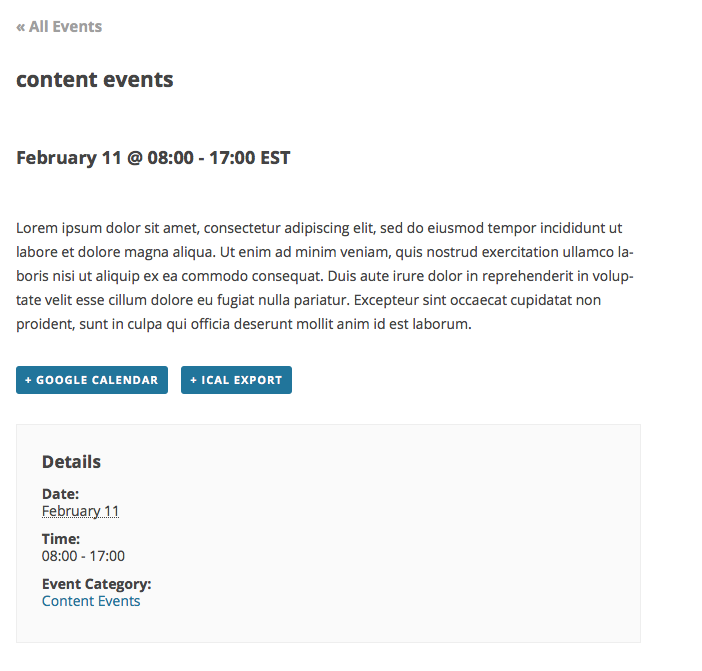
To hide the “date” on events like this that are in the “Content Events” category, but leave all other events displaying normally, add this snippet of code to your theme’s functions.php file:
add_filter( 'tribe_events_event_schedule_details', 'tribe_hide_date_if_in_category', 10, 2 );function tribe_hide_date_if_in_category( $schedule, $event_id ) {
if ( $event_id && is_object_in_term( $event_id, Tribe__Events__Main::TAXONOMY, [ 'content-events' ] ) ) {
return tribe_get_start_time( $event_id ) . ' - ' . tribe_get_end_time( $event_id );
}return $inner;
}
Here’s an example of how that originally-shared event would now look:
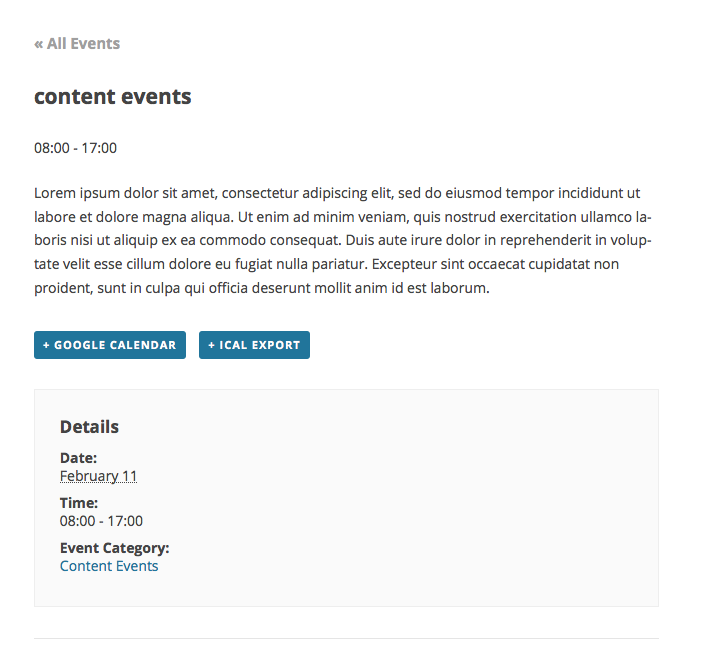
For any other tweaks or customizations you want to make, you will have to take the reins on implementing those because we do not support customizations. So I unfortunately cannot provide any other custom code. Please see this article for more information on our lack of support for customization questions: https://theeventscalendar.com/knowledgebase/what-support-is-provided-for-license-holders/.
Despite that policy I have written custom code above, of course, and hope it helps you get started on this!
Best of luck with your customizations,
GeorgeFebruary 26, 2016 at 8:35 am #1082460KeymasterThis topic has not been active for quite some time and will now be closed.
If you still need assistance please simply open a new topic (linking to this one if necessary)
and one of the team will be only too happy to help. -
AuthorPosts
- The topic ‘Hidden Date/Time’ is closed to new replies.