

Forum Replies Created
-
AuthorPosts
-
George
ParticipantGlad to hear it Alvaro!
At present, we have still not reliably recreated this issue 🙁
Now, we have a bug ticket for it anyways, so as soon as we can recreate the issue we can work on fixing it. However, to be frank, that could take several weeks until there’s an official fix.
I’m really sorry about that!
The best way to stay up-to-date on bugfixes is to simply update your plugin every time an update is available. Each update has a “changelog” of all of the changes in that release; if this bug is fixed in a given release, it’ll be noted in the changelog.
We also publish release notes with the same sort of information on our blog → http://theeventscalendar.com/blog
Since a fix could take several weeks to arrive, I will close this thread for now. Feel free to open a new thread if other issues and questions ever arise 🙂
Cheers!
GeorgeFebruary 8, 2016 at 1:20 pm in reply to: : strtotime() expects parameter 1 to be string, object given in on line #1069759ParticipantNice! Best of luck with your site 🙂
— George
February 8, 2016 at 1:20 pm in reply to: Warning: strtotime() expects parameter 1 to be string, object given in #1069757ParticipantHey @Alvaro,
Unfortunately adding those details is a bit more complicated. Permalinks can be retrieved using WordPress’ own function get_permalink(), and venue information can be retrieved using tribe_get_venue() and other such functions, but adding that information to the tooltips requires a bit more code editing than the simple swapping of data I demonstrated above.
The amount of customization required is quite significant. We cannot offer much help with the whole customization, but hopefully these suggestions help:
1. Make the simple customization demonstrated in my earlier reply here for starters. Then tinker around with this to get a first-hand sense of how the Google Maps markers work and are generated.
2. Find the map_add_marker() JavaScript function here in your Events Calendar Pro (not The Events Calendar, but Events Calendar Pro!) plugin files:
src/resources/js/tribe-events-ajax-maps.jsIt should look like this:
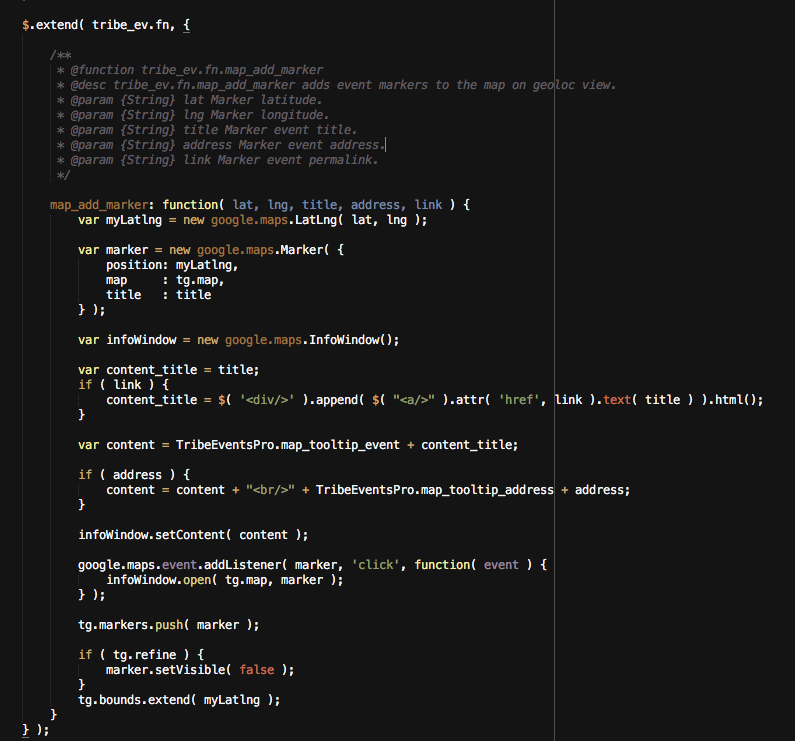
This function is where some of the tricky elements of the customization start to arise. You’ll have to take the reins from here, but essentially you will need to recreate the event-generation JavaScript but for a third item on the marker, which will be a text link of the venue name linked to the venue permalink….
I’m sorry that we can’t delve into the whole thing for you! I wish you the best of luck with your customizations.
Also, since this thread is so old and was unanswered for almost a month before you posted in it, I will close this thread to facilitate keeping the forums recently active.
Thank you,
GeorgeParticipantThanks for adding your input to this, Alvaro! I will close this thread but would like to encourage you to also consider voting for ideas–or adding ideas, if you don’t see them on the page yet–on our UserVoice page here: http://tribe.uservoice.com.
Check that page out and definitely contribute there; it’s a great resource and one we frequently incorporate ideas from into our plugins.
Cheers!
GeorgeParticipantHey James!
While we unfortunately don’t have any specific advice on integration with geomywp, there is indeed an action that is fired upon the creation of a Community Events submission.
The action is simply ‘tribe_community_event_created’, and includes the Event ID of the newly-created event as an argument in its callbacks. So to actually use this hook, you’d write some code like this:
add_action( 'tribe_community_event_created', 'tribe_example_for_james' );function tribe_example_for_james( $event_id ) {
echo $event_id; // echoes event ID...
}
Obviously you wouldn’t just “echo” the Event ID like in the above example function, but it’s just an example to show you all of the parts in place.
I hope that’s helpful and wish you the best of luck with your customizations. Please let me know if there’s anything else I can help with!
— George
ParticipantHey John!
Thanks for reaching out.
it’s unrealistic to expect our non-technical users to “manually sync” with their calendar, not to mention the time drain to keep up.
So to be clear, when you say “subscribe”, it sounds like you mean that you want users to have events from your site auto-posted to their own individual Google Calendars or Outlook calendars or something like that?
Is this correct? Is this the sort of thing you mean?
If not, can you clarify exactly how the subscription will work?
If you do mean the sort of thing I gave an example of above, then unfortunately our products to not have a feature like this 🙁
One thing that might help which is NOT a premium feature–it’s included in The Events Calendar itself–is the simple addition of /feed to the events URL on your site. This is auto-refreshed every time a new event is published!
So if your site is example.com/, and your events URL is example.com/events, then you can have users “subscribe” with an RSS application at example.com/events/feed
That’s unfortunately the best option of the type you describe at this point 🙁 Sorry to disappoint!
— George
ParticipantHey @Tawnya,
Sorry to hear about this! Can you share a link to your site and then also include your “System Information” in your reply? Here’s how to do that → https://theeventscalendar.com/knowledgebase/sharing-sys-info/.
This will help us investigate this, because this is not default behavior and I cannot recreate it on my site unless I write custom code that specifically does that….
Thanks!
GeorgeParticipantHey @fxidesigns,
I’m genuinely sorry to hear that issues are persisting.
Josh shared a snippet in your other thread on this topic, and I’m wondering if you are able to try that out and find some progress with these issues? Here’s a link to where the snippet is shared → https://theeventscalendar.com/support/forums/topic/ical-importer-duplicating-events/
Next, in that thread you say this:
Actually I have deleted the events using a SQL command… however it does seem to work now that I optimized the DB
Is this DB optimization something you can perform again, if the above-shared code snippet doesn’t help?
Finally, for now, it has been mentioned in some of your threads but I wanted to restate the fact that we do have some known bugs here. I’m sorry that we haven’t been able to fix these on-demand immediately; we’re working on them! We are hoping to release a “maintenance release” soon and have several iCal-related bugs prioritized for that release.
Your patience thus far, and going forward, is much appreciated. I hope that either the snippet that Josh wrote, which I shared above, or your DB Optimization fix are temporary solutions that can help until a proper fix arrives. Let me know if this is the case.
Thank you,
George
PS
You mention that this job is a “daily” job–how many events are typically imported each time the job is run? It’s probably a bit different each time, but I mean in general–is it usually “dozens” of events? Hundreds? Or just handful of events, typically? Just curious about this. Thanks!
February 8, 2016 at 10:50 am in reply to: : strtotime() expects parameter 1 to be string, object given in on line #1069646ParticipantHey @Rex,
Thanks for posting your code here. I’m wondering if changing the ‘start_date’ argument in your use of tribe_get_events() alone might help here–try this instead of your current use of new DateTime():
'start_date' => current_time( 'Y-m-d' ),Let me know if this helps!
George
ParticipantNice! The recommendation is much appreciated.
I’ll keep an eye out for your email, while for now I’ll close this thread.
Stay tuned over email!
Cheers,
GeorgeParticipantHey @swacoop,
We happen to have a guide here that might be helpful → https://theeventscalendar.com/knowledgebase/moving-the-ticket-form/
Check out that guide, try its methods, and let us know if it helps! 🙂
Cheers,
GeorgeParticipantHey Robert,
I’m sorry to hear this!
I’m wondering if, first, can you share your site’s “System Information” here? Here’s how to do that: https://theeventscalendar.com/knowledgebase/sharing-sys-info/.
Next, try going to Settings > Permalinks in your admin area, and just click “Save Changes” without actually making any changes. This may seem like an odd thing to do but is a little “trick” within WordPress to get the permalinks across your site to refresh, which might help here. Then try reauthorizing and such and see if anything is improved….
Thank you!
GeorgeParticipantHey @Thomas,
Thanks for reaching out. This is an interesting situation and, I’m sorry to say, our recurring events feature will not be the best option for implementing the unique and variable schedule here. It does not have the flexibility to pull off the scheduling you describe.
To demonstrate why, I would like to highlight what you said in your post:
We do not have fixed days or weeks during the events, it even could happen on another weekday, or one month not at all. But it will be always the same event.
This lack of consistency and patterns in the scheduling of the event itself mean that it is not “recurring” in the sense that our plugin code understands. I know that it is to us as people, and it’s the same event that occurs frequently and such. But our code and the “recurring events” feature is a bit more literal and specific, and only supports events whose actual schedule details are repeatable and recurring.
So, if your event was the first Monday of every month, with some months missing, you could add that in the recurring events configuration easily. If it was every-other Wednesday on top of this, you could add that, too.
Our plugin does support “weird”/complicated recurrences like the example above….
But in your event’s case, where there is no repeating pattern of when it will occur, our recurring events feature does not support that unfortunately.
I’m sorry about this! I hope my explanation here is informative and helpful; please let me know if so, and if there’s anything else I can help with here, any further questions on this etc.
Sincerely,
GeorgeParticipantHey Adam,
Thanks for reaching out. I agree with you that there should be better ways of handling this at this time, but I would like to quote something from that thread directly:
You can’t have newlines without the \n according to the ical spec so the file wouldn’t be valid. If there are no newlines, I imagine it imports one long line successfully. However, be aware that iCal also has wrapping requirements per the spec so you could only have ~76 characters or so before you would be invalid.
So, those limitations are the current limitations in place. And please note that these are limitations imposed by the iCal spec itself, not by us by choice. We are bound by these limitations and, at this time, unfortunately have not come up with a better solution here.
With this in mind, do you notice anything “erroneous” about the newlines in your iCal feed? In other words, are the new lines you are finding being added where there aren’t supposed to be new paragraphs or new lines, etc.?
Or are the newlines being added where they should be? And so then your main complaint is this one:
It appears the iCal Importer strips the \ leaving behind just an ‘n’ character which runs all of the paragraphs together creating a giant mess.
This IS something we are actively working on and I will investigate the status of this bug.
Thank you,
George -
AuthorPosts