

Forum Replies Created
-
AuthorPosts
-
George
ParticipantHey @aafhhl,
Sorry to hear about these issues–you mention this issue happening with this one event that you created back in versions 3.x of The Events Calendar. I’m curious, though: if you create a brand new event now on your site, with some free “test” tickets just to test “buying” those free tickets, does the Attendee List behave any better with this event and its tickets?
I cannot recreate issues with my own events and such, so am curious–this will be a very useful test.
Let me know what you find!
Cheers,
GeorgeParticipantHey @Ziad,
Thanks for reaching out.
To be clear, we cannot help with your login form, nor can we help with anything related to userPro. We can only help with the default configuration of things.
If you temporarily disable your custom Login Form, and the userPro plugin, then do the community events “Access Control” settings work any better?
Thank you!
GeorgeParticipantHey @Jeanine,
Thanks for reaching out. Hiding the event dates on the front-end of your site is something that you can definitely do with a bit of custom CSS. Can you share a link to one of these events on your site, so that I can take a look and recommend some specific CSS for that?
Also, you mention this in your question:
I want it to appear within the entries of my “Events Calendar”.
Can you clarify what this sentence means? Are you saying that you don’t want the date and time to display, and then also want one event to show up in every single date on the calendar? If not, then what do you mean?
Thanks!
GeorgeFebruary 8, 2016 at 7:57 am in reply to: Remove suffix "th" after date format in the Week View widget. #1069539ParticipantHey David,
Thanks for reaching out. Do you mean the “Week View” on the main events page? As shown in this screenshot for example:
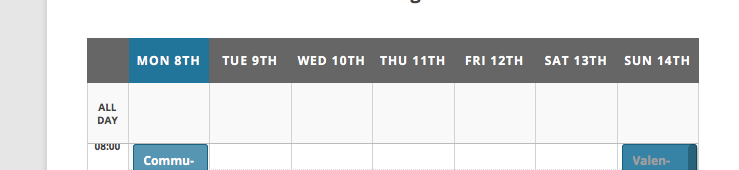
If so, then head to Events > Settings > Display in your wp-admin and scroll down a bit to the section called “Date Format Settings.”
You should find an option called “Week Day Format,” which looks like this:

Remove the “S” so that instead of “D jS” it’s just “D j”, like this:

That should remove the “th” and such in Week View:

I hope this helps!
GeorgeParticipantHey Ricardo!
Unfortunately, there is NOT any official integration with the “clinico” theme, nor a staff-scheduling feature 🙁
I’m sorry to disappoint! Please let me know if there’s anything else I can help with.
Thank you,
GeorgeParticipantHey @Chris,
If you had an old thread here, it was definitely not deleted. We never delete threads. I think you are talking about this thread here, where I replied back in January but have not heard from you or the other user in the thread, “Matt” → https://theeventscalendar.com/support/forums/topic/new-version-doesnt-populate-calendar-on-my-home/
As for your current issues in this thread, can you link to where the calendar is showing as “dots on dates”? I tried finding this on your site but could not find it. Even the month view grid page loads and works fine for me: http://columnsofknowledge.com/events/month/.
One thing about this issue, which is very important, is that on every page on your site there is a JavaScript TypeError happening because of some JavaScript within your theme. The file responsible is your theme’s /js/base.js file. These sorts of errors can break web pages so it could be responsible for the calendar problems you describe on your site.
Please contact your theme author for some assistance in fixing that theme JavaScript error. That alone should be a big help! And here’s a screenshot of the error (which includes the whole path to the theme file responsible):

Resolving that error is step one. There can really be no further meaningful troubleshooting as long as that error persists, since it can cause breakages on web pages.
I hope this is helpful as a first step towards resolving the other issues on your site.
Cheers,
GeorgeParticipantHey Nathalie,
There is no autoresponder integration with our plugins on their own; at this time, to implement this sort of integration you would have to write custom code to make them work together.
Custom code is unfortunately not something that we can help with, but if you are in need of a professional developer to help you build these customizations, we have a list of some highly-rated professionals here that we share for situations like this one → http://m.tri.be/18k1. (We have no affiliation with any of these folks, they’re just some well-respected names in the community.)
I hope this information is helpful; let me know if so and if there’s anything else I can try to help with.
— George
ParticipantHey @Birgit,
Deleting that comma is unfortunately a quite-involved customization to make at this time. We are hoping to simplify this in the future, but for now you have to edit core plugin files directly.
To get started, head to your plugin files for The Events Calendar and navigate to this file:
/src/Tribe/Main.phpFind the function called fullAddressString()–it’s quite far down the file, around line 2916 or so. Here’s a screenshot of this function:
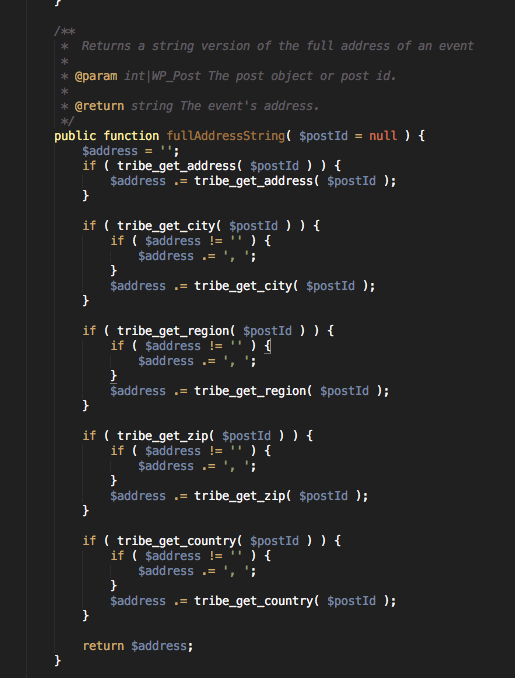
Change this block of code:
if ( tribe_get_city( $postId ) ) {

    if ( $address != '' ) {

        $address .= ', ';

    }
$address .= tribe_get_city( $postId );
}
To this:
if ( tribe_get_city( $postId ) ) {

    $address .= tribe_get_city( $postId );

}
That might help; if it’s not the right comma, then undo that change and then try removing commas from the other blocks in that function.
Tinker around with this a bit and I’m sure you’ll be able to get things looking just how you hope.
Best of luck with your customizations,
GeorgeParticipantHi Mel,
Thanks for reaching out. The Events Calendar does not have built-in integration for what you describe, so you would have to write custom code yourself to connect The Events Calendar with your “course platform.”
Let me know if there’s anything else I can help with!
Cheers,
GeorgeParticipantHey Philip,
Doing this would unfortunately require custom coding. I say “unfortunately” because we cannot help with custom coding 🙁 See the “Product Support” section here for more information on this → http://theeventscalendar.com/terms
—
What I wrote above is true, and the support we can provide here is very limited but still, I’m wondering: when you say, “autor detail such as name and email,” who is the “autor”? Do you mean the name and email of the person who submitted the event? Or the name and email of the “Organizer” that is entered for the event submission?
Thank you,
GeorgeFebruary 6, 2016 at 7:19 am in reply to: Would like to sell ads to display in calendar area #1068862ParticipantThank you for voicing your desire here, @Jskk123!
Since @Shroyer’s original query has been addressed here, I will close up this thread for now.
But I would encourage both of you to bring your ideas to our UserVoice page at tribe.uservoice.com, which is a great place to submit ideas like this one and add “votes” to these ideas if someone’s already submitted them…we frequently include features in our plugins based on the items on this page, so definitely check that out and share your ideas there!
Cheers 🙂
GeorgeParticipantHey @Kadi,
The “Product Support” section of this page provides a detailed overview of what “counts” as something we can help with, along with examples of the sorts of things we cannot help with → http://theeventscalendar.com/terms
Please read that and let me know what further thoughts you have.
I cannot provide further assistance with your code. When it comes to the date dropdowns, you may not have changed something related to them yourself, but your question is “how to make them be on one line” because they are not currently on one line; how to customize their appearance, essentially; a customization.
If you have a separate question about drop-downs other than “how to fit them on one line”, please let me know, and sorry in advance for misunderstanding your question!
Sincerely,
GeorgeParticipantHi Paul,
That function comes from a PHP class called iCalcreator. This is a vendor script, not one of our own, so the best source for answers to questions like yours here is actually the documentation site for the iCalcreator class.
That site is here → http://kigkonsult.se/iCalcreator/index.php
I hope you check that out and tinker around a bit based on the information that it provides.
Best of luck with your coding!
GeorgeParticipantHey Fabrice,
This is an odd issue; “Events” should indeed be showing up in that menu selection metabox.
1. If you disable your French translation, so that there are no translations loaded at all and the site is running in English, does that change anything regarding this behavior?
2. If #1 does not change anything, then I would recommend adding the following code to your theme’s functions.php file:
add_action( 'admin_head', 'tribe_support_test_2' );function tribe_support_test_2() {
$args = get_post_type_object( 'tribe_events' );print '
';
	print_r( $args );
	print '
';
die();
}This will make your admin fail to load, but will print a bunch of handy data. This is intentional, and temporary, don’t worry!
Once you add this code, when you go to /wp-admin you should see output like this:
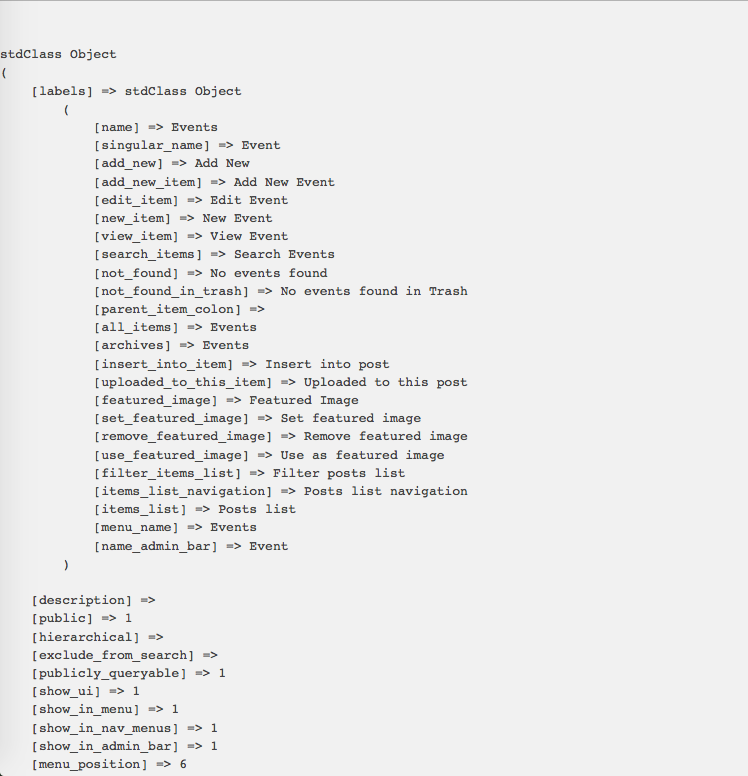
The rest of your page will not load but this is fine.
Copy and paste ALL of the output code into a Gist at http://gist.github.com, then share a link to that Gist here with me.
Once you’ve shared the Gist, you can go back and remove that code from your theme’s functions.php file.
I will review that code output and see if I can learn anything from it.
Thank you!
GeorgeParticipantFabrice, our response times are one reply per 24 hours. Further, your thread was posted at a time that was late Friday afternoon in the timezones of almost everyone in our support team.
Thank you for your patience.
George -
AuthorPosts