

Forum Replies Created
-
AuthorPosts
-
February 29, 2016 at 7:24 am in reply to: Selling tickets with Community Events (Pre-purchase) #1083308
George
ParticipantHey @Stefano,
Thanks for reaching out!
What you describe should indeed be possible with JUST Community Events—you do not need Community Events Tickets for these features.
Essentially, what you can do is set the default status for submitted events to “Draft” when they are submitted. This is the default setting, but you can confirm this on your site by going to Events → Settings → Community in your wp-admin and ensuring the Default status for submitted events option is set to “Draft” (or “Pending Review”).
So then events will be submitted, and will not be published immediately. They’ll be “Drafts” in your wp-admin, which you can filter easily by using the filters like the one shown in this screenshot:
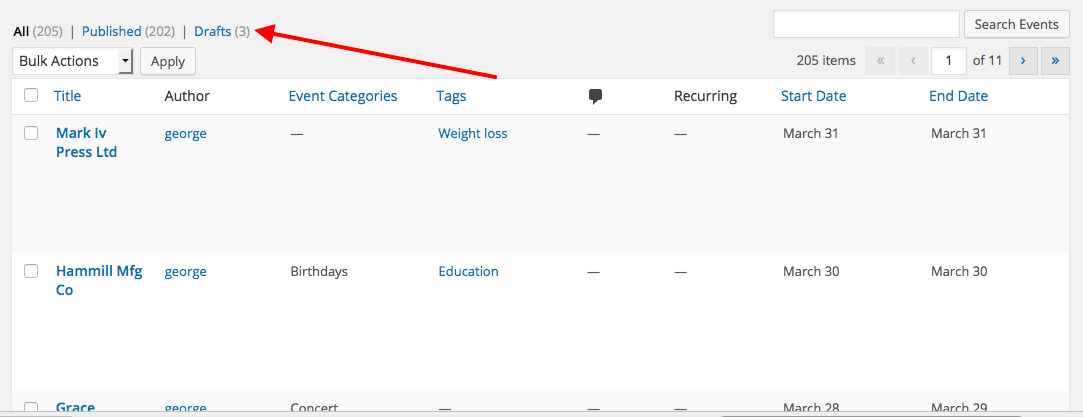
You can then edit these draft events in your wp-admin to manually add tickets as you describe, to your specific standards. Then you can save the tickets and “publish” the event, and the tickets will work just like normal.
I hope this helps!
GeorgeParticipantHi @Karly,
Thanks for reaching out—good question. At this time you could indeed only go about this customization by modifying a core plugin file, which is of course not ideal and something I would recommend very strongly against.
Not only does this require manual updating of that file change after each PRO update, but recurrence specifically is a rather delicate feature, and messing with it on a code level is just a slippery slope for a number of potential problems.
An Alternative Approach
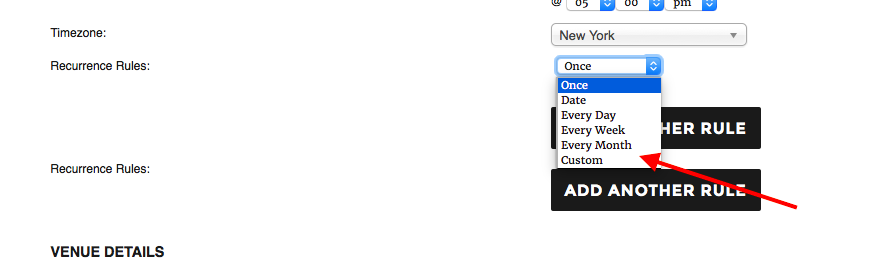
I tinkered a bit and was able to come up with a JavaScript-based solution for removing the “Every Year” recurrence option from the Community Events submission page.
I know that a JavaScript solution is not ideal perhaps, but this allows you to paste the snippet into your theme’s functions.php file so that no core file modifications are required! 🙂 Here’s the snippet:
add_action( 'wp_footer', 'remove_annual_recurrence_from_community_submit_page' );function remove_annual_recurrence_from_community_submit_page() {
if ( ! tribe_is_community_edit_event_page() )
return;wp_enqueue_script( 'jquery' );
?>
<script type="text/javascript">
jQuery(window).load( function() {
jQuery( '.tribe-event-recurrence option[value="Every Year"]' ).remove();
});
</script>
<?php
}
And here’s a screenshot of the result on my local testing site to show it working as intended:
I hope this helps!
Sincerely,
GeorgeParticipantHey James,
I’m sorry to hear about these issues!
The snippet shared here, that modify_bar_label() function, is just a gettext string replacement, so I am not sure why that broke things. At this time, there unfortunately is not a better way to go about changing that label with PHP, so we’ll have to try something else entirely.
First, get rid of that snippet from your site if you haven’t already 🙂
Next, try adding this snippet to your theme’s functions.php file or something:
add_action( 'wp_footer', 'change_location_filter_label_text' );function change_location_filter_label_text() {
if ( ! tribe_is_event() )
return;
?>
<script type="text/javascript">
document.querySelector( '.label-tribe-bar-geoloc' ).textContent = 'Search by post code';
</script>
<?php
}
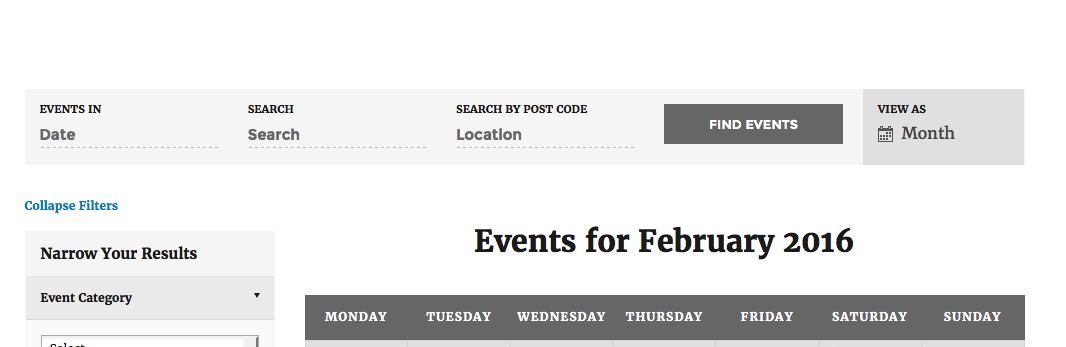
A true PHP solution would be better, but this above snippet should do the job for now until we are able to provide a simple filter or something here. Here’s an example of the above code snippet working well and changing that label text:
I hope this code snippet helps!
Sincerely,
GeorgeFebruary 29, 2016 at 5:59 am in reply to: Event Tickets Pricing Area with Inventory Amounts… #1083277ParticipantHi @inspire99,
Thank you for reaching out!
Unfortunately, what you are trying to do is only possible with some code customizations 🙁 We cannot help with code customizations, but I’m happy to help as much as possible regardless!
To be clear, do you mean that basically, this is how tickets currently display on your site:
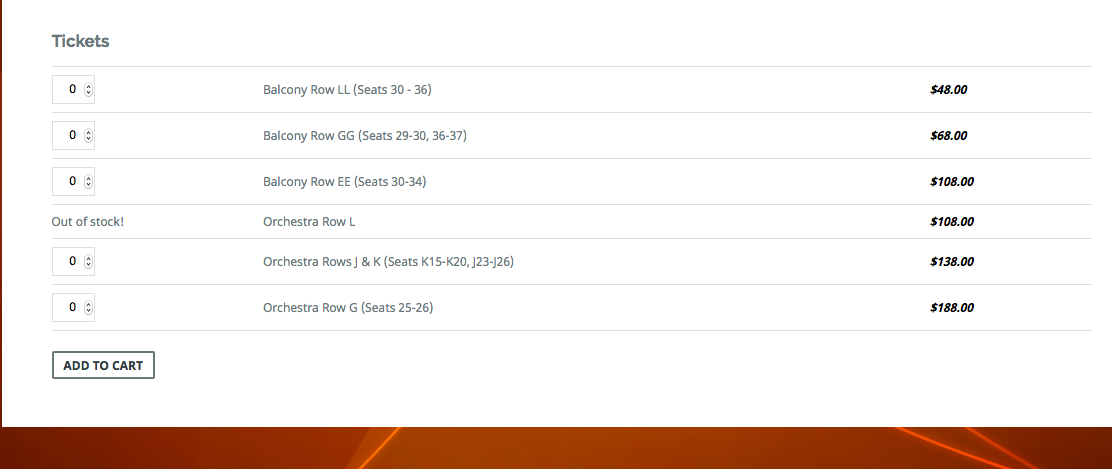
And so your ideal design would be that the “Quantity” selection on the left is over on the right next to the price? So that the left-most column is the description?
Thank you,
GeorgeParticipantHey @Melanie,
Thanks for reaching out!
1. Some Backstory
You cannot put The Events Calendar’s main calendar view into a page. The generated /events URL itself is not a page, either.
Let me explain:
The nature of a calendar means that a “static page” is simply not a feasible technological approach to building a calendar. Instead, we make the /events URL generate on your site and this serves more like a “Feed” URL, or an API Endpoint, if you’re familiar with that term.
This allows for great flexibility in terms of paging through months, weeks, days, etc., which using a Page in WordPress simply does not allow.
2. Using the Custom Template
Now that I’ve explained what’s going on here, I would like to try to get your page builder options working. They might work, however I wold like to point out that “page builders” are not generally well-made code and generally do break WordPress coding standards in many, many ways. So as an example, if the suggestion I am about to share does not help, the limitation is arising from your page builder, not from The Events Calendar.
That suggestion itself would be as follows:
- Head to Events → Settings → Display in your site’s wp-admin.
- Look for an option here called “Events Template”.
- Try out every single template available here! Try one template, then save the changes, then check out the page builder functionality on your site. Any progress? If not, then go back to settings and choose a different template, and repeat until you’ve tried everything.
I hope this information and these steps help!
If not, and this discrepancy is a deal-breaker for your site, then:
1. Sorry for the trouble and the time spent here!
2. We are happy to issue a refund immediately. If you do the steps above and the page builder is still not working on The Events Calendar pages, you can get a refund by doing these steps → https://theeventscalendar.com/knowledgebase/refund-policy/Sincerely,
GeorgeParticipantHey Catherine,
I do not know of a specific problem with the method you describe here—you should be good to go with proceeding in this way.
I should point out, however, that making a backup of your site and database is something I would recommend before installing or updating any piece of software on your site! Not just The Events Calendar 🙂 But any other plugin, your theme, or WordPress itself of course.
Just my two cents on that—and I would recommend a backup here before proceeding, just for good measure—but yes, you should be able to proceed in the manner you’ve described without issue.
Sincerely,
GeorgeParticipantHey Mark,
Filter Bar version 3.9.1 is very outdated and will likely break your site.
Why are you trying to use that specific, old version?
I might still be able to get those files for you regardless, but am just curious! 🙂
Thank you,
GeorgeParticipantI’m sorry to hear this, @Stavros!
We cannot log into customer sites for any reason, so please do not post any site credentials on this site.
I’m curious, @Stavros—what is the specific thing that happens when you try to save the key? Does the key just disappear? Does a message pop up? If so, what message?
Thank you!
GeorgeParticipantSounds good, @Kenna! I’ll close up this thread for now, but open a new thread any time if you’re curious about any other issues.
I wish you the best of luck with your project 🙂
Sincerely,
GeorgeParticipantNo worries @petitmill, thank you for the update here and for being mindful of our terms!
I’m sorry that there’s not much specific action I can recommend here. If you’re willing to tinker around with code a bit, you might be able to make some progress by modifying the getTemplateHierarchy() function—you can search for this inside your plugin code, it’s in a file at src/Tribe/Templates.php and is where the loading of templates ultimately happens.
I hope this is a helpful step!
Sincerely,
GeorgeParticipantHey @Cully,
I really appreciate the kind words about our support processes! We don’t always have good news to share, like with our less-than-ideal plugin performance at this time, so I thank you your patience and politeness despite the bad news here 🙂
Thank you for this information, as well. I do not doubt that our plugins are one of the main causes of your site’s slowness—if not the main culprit outright.
1. How many other plugins are on your site?
2. Do you notice any improvements with the loading of at least the Month View if you head to Events → Settings in your wp-admin and try checking this option (if it isn’t already!):
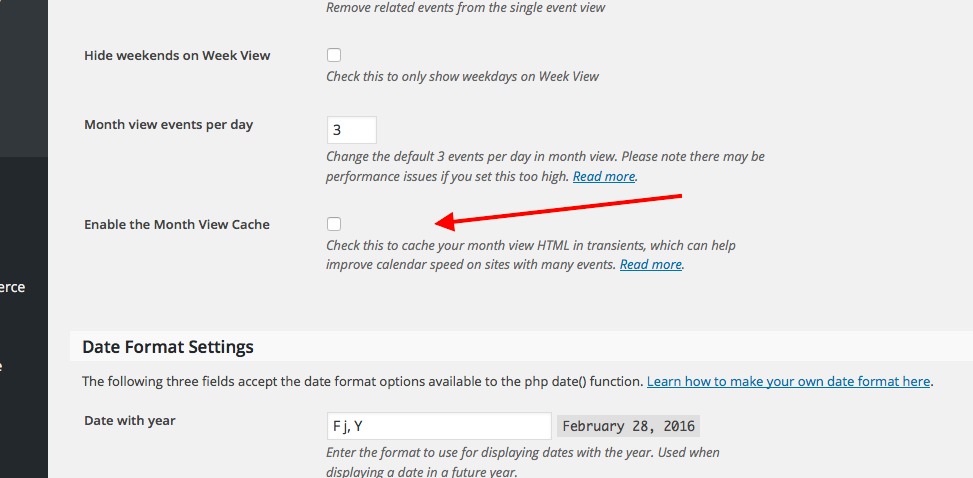
This may make a positive impact on load speeds and such; if you already have this Month View Cache enabled, then apologies for mentioning something you’re already doing!
3. Out of curiosity, are many of your events recurring events? If so, something that might help is to shorten the window of time in which recurring event instances are auto-generated. This will not affect the functionality of the events at all, it just means that, for example, if there is recurring event happening for the next year, instead of being able to paginate into all 12 months of the event, you can only paginate three months ahead from the current date or so.
If this sounds relevant to your site, then head to Events → Settings in your wp-admin and on the “Default” tab, change the Clean up recurring events after and Create recurring events in advance for options to something smaller than the default value, which should be either 12 or 24 months.
I hope these suggestions make some sort of impact—if not, then unfortunately the best recommendation I have at this time is, essentially, to wait for our performance improvements to be released in the coming weeks, months, and beyond 🙁 I know this is far from ideal, but I can promise that we are working hard on improving the performance of our plugins across the board!
Sincerely,
GeorgeParticipantHey Alex,
Sorry for my misunderstanding here! However, I do not see Community Tickets in your account. Your account records show that you only have these plugins at this time:
• WooCommerce Tickets
• Events Calendar Pro
• Community Events
• Event Tickets PlusNone of these are Community Tickets, which is a separate plugin here → https://theeventscalendar.com/product/community-tickets/
I hope this clarifies things a bit!
Thank you,
GeorgeParticipantHey @Kenna,
Thanks for the elaboration here. What you describe is actually a bit more complicated than I assumed, and this sort of “tiered access” system is not possible with our plugins at this time 🙁
I’m sorry about this!
Sincerely,
GeorgeParticipantHey @Matthew,
I’m sorry about this code no longer working!
I think this is something we should make more easily filterable, and I will discuss doing so with a developer and see if we can include some filters in some upcoming future release.
For now, however, I have cooked up a JavaScript solution that should work well. I know JavaScript isn’t ideal, but it should hopefully work well as just a temporary solution for now:
add_action( 'wp_footer', 'change_location_placeholder_text' );function change_location_placeholder_text() {
if ( ! tribe_is_event() )
return; ?><script type="text/javascript">
document.getElementById( 'tribe-bar-geoloc' ).placeholder = 'Enter City or Zip';
</script><?php
}☝️ Paste that into your theme’s functions.php file and let me know if it helps!
Thanks,
GeorgeParticipantI’m sorry to hear about this, @Phillip!
You mention that switching to the 2015 theme did not help—what do you find if you do similar testing with all of the other plugins on your site?
For a full and comprehensive test here, I would recommend doing all of the steps outlined here: https://theeventscalendar.com/knowledgebase/testing-for-conflicts/
After EACH STEP in that process, check on your month view and try paginating through the months again—how do things behave? Do things improve anywhere along the way with your testing?
I only suggest this testing because there is not a known bug like this at this time, and I cannot reproduce this behavior on my own testing site whether logged in or logged out.
Let us know what you find!
Thank you,
George -
AuthorPosts