
Home › Forums › Calendar Products › Community Events › Editing a Recurrence Option
- This topic has 5 replies, 2 voices, and was last updated 10 years, 7 months ago by
George.
-
AuthorPosts
-
February 28, 2016 at 5:53 pm #1083183
Sean
ParticipantHi,
We want to remove “yearly” from the recurrence options so that annual events are submitted or updated each year instead of being bundled in with the regularly recurring events (weekly, monthly, etc). I was going to perform a template override on /the-events-calendar-community-events/src/views/community/modules/recurrence.php but found that file actually “includes” /events-calendar-pro/src/admin-views/event-recurrence.php
Is the only way to remove the Yearly options going to be editing that core file? Or is there another method that’ll allow us to do so without having to update that file each time a new version of PRO is released?
February 29, 2016 at 6:43 am #1083299ParticipantHi @Karly,
Thanks for reaching out—good question. At this time you could indeed only go about this customization by modifying a core plugin file, which is of course not ideal and something I would recommend very strongly against.
Not only does this require manual updating of that file change after each PRO update, but recurrence specifically is a rather delicate feature, and messing with it on a code level is just a slippery slope for a number of potential problems.
An Alternative Approach
I tinkered a bit and was able to come up with a JavaScript-based solution for removing the “Every Year” recurrence option from the Community Events submission page.
I know that a JavaScript solution is not ideal perhaps, but this allows you to paste the snippet into your theme’s functions.php file so that no core file modifications are required! 🙂 Here’s the snippet:
add_action( 'wp_footer', 'remove_annual_recurrence_from_community_submit_page' );function remove_annual_recurrence_from_community_submit_page() {
if ( ! tribe_is_community_edit_event_page() )
return;wp_enqueue_script( 'jquery' );
?>
<script type="text/javascript">
jQuery(window).load( function() {
jQuery( '.tribe-event-recurrence option[value="Every Year"]' ).remove();
});
</script>
<?php
}
And here’s a screenshot of the result on my local testing site to show it working as intended:
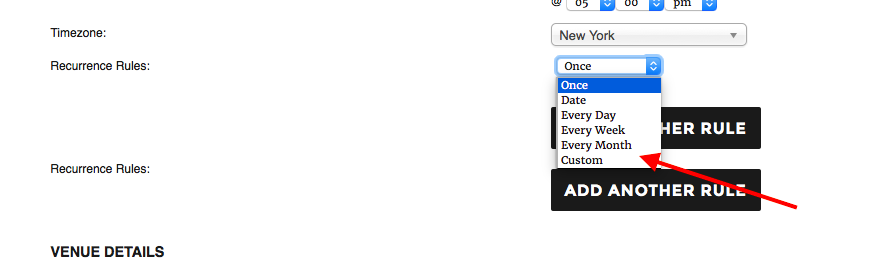
I hope this helps!
Sincerely,
GeorgeFebruary 29, 2016 at 7:38 am #1083321ParticipantGood morning George,
Thanks for your response and recommendation. I really appreciate you putting this Javascript snippet together! I tried it out and it does work perfectly for removing the Yearly option from the Recurrence Rules dropdown. The only other aspect of removing the annual recurrence option is removing Yearly from the Frequency dropdown. That can be accessed by choosing Custom from the Recurrence Rules dropdown.
What would be the best way to do that? Use a similar snippet to the one above (which I I was able to achieve using your snippet as a guide), or adding it within your snippet (something I’m not sure how to do)?
add_action( 'wp_footer', 'remove_yearly_recurrence_frequency_from_community_submit_page' );

function remove_yearly_recurrence_frequency_from_community_submit_page() {

    if ( ! tribe_is_community_edit_event_page() )
        return;

    wp_enqueue_script( 'jquery' );
?>
    <script type="text/javascript">
        jQuery(window).load( function() {
            jQuery( '.custom-recurrence-frequency option[value="Yearly"]' ).remove();
        });
    </script>
<?php
}
Thanks again,
KarlyFebruary 29, 2016 at 9:27 pm #1083728ParticipantThanks for the update, @karly!
To combine the methods you should make the code in your snippet that looks like this:
jQuery( '.custom-recurrence-frequency option[value="Yearly"]' ).remove();To this:
jQuery( '.custom-recurrence-frequency option[value="Yearly"]' ).remove();

jQuery( '.tribe-event-recurrence option[value="Every Year"]' ).remove();
That should do it!
— George
March 1, 2016 at 8:36 am #1083929ParticipantAh, success! Thank you so much George!
March 2, 2016 at 7:46 am #1084324ParticipantGlad to hear it! Best of luck with your project.
— George
-
AuthorPosts
- The topic ‘Editing a Recurrence Option’ is closed to new replies.