
Home › Forums › Ticket Products › Event Tickets Plus › Calendar Takes Forever to Load
- This topic has 5 replies, 2 voices, and was last updated 10 years, 7 months ago by
George.
-
AuthorPosts
-
February 28, 2016 at 5:02 pm #1083166
Cully
ParticipantI help manage a WordPress site for a client. We have the Events Calendar Pro plugin installed. It has quite a few events in it. We’ve run into a few problems with the Events Calendar plugins around memory usage and site speed:
1. The calendar page takes FOREVER to load (http://www.parentingsuccessnetwork.org/events/). This just seems to be because of the poor performance of the Events Calendar plugin.
2. The site in general is slowed by the various Events Calendar plugins, because of all the hooks and actions is registers. As we’ve done performance analyses on the site, the Events Calendar plugins have consistently been at the top of resource use.
We’ve increased the memory limit on the site, and it doesn’t help. However, even if it did help, the fact that we have to significantly increase our memory limit just to generate a simple calendar is pretty unreasonable.
We would like to continue using the plugins; apart from performance issues, they work great for what we do. However, they are crippling our site.
February 28, 2016 at 5:07 pm #1083171ParticipantI’m sorry to hear about these issues, @Cully. Performance is indeed something we want to improve, though at this time there is little that can be done because the code changes required to make an impact are significant 🙁
We’re working on such code changes—actively! But it will take some time before we have significant performance improvements shipped in the plugin.
For now, in regards to your specific site, can you share some of the following details in this thread here? It might help me make some recommendations that could, in turn, help you/your site:
1. You say the calendar has “quite a few events in it.” Can you clarify what this actual number is, roughly? Check in your wp-admin. How many events are in your site?
2. Can you share your “System Information” with us? Here’s how → https://theeventscalendar.com/knowledgebase/sharing-sys-info/
3. Who is your webhost? Share a link to their page if possible.
Thank you!
GeorgeFebruary 28, 2016 at 5:18 pm #1083175ParticipantFirst, you guys do such a good job at customer support. Every time I’ve asked a question on here I’ve received a prompt, honest, amazing response. Thank you 🙂
1. We have 1,342 events.
2. WordPress 4.4.1, PHP 5.6.10, The Events Calendar PRO version 4.0.6, The Events Calendar: Filter Bar version 4.0.3, The Events Calendar version 4.0.6
3. The site was hosted by Lunar Pages. We just moved to a Dreamhost VPS. We saw a slight improvement, but the bottleneck is definitely the plugins.
The Events Calendar plugins aren’t the only ones giving us trouble. However, they seem to be the biggest contributors.
I’ve look through the code a bit; it does seem like quite the job to improve performance. I hope it goes well for you all!
February 28, 2016 at 6:28 pm #1083190ParticipantHey @Cully,
I really appreciate the kind words about our support processes! We don’t always have good news to share, like with our less-than-ideal plugin performance at this time, so I thank you your patience and politeness despite the bad news here 🙂
Thank you for this information, as well. I do not doubt that our plugins are one of the main causes of your site’s slowness—if not the main culprit outright.
1. How many other plugins are on your site?
2. Do you notice any improvements with the loading of at least the Month View if you head to Events → Settings in your wp-admin and try checking this option (if it isn’t already!):
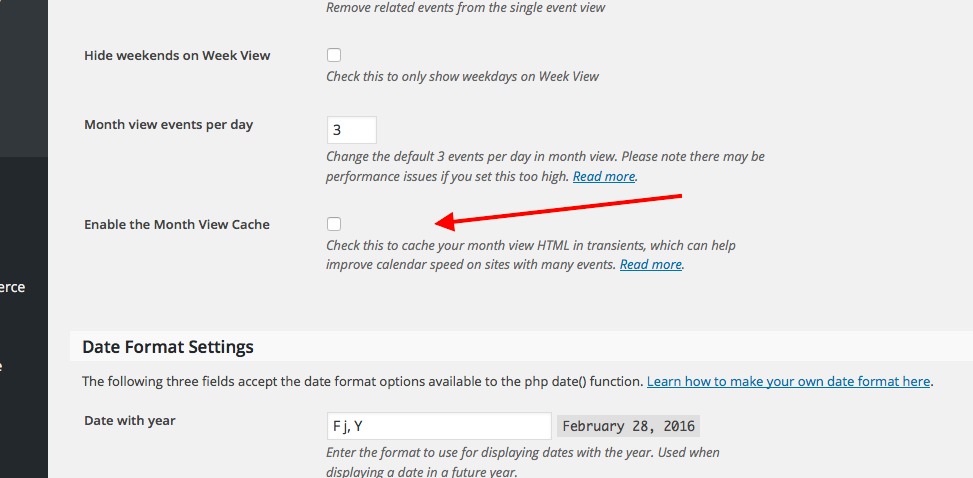
This may make a positive impact on load speeds and such; if you already have this Month View Cache enabled, then apologies for mentioning something you’re already doing!
3. Out of curiosity, are many of your events recurring events? If so, something that might help is to shorten the window of time in which recurring event instances are auto-generated. This will not affect the functionality of the events at all, it just means that, for example, if there is recurring event happening for the next year, instead of being able to paginate into all 12 months of the event, you can only paginate three months ahead from the current date or so.
If this sounds relevant to your site, then head to Events → Settings in your wp-admin and on the “Default” tab, change the Clean up recurring events after and Create recurring events in advance for options to something smaller than the default value, which should be either 12 or 24 months.
I hope these suggestions make some sort of impact—if not, then unfortunately the best recommendation I have at this time is, essentially, to wait for our performance improvements to be released in the coming weeks, months, and beyond 🙁 I know this is far from ideal, but I can promise that we are working hard on improving the performance of our plugins across the board!
Sincerely,
GeorgeMarch 3, 2016 at 8:25 pm #1085130ParticipantThe month view caching did improve load time by quite a bit. We’ll try reducing the lifetime of recurring events and see if that does anything. Thanks again for your great help!
March 7, 2016 at 1:47 pm #1085992ParticipantGlad to hear about some of the progress here, @Cully. Keep your eyes on plugin updates over time, and/or on our blog at http://theeventscalendar.com/blog—we post information about updates there and we have many performance-related plans in the works that will be posted about on the blog and such.
For now, I’ll close this thread—if other issues arise or if there are other questions we can try to help with, post a new thread any time.
Thank you!
George -
AuthorPosts
- The topic ‘Calendar Takes Forever to Load’ is closed to new replies.