

Forum Replies Created
-
AuthorPosts
-
George
ParticipantI’m sorry to hear about these issues, @Cully. Performance is indeed something we want to improve, though at this time there is little that can be done because the code changes required to make an impact are significant 🙁
We’re working on such code changes—actively! But it will take some time before we have significant performance improvements shipped in the plugin.
For now, in regards to your specific site, can you share some of the following details in this thread here? It might help me make some recommendations that could, in turn, help you/your site:
1. You say the calendar has “quite a few events in it.” Can you clarify what this actual number is, roughly? Check in your wp-admin. How many events are in your site?
2. Can you share your “System Information” with us? Here’s how → https://theeventscalendar.com/knowledgebase/sharing-sys-info/
3. Who is your webhost? Share a link to their page if possible.
Thank you!
GeorgeParticipantHey @Edwin,
Sorry to hear about this! It sounds like your theme is causing the discrepancy here.
Can you share a link to your site’s events page so that I can see this issue live? I will try to recommend the CSS necessary to fix this.
Thank you!
GeorgeParticipantHey Alex,
This feature is unfortunately not possible with Community Events. We have this feature as part of the Community Tickets add-on, but not Community Events on its own.
Sorry to disappoint!
Sincerely,
GeorgeParticipantHi Jorde,
Thanks for reaching out!
At this time, none of our plugins provide the functionality you are looking for. I’m sorry to bear this news!
Let me know if you have further questions here.
Thanks,
GeorgeParticipantHey @Kenna,
You unfortunately cannot do this at this time unless you were to write some extensive custom code 🙁
We cannot help with custom coding (check out the “Product Support” section of this page for more information → http://theeventscalendar.com/terms). However, can you describe a bit more about who the “certain people” would be in your case?
Based on your use case, I will try to recommend some custom code if possible! 🙂
1. For example, is this as simple a distinction as non-registered users will not be able to see the ticket form and buy tickets, but users who have accounts on your site can buy tickets for events?
2. Also, is this a universal “limitation” for all of the events on your site? Or will only certain events be “exclusive” in this way?
Thank you,
GeorgeParticipantHey @Rob,
Thanks for reaching out—interesting question!
The way it works is that the importer looks for the matching venues and organizers by name first, then matches the IDs of the found venues and organizers and updates post meta in the Event post so that the items are linked together.
Adding columns and other customizations to the importer is technically possible, but is a rather complicated code customization to make. It is only possible with custom code. We cannot help with custom coding, unfortunately, but it is technically possible if you were to write the code yourself or hire someone to do it for you.
I hope this information helps!
– George
ParticipantI’m sorry to hear about this issue, @Karen!
Would you mind sharing a screenshot of the admin edit-event screen for the event whose time does NOT display? You can do so by uploading the screenshot to Imgur.com, Flickr.com, CloudUp.com, or any similar image-hosting site; then just share the links to those images here and I’ll take a look.
I’m curious how the event is configured and a screenshot of the admin configuration of that no-Time-display event will be useful.
Also, can you share your “System Information” with us? Here’s how to do that → https://theeventscalendar.com/knowledgebase/sharing-sys-info/
Thank you!
GeorgeParticipantHey @petitemill,
Thank you for reaching out. We unfortunately cannot provide any assistance with custom coding projects like this. Please see the “Product Support” section on this page for more information → http://theeventscalendar.com/terms
I would still like to help as much as possible regardless, though!
For example, one thing alone that might be a major factor here is the naming of your files alone. Instead of archive-venue.php, for example, try archive-tribe_venue.php. And instead of archive-organizer.php, try archive-tribe_organizer.php.
More work will likely be needed, but this simple file name change alone should make an impact!
Cheers,
GeorgeParticipantThank you for reaching out, Laura!
I’m sorry to bear this news, but unfortunately Community Events does not do most of the things you list here. 🙁
If you have any further questions here please let me know!
— George
ParticipantHey @zeeheldennieuws,
Thanks for reaching out!
To be clear, are you asking for how to make the default Venues view which looks like this:
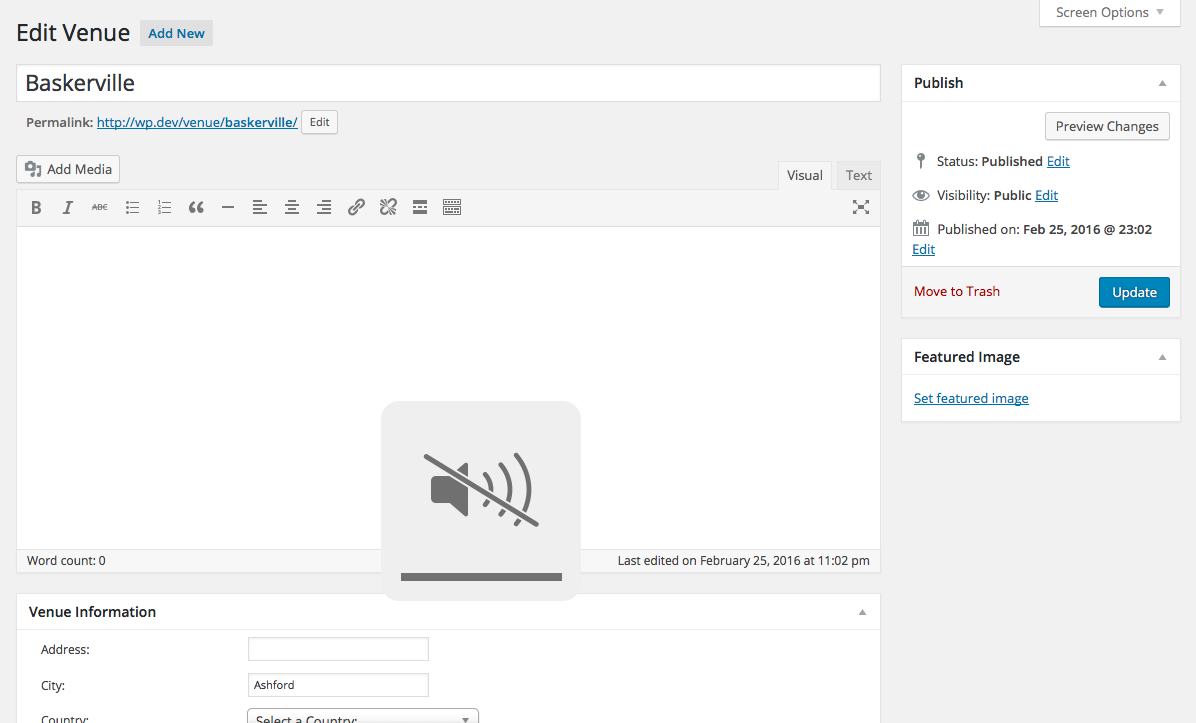
Have “event categories” and “tags” like this:
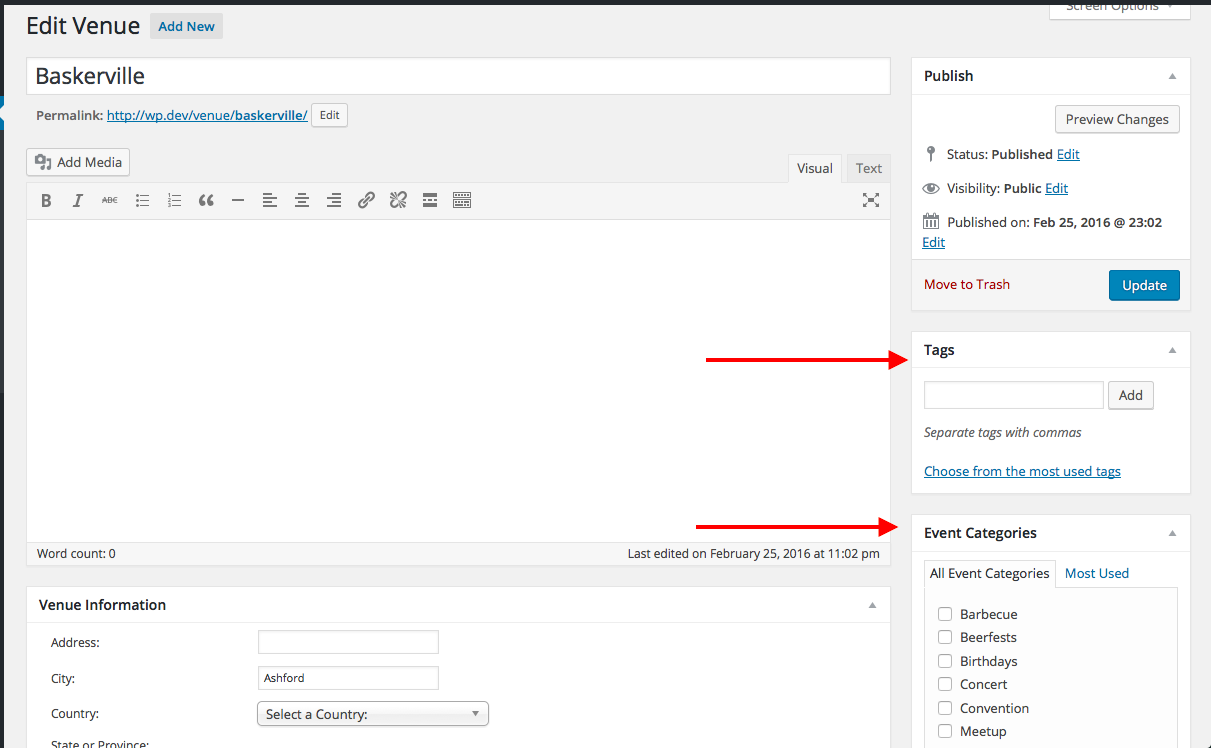
If so, then yes, you can do this by adding the following snippet to your theme’s functions.php file:
add_action( 'admin_init', 'add_taxonomies_to_venue_post_type' );function add_taxonomies_to_venue_post_type() {
register_taxonomy_for_object_type( 'tribe_events_cat', 'tribe_venue' );
register_taxonomy_for_object_type( 'post_tag', 'tribe_venue' );
}
This is using the default WordPress function register_taxonomy_for_object_type(), which you can read more about here → http://codex.wordpress.org/Function_Reference/register_taxonomy_for_object_type
I hope this helps!
— George
ParticipantHey @Phil,
Thanks for reaching out!
I took a look through our code to try and find a hook or filter to easily set a default author here, but unfortunately there is no such hook or filter to be found at this time 🙁
So, unfortunately, there are only two ways to go about setting a default author like you describe. Both unfortunately require custom coding, though in different ways. We unfortunately cannot help with custom coding 🙁
The first method would be to dive into the plugin code itself and customize the code there. This is not recommended because you would have to re-add this code after each plugin update. Although if you’re interested, you’d want to head into your iCal Importer files and to /src/Tribe/Main.php specifically. On this file there’s a function called processImportSubmission() which is where you can add a post_author specification..
Another alternative, however, would be to try a simpler customization which is to paste a custom code snippet in your theme’s functions.php like the ones listed here → http://wordpress.stackexchange.com/questions/84782/set-a-user-as-author-of-all-new-posts-posted
If the user ID of the author you wanted to be default was 332, for example, then you would modify the code in the above-linked example that looks like this:
$my_post['post_author'] = 1;
To this:
$my_post['post_author'] = 332;
This snippet may not do the job, but is likely to. I hope you try it out and that it helps!
Sincerely,
GeorgeParticipantHey Jenny,
Thanks for reaching out and for your interest in our software! I will address your questions as follows:
So I was wondering if the the community events would allow the gardens to sign in as users and add their event.
YES — Community Events can indeed add this functionality.
We would like to use the pro option to add custom fields and only allow the gardens to enter values for them and not the fields themselves. (if that makes sense!)
YES — If you have The Events Calendar, Events Calendar Pro, and Community Events installed, then custom fields for events can be created in your Events Calendar Pro settings. These fields will be available to be populated by users in both your wp-admin and on the Community Events submission form.
I’ve potentially got a few other questions, but if I can get access to a demo of the admin that might answer a lot of them. Can I get access?
NO — Unfortunately, we do not have a demo which allows for admin access. I am sorry about this! The only “demo” we have is a front-end demo at http://wpshindig.com/events
Sorry to disappoint on that last point—I hope this information is helpful nonetheless. Let me know if there’s anything I can shed more light on or help with!
Sincerely,
GeorgeParticipantHey @Stavros,
I’m sorry you’re having these issues!
To be clear, all plugin features work out-of-the-box fine even if the license key is not entered.
Now, there is still a problem here, but I just wanted to clarify that.
Speaking of the problem here, I cannot recreate it on my own test site. This makes me suspect a plugin or theme code conflict on your site. To test for this, I would recommend running through the troubleshooting process outlined on this page → https://theeventscalendar.com/knowledgebase/testing-for-conflicts/
After each step in that process, go back to the settings page in your wp-admin where you can enter the license key; try saving it again, and see if anything improves along the way.
1. What do you find when you do this?
2. Unfortunately, our plugins are not fully, 100% compatible with WPML. I mention this because I notice WPML and numerous add-ons for it in your site’s “System Information.” Now, you may be able to use WPML itself with The Events Calendar and Events Calendar Pro with little issue if you set it up exactly as according to this article → https://theeventscalendar.com/knowledgebase/setting-up-the-events-calendar-with-wpml/
However, bugs may arise and there is even less support for all of the additional WPML sub-plugins you have installed on your site.
I’m sorry to bear this bad news!
Sincerely,
GeorgeParticipantHey @Stavros,
Thanks for reaching out!
Unfortunately, with Events Calendar Pro alone you cannot have front-end event submissions. This feature requires our add-on Community Events, which you can find and learn more about here → https://theeventscalendar.com/product/wordpress-community-events/
Community Events does NOT require Events Calendar Pro. If you just want Community Events, and do not want Events Calendar Pro, let me know and I can refund that order!
Thanks,
GeorgeParticipantHi Alex,
Thank you for the follow-up. This Gist link is indeed the Gist link the user in that other thread shared.
To clarify, I’m curious if you can share your specific implementation of this code. The original user is using this in their single event template.
Are you? If so, 1. what is the file name of your custom template and 2. can you copy and paste your current, non-working version of this single event template into a Gist at http://gist.github.com and share a link to that Gist? I will take a look.
Sorry if my original request wasn’t very clear!
Thank you,
George -
AuthorPosts