

Forum Replies Created
-
AuthorPosts
-
George
ParticipantHey @Alex,
If your version of that code is not working, then to troubleshoot we would have to be manually testing and debugging a customization. We unfortunately cannot help with that, as described in more detail in the “Product Support” section here → http://theeventscalendar.com/terms
That being said, I’m happy to at least try and help as much as possible here!
To that end, can you copy and paste your entire, un-edited custom code into a Gist at http://gist.github.com, and then share a link to that Gist here?
I cannot promise a successful outcome here, unfortunately, but like I said, I’m happy to give it a shot and see if I can spot the problem.
Thank you,
GeorgeFebruary 27, 2016 at 6:41 pm in reply to: Can I have users fill out a contact form that will create an event #1083033ParticipantHey Cory,
I’m glad to hear that!
In regards to your customization question, the answer is technically “as much customization as you would like to make or are willing to pay for.” That might sound odd, but to elaborate a bit on this, what I mean is that you are only limited by your own coding knowledge. We cannot help at all with customizations, but you can custom code anything you would like.
If you yourself do not know how to make the customizations you would like to make, then unfortunately your best option from there would be to hire a professional to help. We have a list of great developers here → http://m.tri.be/18k1 (and have no affiliation with any of these folks–they’re simple some well-respected names in the community that we’ve compiled to share in situations like this one).
I hope this information helps!
Sincerely,
GeorgeParticipantHey @stephaneperrin,
I’m really glad to hear about some progress with the display of Photo View!
When it comes to the number of events being limited to 5, this is another odd issue that is likely the result of a theme or plugin conflict.
I would recommend first head to Settings → Reading in your site’s wp-admin.
In this settings page, there should be two options which I’ve shown in this screenshot:
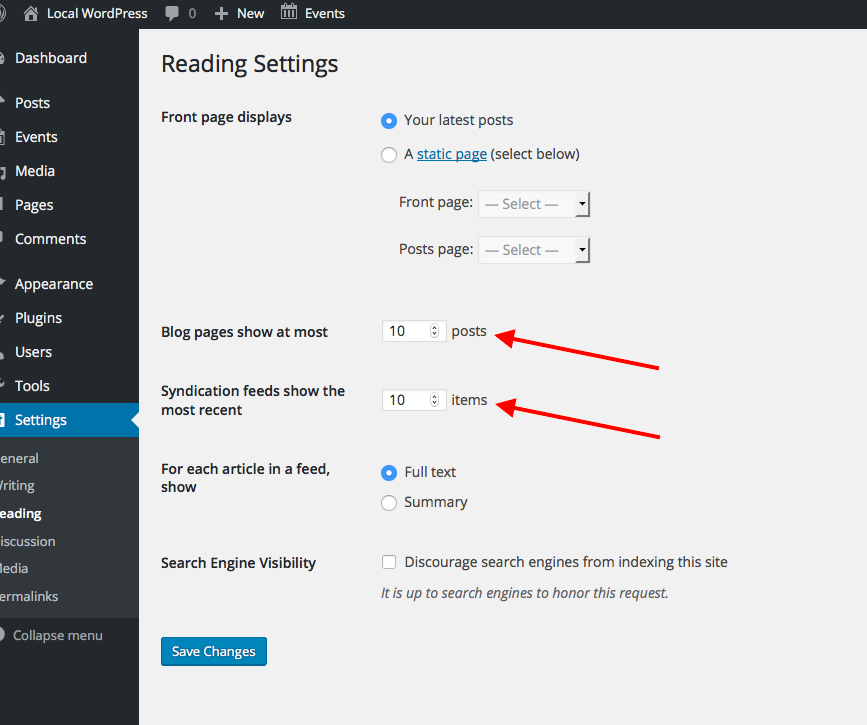
What are the current values of these options? If either one is 5, does changing that option to something else alter the number of events loaded in your Photo View and such?
If neither option is set to 5, then unfortunately the “plugin or theme conflict” is even more likely the culprit here 🙁 In this case, I would recommend that you perform EACH troubleshooting step outlined on this page → https://theeventscalendar.com/knowledgebase/testing-for-conflicts/
After EACH step in that process, check on the Photo Views you’ve described here—see if the number of events changes from 5 at all, and see if “previous” and “next” event links work any better….
Let us know what you find!
Thank you so much for your patience here, @stephaneperrin.
Sincerely,
GeorgeParticipantThank you for clarifying things, Ruby. Our plugins unfortunately do not work with WPML at this time and so that alone could be the source of the problems you currently face on your site 🙁
One thing that might be worth is trying to undo all of your current WPML configurations, and then try to set things up again with it on your site exactly as described in this knowledgebase article → https://theeventscalendar.com/knowledgebase/setting-up-the-events-calendar-with-wpml/
If you do the exact steps here and still have issues, then unfortunately WPML and our plugins may not be able to coexist on your site.
I’m sorry to bear this bad news!
GeorgeParticipantHey Ann,
I’m sorry to hear that your first attempted response was lost!
In regards to your issues, I would recommend that you try the solution proposed in this knowledgebase article → https://theeventscalendar.com/knowledgebase/use-the-event-cost-field-with-tickets-installed/
That code snippet should re-instate the Cost Field on your site even though tickets is installed, without affecting the functionality of either tickets or that original Cost Fields.
If this doesn’t help, or you’d rather not even get into the realm of adding custom code snippets to your site, then we can indeed issue a refund and to do this you should simply follow the steps outlined here → https://theeventscalendar.com/knowledgebase/refund-policy/
I really appreciate the kind words about our plugins, Ann, and am glad that they’ve been useful! Try out the code snippet linked above to try and make things even better on your site…if not, we’re happy to refund the purchase of the ticketing plugins.
Thank you,
GeorgeParticipantHey @bruciebruce,
I’m glad to hear there is some progress. For ensuring the display of featured images, you will have to use the tribe_event_featured_image() function in custom templates. You can read about this process here → https://theeventscalendar.com/knowledgebase/themers-guide/
We unfortunately cannot provide code-level help 🙁 You will have to take the reins on your customizations. For example, when it comes to locating “Buy Now” buttons, these are not generated by The Events Calendar itself for example, they will be coming from your eCommerce plugin most likely.
To find where this markup is, a great method is to do a “Find in folder” search on your site’s “wp-content/plugins” directory for the markup associated with the Buy Now button. This searching should eventually lead you to the file inside your site’s code where the markup is generated, and you can tweak and tinker from there.
I wish you the best of luck with your customizing! I’m sorry we cannot assist with these projects. If you need further help with things on a code level, I would recommend researching online or hiring a professional developer to assist further. We have a list of great developers here → http://m.tri.be/18k1 (and have no affiliation with any of these folks–they’re simple some well-respected names in the community that we’ve compiled to share in situations like this one).
Best of luck with your project,
GeorgeParticipantHi @Clarity,
You can try this code instead:
add_action( 'login_form_top', 'redirect_to_better_login_page' );Do not define the redirect_to_better_login_page() function more than one time.
Also, ensure that your links end up like this:
'http://avindustrycalendar.com/login-register/'
Not like this:
'http://avindustrycalendar.com/login-register/&#O39;
The closing PHP tag is also not required and I would recommend removing it.
— George
ParticipantThis thread is being closed and continued in this other forum thread: https://theeventscalendar.com/support/forums/topic/1082610/.
— George
ParticipantHi Sara,
We do not provide technical support over email.
We also do not provide customization support or theme-related support, in general—even to our Premium users.
However, I was trying to do that in the other thread of yours. Your issue is a theme design issue and I am trying to help anyways, so please bear with us and I’m sure we’ll be able to get to a positive outcome here.
You are able to post on this current forum thread, so for now, never mind your other thread. I will close it. You can just continue the conversation here in this thread with me 🙂
Where We Left Off
The last question I posed to you in that other thread was whether or not you could share a link to your site’s event page. Here’s a full quote of my last reply:
That item in the red circle is not displaying correctly because of theme issues on your site; can you link to the page where this is happening on your site? I’ll take a closer look and try to recommend a solution.
So, can you share a link to the events page on your site where the issue described in that other thread is happening? I will take a look and try to recommend a solution.
Thank you,
GeorgeParticipantHi @stephaneperrin,
I would like to share an update regarding some aspects of the Photo View issues here. It’s a Saturday night, so I didn’t expect to make much progress with this today, but one of our developers, Brian, has come up with something that might help temporarily until we can properly fix this in our code.
To try out this custom solution, simply copy and paste the following code into the bottom of your theme’s style.css file:
.tribe-events-photo #tribe-events-photo-events {

   opacity: 1;

}
Let us know if adding that snippet to that file improves any of the Photo View behavior on your site!
Thanks,
GeorgeParticipantHi Douglas,
We are unfortunately only able to process refunds for items within thirty days from their date of purchase. However, we would be happy to try initiating a refund despite this. It MAY be possible by working with the payment processor, though I cannot guarantee that outcome.
To help us try and help you get a refund, please follow the same steps as normal for a refund as described in this article → https://theeventscalendar.com/knowledgebase/refund-policy/
We will respond to your email from there to continue this conversation.
— George
ParticipantNice! Best of luck with your customizations.
— George
ParticipantThanks for the update, @Edwin! Best of luck with your site.
— George
ParticipantHi Douglas,
The support droid auto-bot closes threads automatically after 2 weeks of inactivity. There is no pinpointed bug here at this time, so we will have to continue investigating this and that could take weeks or months until we are able to isolate the problem and publish a fix.
That will be longer than 2 weeks, and so the bot will close this thread regardless before a resolution is had.
I will be closing this thread unless @Stephaneperrin has further questions. I encourage you to open a thread of your own for problems on your site.
— George
ParticipantHey Ruby,
Sorry to hear about these issues!
First, can you share your “System Information” with us? Here’s how → https://theeventscalendar.com/knowledgebase/sharing-sys-info/
Next, can you clarify where the ?lang=fr feature comes from in your URLs? How did you enable this on your site?
I will continue investigating with these details.
Thanks!
George -
AuthorPosts