
Home › Forums › Calendar Products › Community Events › Theme conflict – any workaround possible?
- This topic has 2 replies, 3 voices, and was last updated 10 years, 7 months ago by
Support Droid.
-
AuthorPosts
-
February 27, 2016 at 2:32 pm #1083002
James
ParticipantHi,
I had a problem with my google maps snippet not being visible but could not figure out why – see earlier thread: https://theeventscalendar.com/support/forums/topic/google-maps-snippet-not-showing/
After a discussion with the theme developers it turned out to be caused by the inputting of the following code in to functions.php:
function modify_bar_label( $translated_text, $text, $domain ) {
switch ( $translated_text ) {
case ‘Near’ :
$translated_text = __( ‘Search By Postcode’, ‘tribe-events-calendar-pro’ );
break;
}
return $translated_text;
}
add_filter( ‘gettext’, ‘modify_bar_label’, 20, 3 );This was done to change the text on the filter bar from ‘Near’ to ‘Search by postcode’ so that users could more easily understand what this part of the filter bar is for. Is there another code that would achieve the same effect which could be used? I am hoping to find a solution where I can change the text without the google maps snippet on each event disappearing.
Many thanks
James
February 29, 2016 at 6:08 am #1083281George
ParticipantHey James,
I’m sorry to hear about these issues!
The snippet shared here, that modify_bar_label() function, is just a gettext string replacement, so I am not sure why that broke things. At this time, there unfortunately is not a better way to go about changing that label with PHP, so we’ll have to try something else entirely.
First, get rid of that snippet from your site if you haven’t already 🙂
Next, try adding this snippet to your theme’s functions.php file or something:
add_action( 'wp_footer', 'change_location_filter_label_text' );function change_location_filter_label_text() {
if ( ! tribe_is_event() )
return;
?>
<script type="text/javascript">
document.querySelector( '.label-tribe-bar-geoloc' ).textContent = 'Search by post code';
</script>
<?php
}
A true PHP solution would be better, but this above snippet should do the job for now until we are able to provide a simple filter or something here. Here’s an example of the above code snippet working well and changing that label text:
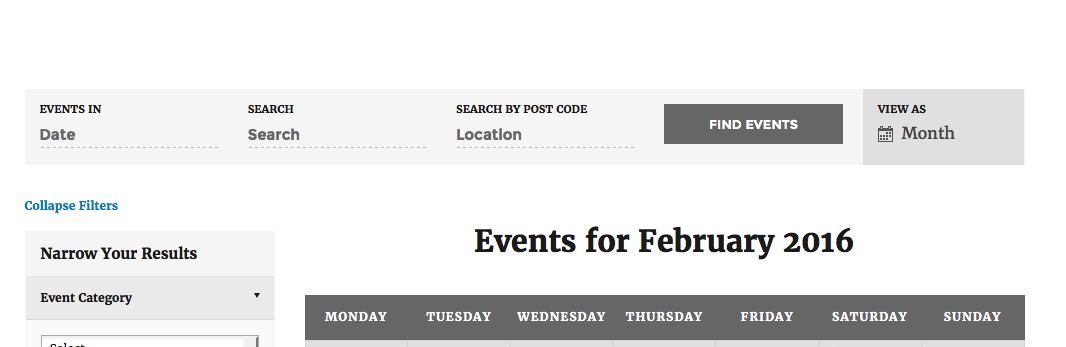
I hope this code snippet helps!
Sincerely,
GeorgeMarch 15, 2016 at 9:35 am #1089149KeymasterThis topic has not been active for quite some time and will now be closed.
If you still need assistance please simply open a new topic (linking to this one if necessary)
and one of the team will be only too happy to help. -
AuthorPosts
- The topic ‘Theme conflict – any workaround possible?’ is closed to new replies.