

Forum Replies Created
-
AuthorPosts
-
March 2, 2016 at 3:55 pm in reply to: 'View Calendar' link does not work in top WP edit bar #1084601
George
ParticipantHey Diane,
Thanks for this—that is very odd link behavior and I cannot recreate it.
Also, it seems that your “System Information” block is cut short—as you can see, not even The Events Calendar or Events Calendar Pro are included in the “Plugins” section, which is erroneous because those plugins are clearly installed on your site.
So, not to belabor the point, but could you be sure to copy and paste the ENTIRE section of “System Information” here?
Thank you for your patience with this!
GeorgeParticipantHey Victoria!
Sorry that this wasn’t clear on our site—you do NOT need Events Calendar Pro for Event Tickets Plus or any other add-on.
To use Event Tickets Plus, you only need this software on your site installed and activated:
• The Events Calendar — free.
• WooCommerce — free.
• Event Tickets — free.
• Event Tickets Plus — premium.I hope this information helps!
GeorgeParticipantHey Veronica,
I’m really sorry to hear about the trouble with the importer on your site.
I’m curious, do you know if your site was getting actual visitors to the site on a daily basis?
When it comes to issuing a refund, we unfortunately are usually only able to process a refund within 30 days from the date of purchase. However, if you follow the steps in the article that follows here, we will followup with you over email—we can work with the payment processor to try to initiate a refund and are happy to do that! → https://theeventscalendar.com/knowledgebase/refund-policy/
Thank you!
GeorgeParticipantGlad to hear it Hanna!
Thank you so much for your patience this—apologies for the trouble. We’ll have this fixed in the core plugin soon 🙂
Best of luck with your site!
GeorgeMarch 2, 2016 at 3:25 pm in reply to: Let events remain in shortcode widget after their past #1084591ParticipantSorry about forgetting that, @Johan! I’d recommend modifying the code to be like this to limit the change to single-events views:
add_filter( 'tribe_events_list_widget_query_args', 'tribe_include_past_events_in_list' );function tribe_include_past_events_in_list( $args ) {
if ( is_single( get_the_ID() ) ) {
$args['eventDisplay'] = 'custom';
}return $args;
}
March 2, 2016 at 3:22 pm in reply to: 'View Calendar' link does not work in top WP edit bar #1084590ParticipantThanks for confirming the location of this bug, @Diane.
We unfortunately cannot log into user sites for any reason, so unfortunately whether you enter a private reply or not I cannot log into your admin.
I know that this can make it slow to communicate about the issue over a thread, but we can move quickly here—can you confirm what URL you are brought to when you click this “View Calendar” link?
Also, can you share your “System Information” with us? Here’s how → https://theeventscalendar.com/knowledgebase/sharing-sys-info/
Thank you for your patience with this process!
Sincerely,
GeorgeParticipantSounds good, Jamie. I wish you the best of luck with that process. I will close up this thread for now, but if other issues arise or if you have any other questions feel free to open a new thread any time 🙂
George
ParticipantGreat find, Jacey.
There are many folks who use W3 Super Cache with The Events Calendar and its add-ons fine, so no customizations should be needed here.
The main thing is to make sure that “script minification” and “script concatenation” options are all OFF—at least for The Events Calendar and Events Calendar Pro and such, if you can specify these features on a per-plugin basis.
This will leave all other caching features in place, and won’t impact site performance, but should help prevent some JavaScript and CSS issues with scripts from The Events Calendar or its add-on.
Let me know if you find anything along these lines in the W3 Super Cache options panel—if not, I would recommend contacting their support team to see if you can prevent any minification of or concatenation with scripts from The Events Calendar.
Thank you,
GeorgeParticipantHey Ben,
Thank you for writing this up.
I do not have any issues with iCal on my local testing setup, but I unfortunately do not have Outlook to test things firsthand in Outlook 🙁
Can you leave this document accessible until we resolve this issue? I am going to create a bug ticket for our developers to investigate a bit more closely and see if we can figure out the problem here.
If you would like to help speed up the process here, I would recommend one last test you could do:
- Deactivate every single plugin from your site except for just these two plugins and no others:
- The Events Calendar
- Events Calendar Pro
- Activate a default theme like Twenty Twelve or Twenty Sixteen on your site.
- Remove all customizations, custom redirects, etc. This is just a temporary removal for the sake of testing!
Once your site is in this state—basically as close to a “clean install” as you can get without actually reinstalling the site—create a new All-Day event on your site and try importing it into Outlook.
When your site is in this specific debugging state, do you notice any difference with the behavior of the event imported into Outlook?
Thank you!
GeorgeParticipantHey @Allison,
I’m sorry for the confusion on my end! I went and pulled from but still get an output file with numerous valid events:
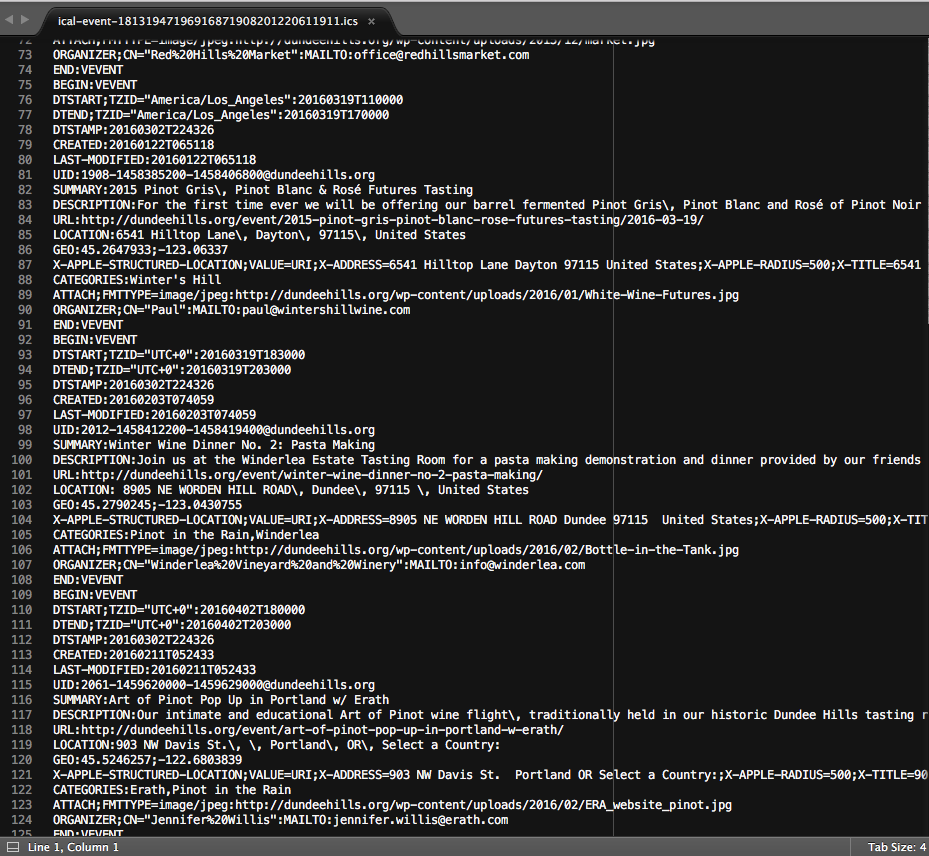
I am continuing to investigate, of course, I just wanted to update you on my current findings still.
— George
ParticipantHi Chris,
The method I described adds an existing custom taxonomy to events. So, yes, if this taxonomy’s settings include archive links then there will be archives you can go to for the taxonomy etc. To get things functioning just right, it again might take some code tinkering, but yes by default it should work as you describe.
Will it display as you describe? A list of links on the single event like in your example, by default?
No.
To get the custom taxonomies to display as a linked list on single-events templates, you would need to customize The Events Calendar’s single-event template to include a custom call to load the taxonomies. You can learn how to do this here → https://theeventscalendar.com/knowledgebase/themers-guide/
An even simpler approach would be to use the hook tribe_events_single_event_after_the_meta to add content after the single-event meta section (or tribe_events_single_event_before_the_meta to add content before the single-event meta section).
You can then use the wp_list_categories() function to simply echo a list of taxonomy links, which you can learn more about here → https://codex.wordpress.org/Template_Tags/wp_list_categories
If the custom taxonomy whose list of items you were echoing was called tribe_events_cat, for example, then you could put all of this code together to add something like this to your theme’s functions.php file:
add_action( 'tribe_events_single_event_after_the_meta', 'tribe_custom_single_event_tax' );function tribe_custom_single_event_tax() {
wp_list_categories( array(
'title_li' => 'Custom Taxonomy Test',
'taxonomy' => 'tribe_events_cat'
) );
}Here’s a screenshot of how that looks:
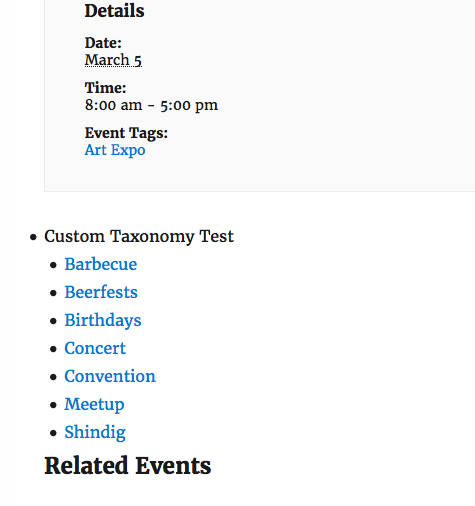
You’d have to take the reins from here to style it how you’d like and all of that, but I hope all of this helps.
George
ParticipantHey Chris,
Thanks for reaching out. If you have custom taxonomies within your site, you can add them to custom post types with the WordPress function register_taxonomy_for_object_type().
That will require adding some custom code, like to your theme’s functions.php file for example, but it’s a rather simple customization to make. You can learn more about that function here → http://codex.wordpress.org/Function_Reference/register_taxonomy_for_object_type
If you have two custom taxonomies called “chris_category” and “chris_tag”, for example, you could add both to the Events post type by adding this snippet to your theme’s functions.php file:
register_taxonomy_for_object_type( 'chris_category', 'tribe_events' );

register_taxonomy_for_object_type( 'chris_tag', 'tribe_events' );
I hope this helps!
— George
ParticipantHey Steven,
At the start of your code snippet is an opening PHP tag, like this:
<?php
If you remove this from your snippet, does anything improve?
— George
ParticipantHi there,
Thanks for reaching out.
It doesn’t look like you have a premium license, so please post any technical support questions like this in our free forums at http://wordpress.org/plugins/the-events-calendar
If you do have a premium license, then sorry for the trouble here! But please log into the account with your license key here on http://theeventscalendar.com and post your questions in our Premium Support forums.
Thank you,
GeorgeParticipantHey @acluk,
Thanks for reaching out. Event duplication is a feature we hope to eventually implement, for sure, but at this time it is not possible 🙁
There are some “post duplication” plugins out there that might work well for you as long as they work with custom post types, which “Events” are.
Sorry to disappoint—let me know if you have any further thoughts on this or if there’s anything else I can try to help with!
Sincerely,
George - Deactivate every single plugin from your site except for just these two plugins and no others:
-
AuthorPosts