

Forum Replies Created
-
AuthorPosts
-
George
ParticipantHey @Neil,
I’m sorry to hear this. First, in regards to the “who’s attending” boxes, you can disable those on any event by un-checking the option in this screenshot:
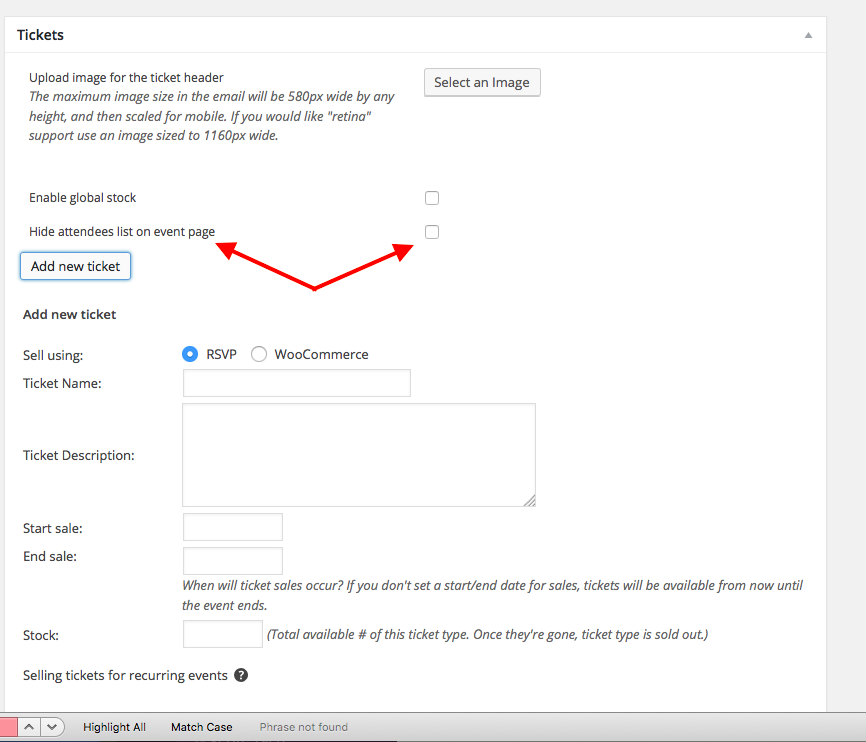
1. I have tried recreating your problem and cannot; can you share your “system information” anew with me, again? I’ll look through this updated information and see if anything is standing out.
I’m really sorry about the trouble here; like I said, I cannot reproduce this behavior, so it’s odd.
2. You say, “If I change the number of tickets available (add or remove) the ticket value changes to FREE!” To be clear, do you mean that you’re going into the edit-event screen for an event, and changing the “Stock” field? This field is seen in the screenshot above.
If you do not mean this, can you clarify what you do mean>?
Thank you!
GeorgeParticipantHey @Pascal2000,
Can you share a screenshot of how you configured your specific “additional information” field for the timeslots? You can do so by uploading the screenshot to Imgur.com, Flickr.com, CloudUp.com, or any similar image-hosting site; then just share the links to those images here and I’ll take a look.
I will try to recreate the problem.
Then, can you also share your system information with us? Here’s how → https://theeventscalendar.com/knowledgebase/sharing-sys-info/
Cheers!
GeorgeParticipantHey Matthew,
A fix was meant to be here; can you share your system information again? Just so I can see a snapshot of the exact environment here after updating? (https://theeventscalendar.com/knowledgebase/sharing-sys-info/)
Thank you so much for your patience; I’m sorry for the trouble here!
GeorgeParticipant☝️ That’s excellent, thank you for posting this Geoff (sorry for my delayed posting, Joe, I was out of office a bit today for a personal matter).
Do keep us posted on things. I hope that 4.1.1 update helps!
GeorgeParticipantGlad to hear it! Thanks for the update. 🙂
George
ParticipantHey Nosko,
Can you share a link to an event on your site that has this “Register for this event” link/button?
Thank you,
GeorgeParticipantNo problem! 🙂
March 31, 2016 at 3:01 pm in reply to: Created recurring event with date exception – yet exception still showing up #1096683ParticipantThank you for this information!
It’s odd because, as I noted, I find that the exclusions work fine…I was wondering if perhaps you were using an out-of-date version of one of our plugins, but alas, you’re not.
From here, the only test I can think of would be to test for a theme or plugin conflict. This is rather likely, because you have 45 plugins on your site, which is fine! But it’s a large enough amount of code running alongside our own code that it’s worth investigating.
To test for this, I would recommend deactivating ALL plugins on your site, except for ONLY these two plugins:
• The Events Calendar
• Events Calendar ProThen activate a default theme like Twenty Sixteen.
When your site is in this specific state, create a new test event with the same exact recurrence pattern and exclusions as your problematic event.
Do your test event’s exclusions seem to work correctly?
Let us know what you find!
Thank you,
GeorgeParticipantHi Sean,
Thanks for this information. In my note above, I mentioned how there are NOT 404 errors on your site.
There are not 404 errors on your site.
Regardless of that, I would recommend this complete set of steps: https://theeventscalendar.com/knowledgebase/fixing-http-404-errors/
Those steps are a common recommendation if there are 404s—but even though there are NOT 404s here, those steps might still be helpful regardless.
Does that make sense? Apologies for the confusion. All I’m recommending is those steps in that article. They might help. 🙂
George
March 31, 2016 at 10:51 am in reply to: The month-calendar in mobile view shows full weekday-names #1096518ParticipantGlad to hear it!
Cheers,
GeorgeParticipantNo worries Andy; hope you’re feeling better!
As noted, we cannot help with custom CSS here. But I will offer some snippets just for the specific things you asked about to hopefully offer a guide for you to take from here and make customizations on your own.
The first issue is with event tickets plus. As you can see the quantity box is tiny. I was hoping that someone could advise on how to fix this. (Also is there away to remove the annoying divider before the price?
Paste this into the bottom of your theme’s style.css file:
table.tribe-events-tickets .woocommerce .quantity .qty {

    min-width: 6em !important;

}
Finally I was wondering if there was a quick fix to reduce the size of the featured image on the events page? or to remove it completely but till have the feature image appear in the related events feed.
You can hide the thumbnail in all places but “related events” by adding this to the bottom of your theme’s style.css file:
.tribe-events-event-image {

    display: none !important;

}
If you want to tweak the image sizing, that’s a bit more complicated but I will touch on how you might be able to do this on your own below.
The second issue was with Event Calendar Pro. I was wondering if there was a way to change the box on the upcoming event list widget to display the month? Currently its just displaying the day and date.
This is a bit tricky but you can do this by adding code like the following to your theme’s functions.php. file:
add_filter( 'tribe-mini_helper_tribe_events_ajax_list_dayname', 'tribe_1093867', 10, 2 );function tribe_1093867( $formatted, $postDate ) {
return date_i18n( 'M', strtotime( $postDate ) );
}
You’ll have to take the reins from here, and while we will not be able to help with further refinement of things on your site, I hope this information helps!
If you need to write more custom CSS on your site, definitely check out a [free!] tool like Firebug if you use FireFox, or the Developer Tools for either Safari or Chrome. They have “Inspector” tools that let you zoom right over the element whose styles you want to change, which makes it much easier to customize stuff.
Cheers,
GeorgeParticipantSorry for my misreading of that! IN terms of the best process for integrating the products, I would recommend creating the events with The Events Calendar and NOT GigPress. GigPress provides an “artists” feature that might be handy; that’s all I was suggesting about that plugin—the event creation itself, though, should be with The Events Calendar itself.
I hope this is helpful—and if you haven’t seen it already, the GigPress documentation is a helpful resource in its own right → http://gigpress.com/docs/
Cheers,
GeorgeParticipantHey Chris,
You can modify the amount of text with custom code, but not through an option in the options panel or anything like that. 🙁
ParticipantNo problem—this thread will remain open. When you’re back, can you share both a link to that specific .ics file and your “System Information” with us? Here’s how to share your system information → https://theeventscalendar.com/knowledgebase/sharing-sys-info/
Thanks!
GeorgeParticipantHey Paul,
Yes, those things each do fall under the definition of “content management.”
-
AuthorPosts