

Forum Replies Created
-
AuthorPosts
-
George
ParticipantSorry to hear this, Tom!
1. What is the specific issue you have on your site that lead you to make this claim?
2. Also, can you share your system information with us? Here’s how to do that → https://theeventscalendar.com/knowledgebase/sharing-sys-info/
Thanks!
GeorgeParticipantHey Andre—thanks for reaching out!
I want to be frank right off the bat that, even for our paid, premium license holders, we cannot help with custom coding projects. → https://theeventscalendar.com/knowledgebase/what-support-is-provided-for-license-holders/
So our ability to help out here in the free, open Pre-Sales Questions forums is especially minimal.
While I wanted to make sure your expectations were set fairly, I’m still happy to help here—and the good news is that we actually do have a function for “updating” event data.
That method is actually part of a whole API class we have, which sounds like it’d be super handy for your needs.
To explore this API class, head to this file in your The Events Calendar plugin files:
the-events-calendar/src/Tribe/API.phpIn this file you’ll find methods like updateEvent(), which seem to be exactly the sort of thing you’re looking for:
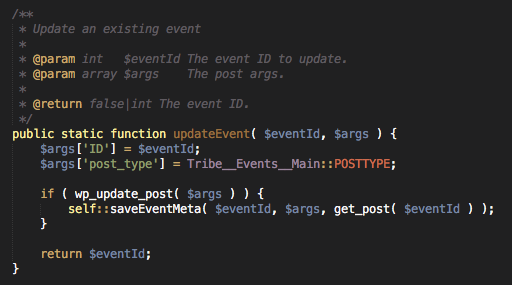
Explore that file, tinker around a bit, and see if this stuff helps. I hope it does!
Best of luck with your project,
GeorgeParticipantThanks for reaching out, Stewart!
Firstly – regarding recurring events, they run their courses at different times in different months, so although it recurs every month its always at a different time. Does this matter? Can I still create just one “event” and give it a different date every month?
Unfortunately, if there’s not really any pattern to the recurring event, then our “recurring events” feature won’t really do the job. If you would describe this event’s occurrence as: “It happens some time every month,” then the best bet is creating a new single event each time.
If, however, the event’s occurrence would be described like this: “It happens every third Thursday of every month, but once in a while it gets shifted to the second Thursday or last Thursday,” then yes our recurrence system allows for adding the occasional “exception” to a pattern like this.
I would recommend checking this article out if you haven’t already → https://theeventscalendar.com/knowledgebase/pro-recurring-events/
Secondly – I see your “Pro” version has custom attributes which is great, but I would really like to change the word “Event” to “Course” everywhere it appears. Are you able to provide me with directions to which files I would need to edit to achieve this?
You can change “Event”/”Events” to “Course”/”Courses” using custom code. We have a knowledgebase article here that shows how → https://theeventscalendar.com/knowledgebase/changing-the-word-events-to-something-else/. Otherwise there is no way to do this—but take a look at that article, it’s a simple customization and so it might not be a hindrance to you.
I hope these answers are helpful! Let me know.
GeorgeParticipantSorry to hear this, Frank!
We can help out. First, however, instead of posting without an account into our Pre-Sales Questions forum, can you log into your account on this site which has a premium license? Then, post to a premium support forum.
Sorry for this added step. We try to keep the Pre-Sales Questions forum very strictly for only Pre-Sales Questions, and only provide our premium technical support in our premium forums.
I’ll close up this thread to facilitate this change—see you in the premium forums!
Thank you,
GeorgeParticipantGreat catch, Dan—sorry about this!
With a knowledgebase our size, we miss stuff sometimes, but I’ve just taken the time to patch up that article. It now shows a working snippet. Try it out out and let me know if it helps!
Cheers!
GeorgeMarch 31, 2016 at 6:44 pm in reply to: Where on this site is there information/application for non-profits? #1096753ParticipantHi Marylu, this is the page you’re looking for → https://theeventscalendar.com/knowledgebase/do-you-offer-discounts-for-nonprofit-organizations/
Cheers!
GeorgeParticipantHi there,
We cannot use
Sorry to hear about this!
1. Can you share your system information with us? Here’s how: https://theeventscalendar.com/knowledgebase/sharing-sys-info/
2. If you activate a default theme on your site, like the Twenty Sixteen theme, and then deactivate ALL plugins on your site except for ONLY The Events Calendar and Events Calendar Pro, does the behavior of these issues change at all?
Thank you!
GeorgeParticipantHey James,
Really sorry for the delay; I followed up with whom I believe is you over email (we only have first names) just now.
Check out your email and respond there with any further questions; I’ve taken over that email thread and will be watching it.
And Marylu, as for your question, you can get the full scoop on your Nonprofit Program here → http://m.tri.be/qe
I hope that information is helpful! If you have any further questions about the program, create a new thread here on the forums and/or shoot an email to support [at] theeventscalendar.com.
For now, I will close this thread. I’ll see you over email, James!
Thank you,
GeorgeParticipantHey @Seow,
Thanks for reaching out. We unfortunately do not have this option at this time, but are hoping to include a solution like you describe in an upcoming release.
I don’t have a specific date for when such a release would be launched, of course, but it’s coming soon!
Stay tuned to releases at http://theeventscalendar.com/blog—if something like this is included in a release, it will be noted in the plugin release notes.
Cheers!
GeorgeParticipantHey there,
Good call. Shortcodes are indeed the solution here, and in fact there’s no other way to pull off what you describe.
The ‘layout’ attribute is only available for the tribe_this_week shortcode, so it won’t work for tribe_events_list.
Also, no, you cannot specify a view. The list widget and list shortcodes only provide the “list” view.
To learn more about the shortcodes and what options there are for each, check out this handy guide for them → https://theeventscalendar.com/knowledgebase/pro-widget-shortcodes/
I hope the information above helps!
For further support, though, please log into your premium-license-having account on this site and post further questions/threads in a premium forum. You’re posting in a free forum here, and not from an account, so we cannot verify your license status.
I will close up this thread to facilitate this change. Apologies for the trouble, it’s just a step we must take here to ensure that our premium support is only available for premium, paying customers.
This is our Pre-Sales Questions forum so you can post without logging in, but for further technical support questions (technical support is premium, “pre-sales” is not), please log in to your account and post in a premium forum.
Thank you,
GeorgeParticipantHey Karrie,
There are the default “category archive” pages which you arrive at if click an Event Category link from a single event page.
So, for example, if you have an event category called “Barbecue”, then you can view all events in that category by going to http://example.com/events/category/barbecue/
This shows past and upcoming events. There is unfortunately no way to change this at this time.
I hope this information helps!
And finally, if you want to add a link to these category archives in your custom menus, you can just create a “Custom Link” and enter the URL directly. Learn more here → https://codex.wordpress.org/Appearance_Menus_Screen#Custom_Links
Cheers,
GeorgeParticipantHey Courtney,
You, indeed, unfortunately cannot have an recurring multiple times within the same day at this time.
Sorry to disappoint!
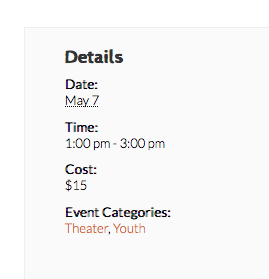
As for the event time not showing up in the Details box, I actually saw the event times there without issue:
George
ParticipantAlso, in the meantime, we’ve published a new release today for all plugins: 4.1.1
I would recommend updating The Events Calendar and all add-ons for it to 4.1.1—it could make a difference with these issues!
Let me know if it does.
Thank you,
GeorgeParticipantI’m sorry those steps didn’t help!
I went to https://vancouvermeninleather.ca/event/leather-den/all/ to try and see the links again to get another look, but it was blocked with a landing page.
I totally understand why, of course, but since we cannot log into customer sites for any reason, would you be willing to temporarily leave that page publicly accessible?
I will work quickly to minimize the amount of time this is necessary, but am just trying to get another look at the issue firsthand.
Thank you!
GeorgeParticipantThe updates are available today – I hope that they and/or the cut-off time option help at all here.
Thank you so much for your patience! I still fail to reproduce your problem but we are scoping our next maintenance release, so if issues persist I will make a big point for our developers to take another look at this.
Sorry for the trouble, Pete.
Sincerely,
George -
AuthorPosts