

Forum Replies Created
-
AuthorPosts
-
George
ParticipantHey Mikael,
We unfortunately do not have 100% complete syncing between Google Calendar and The Events Calendar. While we try to ensure that edits to already-imported events are synced, this does not happen:
If we delete a event in Google calendar will it also be deleted in The Event Calendar?
Events on The Events Calendar can only be deleted from the WordPress site itself.
I hope this helps!
GeorgeParticipantHey Michael,
Looks like they’re using “Featured images” creatively and using a well-made theme.
I would recommend reaching out to them for more insight on their process. And definitely check out a [free!] tool like Firebug if you use FireFox, or the Developer Tools for either Safari or Chrome. They have “Inspector” tools that let you zoom right over the element on a web page that you want to learn more about—so you can see what CSS and JavaScript is making an element look and behave the way it looks and behaves, essentially.
I hope my advice above helps, and, in closing, if you’re interested in hiring a professional to help you make your site look like that site or similar, we have a list of great developers here → http://m.tri.be/18k1 (and have no affiliation with any of these folks—they’re simply some well-respected names in the community that we’ve compiled to share in situations like this one).
Best of luck with your site!
GeorgeParticipantHey @Red Dog,
Thanks for the kind words about The Events Calendar! Glad it’s been helpful. When it comes to ticketing plugins, this configuration is indeed an interesting one:
My business is a dog center and we offer group class sessions (for example, a class would meet once a week at a specific time for a one hour class for 7 weeks.) Can Events Tickets Plus handle this kind of application?
While you can indeed make that event a “recurring event” and add tickets for it, these tickets can only be “checked-in” and such one time. There is not support to have several “Attendees Lists”, in other words—the tickets can be bought once, and then used manually by the event administrators for the rest of the course, but you cannot buy the tickets one time and then have each event have its own Attendees List to do per-event check-ins and such.
Does this help clarify things? Let me know!
In closing, I should mention that we have a thirty-day no-questions-asked refund policy to facilitate a sort of “trial period.” It’s a great way to just test out the plugins firsthand to see how they work for your needs. You can learn more about this policy here → https://theeventscalendar.com/knowledgebase/refund-policy/
Thank you,
GeorgeApril 25, 2016 at 9:11 am in reply to: Advanced Post Builder is causing issues when saving custom quick edit input data #1106677ParticipantHey Russell,
I don’t mean to be facetious with my leading question here, I just genuinely want to be 100% certain that I know what you’re referring to: when you say, “Advanced Post Builder”, you are referring to our plugin Advanced Post Manager, right?
I only ask for clarification because I don’t see our Advanced Post Manager filters in your screenshots, and we do not make a plugin called Advanced Post Builder.
In the meantime, can you also post your “System Information” here? I will investigate this with that information in hand. Here’s how to share it → https://theeventscalendar.com/knowledgebase/sharing-sys-info/
Cheers,
GeorgeParticipantHey @David,
While we cannot offer help with code customizing and such, I think a helpful bit of advice here would be to use the do_shortcode() function in WordPress instead.
You can learn more about that function here → https://developer.wordpress.org/reference/functions/do_shortcode/
This would let you use all shortcode arguments/options as normal, and so you could use something like this instead of what you posted:
if ( function_exists( 'do_shortcode' ) ) {

    echo do_shortcode( '[tribe_mini_calendar category="party"]' );

}
You’ll have to take the reins from here on further tweaking and developing, but I hope this helps! And be sure to check out this guide to our widget shortcodes if you have questions about those → https://theeventscalendar.com/knowledgebase/pro-widget-shortcodes/
— George
ParticipantHey Gene,
This is by design, currently. The ICS exports only export events, even with PRO active on the site.
Exporting venues and organizers themselves can only be done with the WordPress export tools, as described on this knowledgebase article for example → https://theeventscalendar.com/knowledgebase/using-wordpress-export-tools-to-migrate-events-content/
Cheers!
GeorgeApril 25, 2016 at 8:53 am in reply to: Not fully compatible with WPML setting "Languages in directories" #1106663ParticipantHey Henrik,
Thank you for reaching out.
This and many other features of WPML are unfortunately not fully supported at this time. WPML does many non-standard, idiosyncratic things, and so our code simply is not fully supportive of all of its features at this time.
Our primary commitment is for full compatibility with WordPress Core, and for all WordPress Coding Standards-compliant themes and plugins. WPML is not one of these plugins; it’s a great tool though, so we are working on better compatibility, but it could unfortunately take several months before any progress is made on that front in a way that would include the specific issues you mention here.
Sorry to disappoint! I just wanted to be honest and clear about the nature of things.
Sincerely,
GeorgeParticipantHey @John!
We unfortunately cannot help with custom coding, so we are not able to help much here. 🙁
Before closing this thread, however, would like to suggest modifying the line-height property of those header tags, perhaps?
So, maybe specifying a line-height will help reduce that gap you highlight with red in your screenshot. Something like this:
.tribe-events-adv-list-widget .type-tribe_events h2.entry-title {

    line-height: 1 !important;

}
You can of course play around with the actual number there—doesn’t have to be “1”—and can read more about line-height online to play around with this.
We cannot help with customizations and designing things, so you will have to take the reins from here, but if you have any other questions that we can help with, let me know.
Thank you!
GeorgeApril 25, 2016 at 6:48 am in reply to: List View – Does not work and displays blank white screen #1106597ParticipantHey Russell,
Thank you for reaching out, and for your kind words about the plugin! I’m sorry that it’s giving you some trouble here—your issues are ones that I cannot recreate, and that have not been reported by others.
I looked through the system information you posted and did not find anything outright problematic there, so from here I am wondering if you would be able to perform all of the troubleshooting steps outlined in this article → https://theeventscalendar.com/knowledgebase/testing-for-conflicts/
Those steps are very helpful and should reveal—or rule out—a number of potential problems here.
Let us know what you find!
Thank you,
GeorgeParticipantHey Mario,
Thanks for reaching out.
I saw the behavior you described on your site, but I cannot recreate this myself.
So to help us investigate this, can you share your site’s “System Information” with us? Here is how to do that → https://theeventscalendar.com/knowledgebase/sharing-sys-info/
Next, can you perform all of the steps on this page and let us know what you find by doing them? → https://theeventscalendar.com/knowledgebase/testing-for-conflicts/
Thank you!
GeorgeParticipantCan you please confirm that there is no possible way for the calendar to show on the home page of my website.
I can confirm that it is NOT possible to put the full events calendar on the site homepage.
It is also NOT possible to put the full events calendar into any other “Page”. So, if you head to the “Pages” menu in your wp-admin, and find a page here where you are trying to add the calendar, it will not work.
The Events Calendar’s main events page can only exist at the URL of the “events slug” option in your Events Calendar settings. The default setting is /events. So example.com/events will have the full calendar. But you cannot make a page example.com/calendar to have the full calendar; you would need to change the slug option from /events to /calendar.
I hope this clarification helps!
GeorgeParticipantHi Hans,
Can you clarify exactly what you mean by “invoices”? Our plugins do not generate invoices.
Share a screenshot of what you want to change, if possible! 🙂
In the meantime, I should set your expectation here that changing text and such will likely require code customizations. We cannot help with code customizations.
So I will likely only be able to show you where to change the sorts of things you want, and point you in the right direction—but you will have to take the reins on most of the changing and adding of text.
Just wanted to establish this before we continued on this thread! Share some screenshots and I will do my best to help out.
Thank you,
GeorgeParticipantHey Marcus!
Thanks for reaching out.
These things are both possible with Event Tickets & Event Tickets Plus:
1. There should be two types of tickets, different number and price of both.
2. When an order is paid should stock levels fall as visitors see the exact number of tickets are left.Next, you should indeed be able to use the WooCommerce extension for Payson payments without issue:
3. I will use the Payson payment method to make it easy for visitors to pay by credit card.
Finally, you ask this:
Can I use any theme whatsoever to this, or must it be a certain kind of themes? Something you recommend? Or use (WP, Woo and Event Ticket Plus) and then design the site myself?
You can use whatever theme you want! 🙂 We do not have any official recommendations, but I would personally recommend avoiding any sort of “builder” theme like Divi, Genesis, etc.—they break WordPress coding norms and can break plugins like ours.
I would also recommend avoiding anything from a major marketplace like ThemeForest. The code quality is just not there.
So, instead, I would recommend themes from sources with great code quality. These are three examples:
• http://wordpress.org/themes
• http://woothemes.com
• http://arraythemes.comCheers!
GeorgeParticipantHi Dirk,
That’s unfortunately not possible without some code customization. 🙁
We cannot help with modifying plugin behavior—check out this page for more information: https://theeventscalendar.com/knowledgebase/what-support-is-provided-for-license-holders/
So, you will have to take the reins on any further modifications, but to try and shed some light on this specific problem, I have written a snippet for you that does the job quite well for me when I test it myself. Check out that snippet here and add it to your theme’s functions.php file → https://git.io/vwEvN
Cheers,
GeorgeParticipantSure thing!
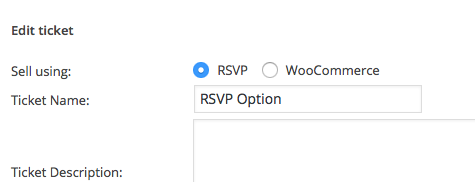
Simply create one ticket using the “RSVP” option—save the ticket, then create another ticket using the WooCommerce option.
The former will be an RSVP, the latter a WooCommerce ticket that you can charge money for.
Here’s a screenshot of the radio buttons that let you choose if it’s a “RSVP” ticket or a “WooCommerce” ticket. Create one of each type on the event and you’re good to go!
— George
-
AuthorPosts