
Home › Forums › Calendar Products › Events Calendar PRO › RSVP & Buy Tickets options
- This topic has 4 replies, 3 voices, and was last updated 10 years, 5 months ago by
Support Droid.
-
AuthorPosts
-
April 24, 2016 at 2:09 pm #1106447
Joe
ParticipantI have Events Calendar Pro and Events Tickets Plus installed. I read the knowledge base articleson setting up Event RSVP’s (https://theeventscalendar.com/knowledgebase/rsvps/). However, since many attendees purchase tickets at the door, my client wants the ability to offer both event RSVP or buy tickets online.
Is there a way to activate both so that the user sees and RSVP option and purchase tickets option at the same time?
NOTE: A possible solution that would acceptable could be to add HTML to each event post that would show RSVP button and also “WHO’S GOING” button to display above the buy tickets block and link to respective pages.
Thank you!
-
This topic was modified 10 years, 6 months ago by
April 24, 2016 at 5:07 pm #1106491George
ParticipantSure thing!
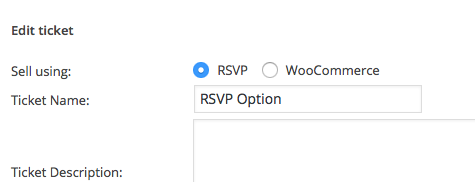
Simply create one ticket using the “RSVP” option—save the ticket, then create another ticket using the WooCommerce option.
The former will be an RSVP, the latter a WooCommerce ticket that you can charge money for.
Here’s a screenshot of the radio buttons that let you choose if it’s a “RSVP” ticket or a “WooCommerce” ticket. Create one of each type on the event and you’re good to go!
— George
April 25, 2016 at 6:12 pm #1106919ParticipantHi George!
Thank you for your quick response. I followed your instructions and successfully created the RSVP ticket. However, this functionality really doesn’t work as I hoped. Ideally, if a person RSVP’s the client would like to require that they are member and have a profile on the website. Even with Guest Checkout disabled in the Woocommerce settings the RSVP in Event Tickets Plus and/or Event Calendar Pro still allows for the user to create an RSVP without requiring login first. If for no better reason, if the RSVP went through Woocommerce check-out this would put the RSVP’s in Woocommerce as orders and allow us to use Woocommerce plugins to send out reminders to RSVP holders to notify them that they need to purchase tickets to assure entry to the event. I know I could custom programming this but I’ve been down this road too many times and I know what a problem this will cause with future updates of your plugins. I would like to suggest this feature for later releases.
Before I close this ticket, the only other solution I can think of which would allow login before RSVP submission would be to create a product an RSVP ticket in Woocommerce for $0 which would then force the user to “checkout” by logging first. Are there any other suggestions you might have?
Thank you for your time,
Joe Gold , OCCO™
Principal Consultant
Online Consulting COmpanyDirect | 702-518-0044 Ext. 700 | Las Vegas
Email | [email protected]
Web | OCCO1.comApril 26, 2016 at 11:15 am #1107291ParticipantHey Joe,
Thank you so much for the feedback here. I would like to address things in reverse order and first, unfortunately, bear the news that I don’t have much insight on your suggestion here:
Before I close this ticket, the only other solution I can think of which would allow login before RSVP submission would be to create a product an RSVP ticket in Woocommerce for $0 which would then force the user to “checkout” by logging first. Are there any other suggestions you might have?
You can try doing that, of course, and see how it works. Otherwise, the only other option is the default RSVP feature that already exists.
Speaking of those already-existing features, now let’s turn to the feedback you provided. This is great feedback and I actually agree with you that there should be an option to require logging in for making RSVPs. I will create a ticket for our developers, and hopefully some time in the coming months this ends up in the plugins.
Thank you,
GeorgeMay 11, 2016 at 9:35 am #1113278KeymasterThis topic has not been active for quite some time and will now be closed.
If you still need assistance please simply open a new topic (linking to this one if necessary)
and one of the team will be only too happy to help. -
This topic was modified 10 years, 6 months ago by
-
AuthorPosts
- The topic ‘RSVP & Buy Tickets options’ is closed to new replies.