
Home › Forums › Welcome! › Pre-Sales Questions › Picking the right "tickets" plugin
- This topic has 5 replies, 1 voice, and was last updated 10 years, 6 months ago by
George.
-
AuthorPosts
-
April 25, 2016 at 11:00 am #1106729
Red Dog
GuestHi there,
I love the design of The Events Calendar and how customizable it is – my business will definitely be using that to give information to current and potential clients. However, I have a unique type of event that I’m not sure that even Events Ticket Plus can handle. My business is a dog center and we offer group class sessions (for example, a class would meet once a week at a specific time for a one hour class for 7 weeks.) Can Events Tickets Plus handle this kind of application? I don’t want them to have to buy a package of tickets to scan each time or anything. I want them to be able to buy the whole session online as just one purchase.
Help?
Thanks!
April 25, 2016 at 2:04 pm #1106801ParticipantHey @Red Dog,
Thanks for the kind words about The Events Calendar! Glad it’s been helpful. When it comes to ticketing plugins, this configuration is indeed an interesting one:
My business is a dog center and we offer group class sessions (for example, a class would meet once a week at a specific time for a one hour class for 7 weeks.) Can Events Tickets Plus handle this kind of application?
While you can indeed make that event a “recurring event” and add tickets for it, these tickets can only be “checked-in” and such one time. There is not support to have several “Attendees Lists”, in other words—the tickets can be bought once, and then used manually by the event administrators for the rest of the course, but you cannot buy the tickets one time and then have each event have its own Attendees List to do per-event check-ins and such.
Does this help clarify things? Let me know!
In closing, I should mention that we have a thirty-day no-questions-asked refund policy to facilitate a sort of “trial period.” It’s a great way to just test out the plugins firsthand to see how they work for your needs. You can learn more about this policy here → https://theeventscalendar.com/knowledgebase/refund-policy/
Thank you,
GeorgeApril 25, 2016 at 2:15 pm #1106805GuestGotcha 🙂 Yeah — think of it like people signing up for a Community Ed class. Sometimes there are one day workshops, and sometimes it’s recurring for a period of time. That would be a great feature to build in for the next update 😉
We don’t need students to show a ticket to the class after the first day and only on the first day to show proof of payment. Having a way to “check in” with a ticket on the is a convenient feature we could use to our benefit (at just the first class.)
So please let me know if this is the type of system you’re suggesting:
We would set up the recurring event on the Event Calendar with all of its details (ex: Sundays, 2pm, 7 weeks) and then we would set it up so that they can purchase “a” ticket that would technically look like t’s just for the first day but would be the price of the whole session. Then they bring their ticket to the first day for proof of purchase and we see them for the next 6 weeks.If that’s the system workaround it sounds good to me.
Could we select a class on a specific day and time and make “drop ins” available? For instance, if we know that 5 people have signed up for a 7 week session of a course so there’s space for 2 more to drop in whenever they want, we could allocate 2 additional “drop in” “tickets for some of those days?
Thank you for all of your help! We’re *this* close to purchasing your two plugins, just need to make sure they’ll totally work for us!
April 25, 2016 at 4:43 pm #1106877ParticipantHey @Red Dog,
I agree that better support for recurring tickets would be nice, and we’ve got some things in the works that will hopefully be rolling out before we’re too far into 2017. 😉
For the time being, however, what you describe here is exactly what is possible and is the exact sort of thing I meant by my earlier description of the possibilities:
We would set up the recurring event on the Event Calendar with all of its details (ex: Sundays, 2pm, 7 weeks) and then we would set it up so that they can purchase “a” ticket that would technically look like t’s just for the first day but would be the price of the whole session. Then they bring their ticket to the first day for proof of purchase and we see them for the next 6 weeks.
☝️ That should work smoothly with our plugins as they currently stand.
Next, you ask this:
Could we select a class on a specific day and time and make “drop ins” available? For instance, if we know that 5 people have signed up for a 7 week session of a course so there’s space for 2 more to drop in whenever they want, we could allocate 2 additional “drop in” “tickets for some of those days?
Yes, this is possible but only if you were to “break off” the event from the recurring series. This won’t really be noticeable at all on the front-end—all it does is make the event a standalone, single event so that tickets can be added to it, instead of a sub-event of a larger recurrence series.
To break off a recurring event, you simply go to the “edit” screen of that single event instance; in the admin bar on the top of the wp-admin screen, you’ll find the “break off” button under the “edit event” button, as shown in this screenshot:
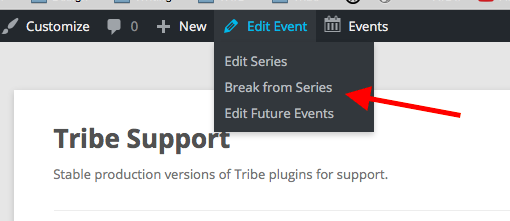
I hope this all helps! Let me know if you have any other questions, comments, or concerns.
Cheers,
GeorgeApril 25, 2016 at 5:17 pm #1106907GuestExcellent! Thank you for your thorough and super prompt responses! It looks like your plugins will definitely fit in our business scheme 🙂
April 26, 2016 at 10:48 am #1107276ParticipantGlad to help!
Open a new thread here any time if other questions, comments, or concerns arise.
Cheers,
George -
AuthorPosts
- The topic ‘Picking the right "tickets" plugin’ is closed to new replies.