

Forum Replies Created
-
AuthorPosts
-
George
ParticipantHi @teubl,
We unfortunately cannot help with your custom coding questions. If you are not sure how get the titles from taxonomies and such, your best options are to research how to do this in WordPress in general online, then continue to tinker on your own; or to hire a professional to help you further.
Please read this page to learn more about what types of questions we can help with → https://theeventscalendar.com/knowledgebase/what-support-is-provided-for-license-holders/
When it comes to the shortcode, you did not reference a specific shortcode. You shared a link to this page: https://wordpress.org/plugins/the-events-calendar-shortcode/
Sorry if you meant something other than that plugin! What specific shortcode are you referring to? And what was the purpose of linking to that third-party shortcode plugin, are you using a shortcode from that plugin too?
Thanks,
GeorgeParticipantHey Mathew,
The last maintenance release we published is documented here, and I can confirm that this is the extent of the fixes included in that release → https://theeventscalendar.com/release-the-events-calendar-4-1-2-and-premium-plugins/
So, as you can see, this specific issue is not addressed there. It’s still in progress.
Thank you for your patience!
GeorgeParticipantHey Josh,
Thanks for confirming all of these details, and for your patience here.
I have to be honest here and admit that, at this time, I do not have anything to recommend. I cannot recreate your behavior no matter my attempts, and nor have our developers been able to identify a culprit yet.
I will continue to investigate—I am very sorry about this issue! In the meantime, one thing I can recommend here if possible is to push back a bit with that response from your webhost—something like:
That query shows an item of the post type ‘post’ being queried. But it’s a calendar archive page for the post type ‘tribe_events’, and an event category whose slug is ‘tribe_events_cat’. Calendar feeds and archive pages for the events post type would not pull in a ‘post’ post type on their own, so is there any chance you could take a closer look at that or see what might be causing the odd behavior?
Thank you,
GeorgeParticipantHey Suzana,
Any insight on what I posted above? No worries—just checking in!
Cheers,
GeorgeParticipantHey Math,
1) am i able to sell bus tickets with event ticket plus?
If “bus” is a post type, then you can sell tickets on the post type. If “bus” is NOT a post type, then no, you cannot.
2) Is the QR code linked to some barcode scanner and does it automatically check on the back end after scanning?
The QR Codes are not tied to any specific sacanner or anything like that. They simply “Check-in” a user. You can download any number of free iOS or Android Apps which will scan the code—if you are logged into your site, then when you scan the code it will “check in” the ticket.
The check-in happens on the back-end.
— George
ParticipantHi, any better luck if you click directly to the link: https://cldup.com/4-haJ9KbfM.png?
Thanks!
GeorgeParticipantHey Joe,
Thank you so much for the feedback here. I would like to address things in reverse order and first, unfortunately, bear the news that I don’t have much insight on your suggestion here:
Before I close this ticket, the only other solution I can think of which would allow login before RSVP submission would be to create a product an RSVP ticket in Woocommerce for $0 which would then force the user to “checkout” by logging first. Are there any other suggestions you might have?
You can try doing that, of course, and see how it works. Otherwise, the only other option is the default RSVP feature that already exists.
Speaking of those already-existing features, now let’s turn to the feedback you provided. This is great feedback and I actually agree with you that there should be an option to require logging in for making RSVPs. I will create a ticket for our developers, and hopefully some time in the coming months this ends up in the plugins.
Thank you,
GeorgeParticipantNo problem!
Best of luck with your site. 🙂
— George
ParticipantGlad to help!
Open a new thread here any time if other questions, comments, or concerns arise.
Cheers,
GeorgeApril 26, 2016 at 10:04 am in reply to: Advanced Post Builder is causing issues when saving custom quick edit input data #1107265ParticipantThank you so much for this information, Russell, and for your patience with my clarifying questions!
I was able to reproduce the problem here and will write up a bug ticket so that we can get this fixed. I tried to see if I could reliably fix it with just a few lines of CSS, but it’s not sufficient and a proper solution from a developer is required here.
I don’t have an ETA for when a fix would arrive for this, but it would hopefully not be more than a few weeks from now.
Thank you for bringing this to our attention!
GeorgeApril 26, 2016 at 9:59 am in reply to: How to insert an image (thumbnail) in countdown widget ? #1107248ParticipantHey @Laurent,
You can modify the Countdown Widget’s contents by making a custom widget template using the principles outlined in this guide → https://theeventscalendar.com/knowledgebase/themers-guide/
Head into your plugin files for Events Calendar Pro, to the file located at /src/views/pro/widgets/countdown-widget.php
Override this template in your own theme by creating a file at [your-theme]/tribe-events/pro/widgets/countdown-widget.php, and then add images and all other customizations you want to make here! 🙂
Cheers,
GeorgeParticipantHey @Renaissancecreative,
Thanks for reaching out!
Pulling off this adjustment of search results is actually a pretty complicated thing to do. 🙁 We are not able to help with customizations, but still like to try and at least help point folks in the right direction to get started on their own.
For modifying search results in this way, the only thing I could think of would be to use the WordPress pre_get_posts() in search results. Recurring events are “child posts” of a single parent post (the parent is the first post in the series)—so if you can hook into the search query and try to make it ignore “child posts,” you might be in luck.
Here are some resources for learning more about modifying queries and such:
• https://codex.wordpress.org/Custom_Queries
• https://codex.wordpress.org/Plugin_API/Action_Reference/pre_get_posts
• http://www.remicorson.com/modifying-the-current-query-with-pre_get_posts/
• http://wordpress.stackexchange.com/questions/140664/custom-search-query
• https://premium.wpmudev.org/blog/build-your-own-custom-wordpress-search/Best of luck with your tinkering!
GeorgeParticipantHey @Adam,
Thanks for reaching out!
1. Just to be clear, in your list view do you mean that you just do not have the date and time that are shown like, for example, in this screenshot:
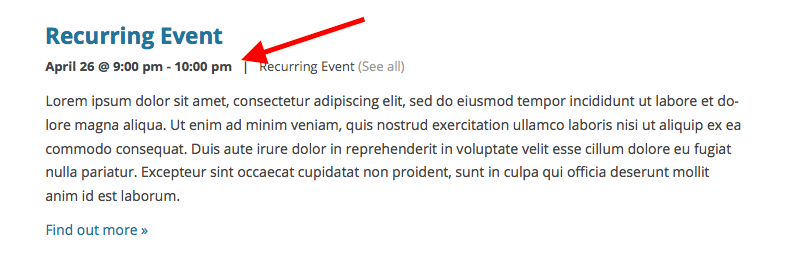
2. Next, can you link to your events pages where this is visible? I’ll take a look.
3. Finally, for now, can you post your system information here? Here’s how to do that → https://theeventscalendar.com/knowledgebase/sharing-sys-info/
Thank you!
GeorgeParticipantHey Vivianne,
Thanks for reaching out. That subject should work for RSVPs without issue, but since you’re using Event Tickets Plus and thus premium tickets in addition to RSVPs, you would need to add code to your theme’s functions.php file like this:
add_filter( 'wootickets_ticket_email_subject', 'new_example_subject' );function new_example_subject( $subject ) {
return 'This is the new subject!';
}
I hope that helps!
GeorgeParticipantHi Jonathan,
We unfortunately do not have a public demo of such features at this time. The only demo we have a is front-end demo at http://wpshindig.com
We hope to roll out a back-end demo to let folks test out ticketing functionality and the like some time in 2017, if all goes to plan—but for now, the closest thing we have to a trial/demo period is our thirty-day, no-questions-asked refund policy. Many people use this time to try the plugins firsthand on their site—if they don’t find them to be the “right fit,” they request a refund in full and move on to another plugin.
You can learn more about that policy here ? https://theeventscalendar.com/knowledgebase/refund-policy/
I hope this helps!
George -
AuthorPosts
